1. Introducció
The RadioLink T12D is a 12-channel 2.4GHz RC transmitter designed for a wide range of remote-controlled models, including FPV drones, fixed-wing airplanes, cars, boats, and robots. It features a 2.8-inch color screen, multiple power supply modes, and advanced telemetry capabilities. This manual provides detailed instructions for setting up, operating, and maintaining your T12D transmitter and R12FG receiver.

Figure 1: RadioLink T12D 12-Channel RC Transmitter with R12FG Receiver
2. Característiques clau
- 12 Fully Proportional Channels: Offers precise control with 5-12 channels programmable.
- Excellent Anti-interference Capability: Utilizes FHSS 67 channels pseudo-random frequency hopping.
- Llarga distància de control: Up to 4000 meters in unobstructed air (FHSS).
- Mainstream Operating System: Powered by freeRTOS+LVGL GUI for a user-friendly experience.
- Múltiples idiomes: Supports Chinese, English, French, Russian, Japanese, Korean, Thai, Polish, etc., with continuous language additions.
- Real-time Telemetry: Built-in telemetry for model battery voltage, RSSI, and receiver voltage.
- Multiple Power Supply Modes: Compatible with 8x AA batteries, 2S-4S LiPo, 18650 Lithium battery, or Type-C power bank.
- Wide Model Compatibility: Supports helicopters, fixed-wings, gliders, multi-rotors, racing drones, cars, boats, and robots.
- Programmable Mix Control: All 12 channels can be programmed for advanced mixing.
- Simulator and Trainer Functions: Enhances learning and practice.
- Actualització en línia: Receiver firmware can be updated via Type-C cable.
- Water Splash Proof Receiver: R16F receiver has an IPX4 waterproof rating.
3. Especificacions
3.1. T12D Transmitter
| Característica | Especificació |
|---|---|
| Canals | 12 fully proportional (5-12 programmable) |
| Freqüència de sortida | Banda ISM de 2.4 GHz (2400 MHz ~ 2483.5 MHz) |
| Difondre l’espectre | FHSS 67 channels pseudo-random frequency hopping/CRSF |
| Sistemes operatius | freeRTOS+LVGL GUI |
| Long-range Module Support | ELRS, TBS Crossfire, and other mainstream modules |
| Personalització del menú | Setting Menu, font, desktop, system theme, etc. |
| Latència de resposta | 3ms, 4ms, 14ms selectable |
| Resolució del canal | 4096 amb jitter regular de 0.5 us |
| Mode de modulació | GFSK |
| Ample de banda del canal | 400 KHz |
| Channel Pacing | 1200 KHz |
| Potència del transmissor | <100mW (20dBM) |
| Rebuig del canal adjacent | >36dBM |
| Velocitat de transmissió | 38 kbps |
| Sensibilitat de recepció | -104 dBM |
| PWM Output Range | 1.0 ms ~ 2.0 ms |
| Cicle | 15ms/per frame |
| Vol. Operatiutage | 7.4-18.0V (8x AA, 2S-4S LiPo, or 18650 Lithium battery) |
| Type-C Port Input Voltage | 5V (can be powered by computer or mobile power bank) |
| Type-C Port Input Current | 500 mA |
| Type-C Port Output Voltage | 4.6V-5.0V |
| Type-C Port Output Current | 1A màxim |
| Corrent de funcionament | 100mA (±10mA)@8.4VDC |
| Control Distance (FHSS) | 4000 meters in the air (unobstructed, interference-free) |
| Control Distance (CRSF) | Depends on RX and TX of long-range module |
| Models adaptables | Rotary Wing/Fixed-wing/Glider/Multicopter/Car/Boat/Robot |
| Sortida de senyal | PWM & SBUS & PPM |
| Volum baixtage Alarma | Customizable for transmitter, receiver, model battery, RSSI |
| Quantitat de model d'emmagatzematge | 100 |
| Storage Subsidiary ID Models | 15 |
| Mode simulador | Sí |
| Trainer Function | Suport |
| Pantalla | 2.8 inches, 320*240 pixels, 16 colorful screens |
| Receptors compatibles | R16FG(Std), R8EF, R8FM, R8SM, R8XM, R8FGH, R8FG, R7FG, R6FG, R6F, R4FGM, R4F |
| Temperatura de funcionament | -30 °C a 85 °C |
| Compatible Control Board Hardware | Ardupilot, Pixhawk, Betaflight, Arduino, Raspberry Pi (via SBUS) |
3.2. R16F Receiver
| Característica | Especificació |
|---|---|
| Longitud de l'antena | 205 mm (8.07") |
| Canals | 16 canals |
| Vol. Operatiutage | 3-12V |
| Corrent de funcionament | 50±10mA@5V |
| Sortida de senyal | SBUS+PWM |
| Freqüència de sortida | Banda ISM de 2.4 GHz (2400 MHz ~ 2483.5 MHz) |
| Difondre l’espectre | FHSS 67 canals de salt de freqüència pseudoaleatori |
| Secció Precisió | 4096, 0.5 us per secció |
| Models adaptables | Rotary Wing/Fixed-wing/Glider/Multicopter/Car/Boat/Robot |
| Distància de control | 4000 meters in the air (unobstructed, interference-free) |
| Telemetria | Telemetria integrada en temps real de la bateria del model voltage, RSSI, and receiver voltage. Data transmission functions for latitude, longitude, distance, satellites, heading, etc. |
| Actualitza en línia | Via Type-C cable to computer |
| EXT Battery Input | 1S-8S (3.0-33.6V) |
| Giroscopi | Gyro-integrated, customizable sensitivity |
| Latència de resposta | 3ms, 4ms, 14ms selectable |
| Prova d'esquitxades d'aigua | IPX4 |
| Temperatura de funcionament | -30 °C a 85 °C |
| Transmissors compatibles | T16D/T12D/T8FB/T8S/RC8X/RC6GS V3/RC4GS V3/RC6GS V2/RC4GS V2/RC6GS/RC4GS |
4. Contingut del paquet
El paquet inclou els articles següents:
- T12D Transmitter x 1
- R16F Receiver x 1
- Cordó x 1
- Type-C Cable (for Upgrade) x 1
- Hook and Spring x 1
- Manual d'instruccions x 1
- Caixa d'embalatge x 1
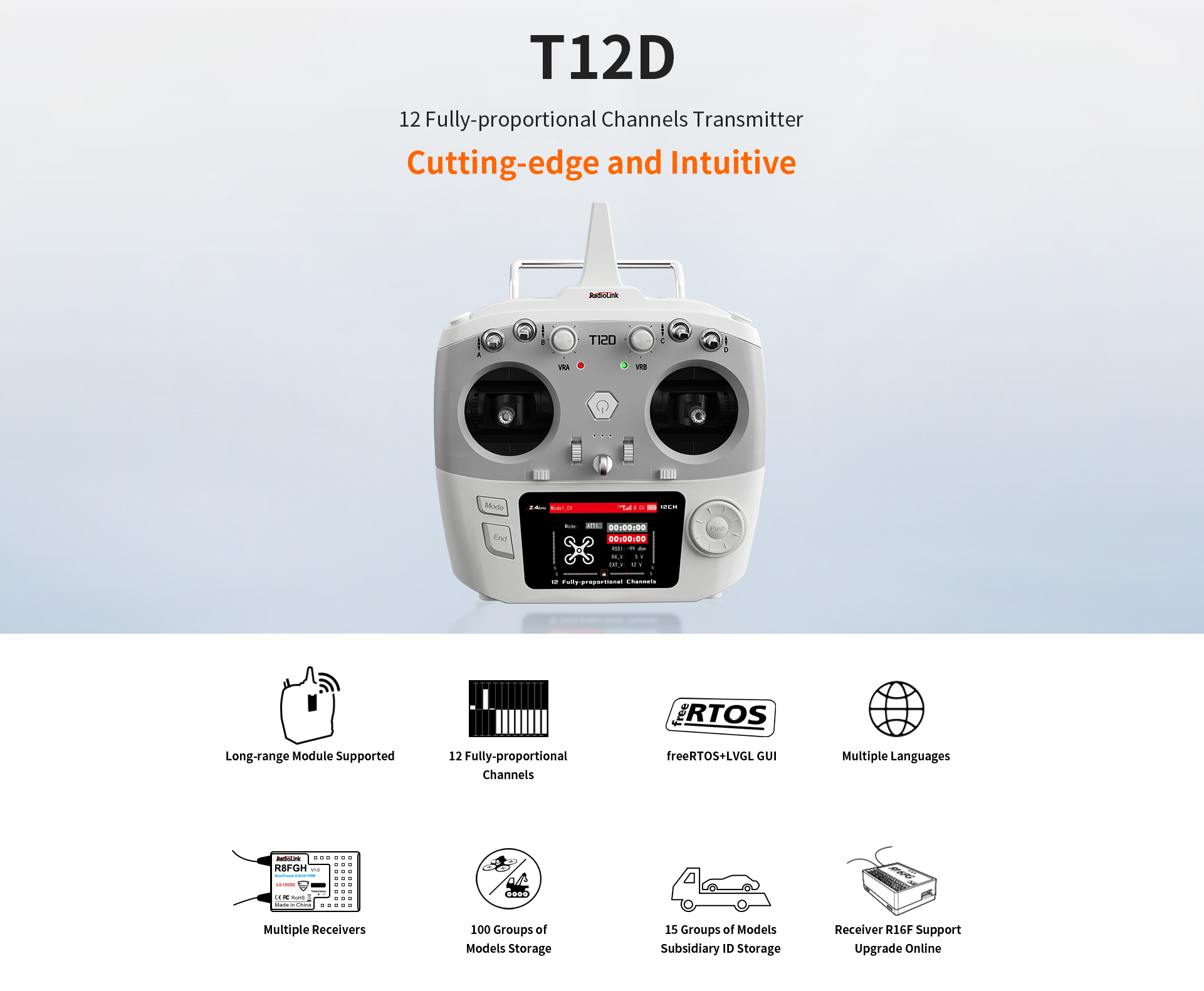
Figura 2: Contingut estàndard del paquet
5. Guia de configuració
5.1. Font d'alimentació
The T12D transmitter supports multiple power supply options:
- 8 pieces of AA batteries
- 2S-4S LiPo battery
- Bateria de liti 18650
- Powered via Type-C cable connected to a computer or mobile power bank (5V input)
Ensure the correct battery type is selected in the system settings for accurate battery percentage display. If using an 18650 Lithium battery, please ensure it is compatible with a JST connector and fits the battery compartment (114.4*35.4*32mm).
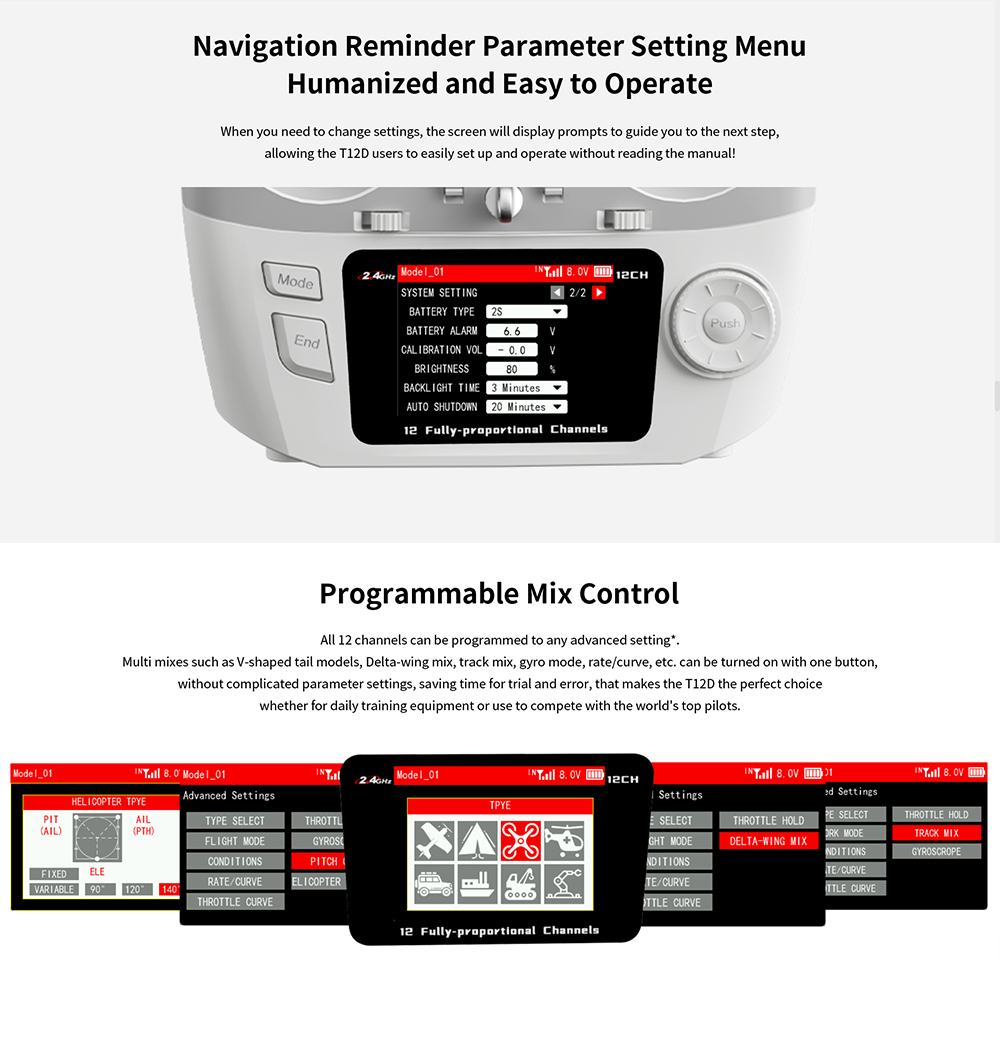
Figure 3: Power Supply Options and Battery Compartment
5.2. Receiver Connection and Binding
The T12D comes with an R16F 16-channel receiver. For initial setup, ensure the transmitter and receiver are properly bound. Refer to the specific binding instructions for your R16F receiver model. Once successfully bound, the signal tower icon on the transmitter screen will be displayed.
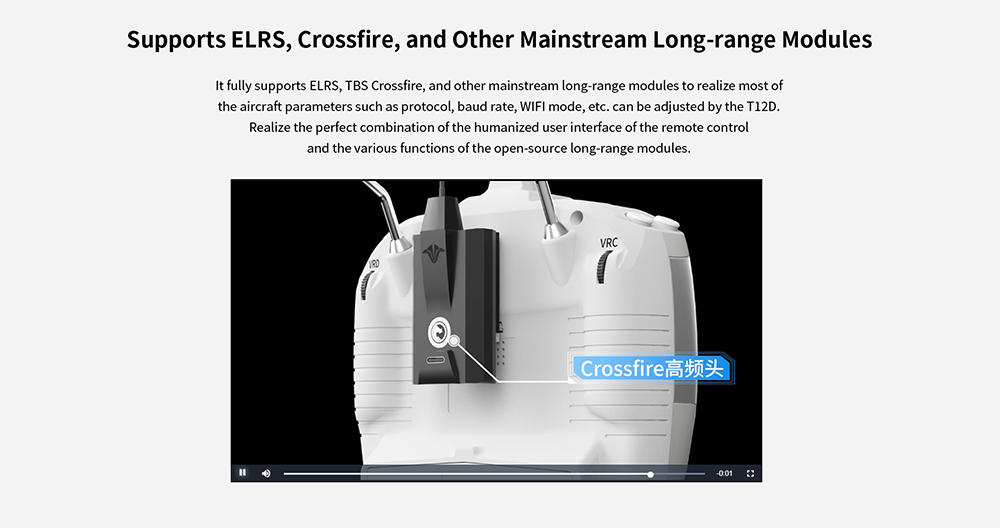
Figure 4: Wide Range of Compatible Receivers
5.3. Actualització del firmware
The R16F receiver supports online firmware upgrades. Connect the R16F receiver to your computer using a Type-C cable for data transmission. This allows you to easily add the latest cutting-edge functions without extra devices.
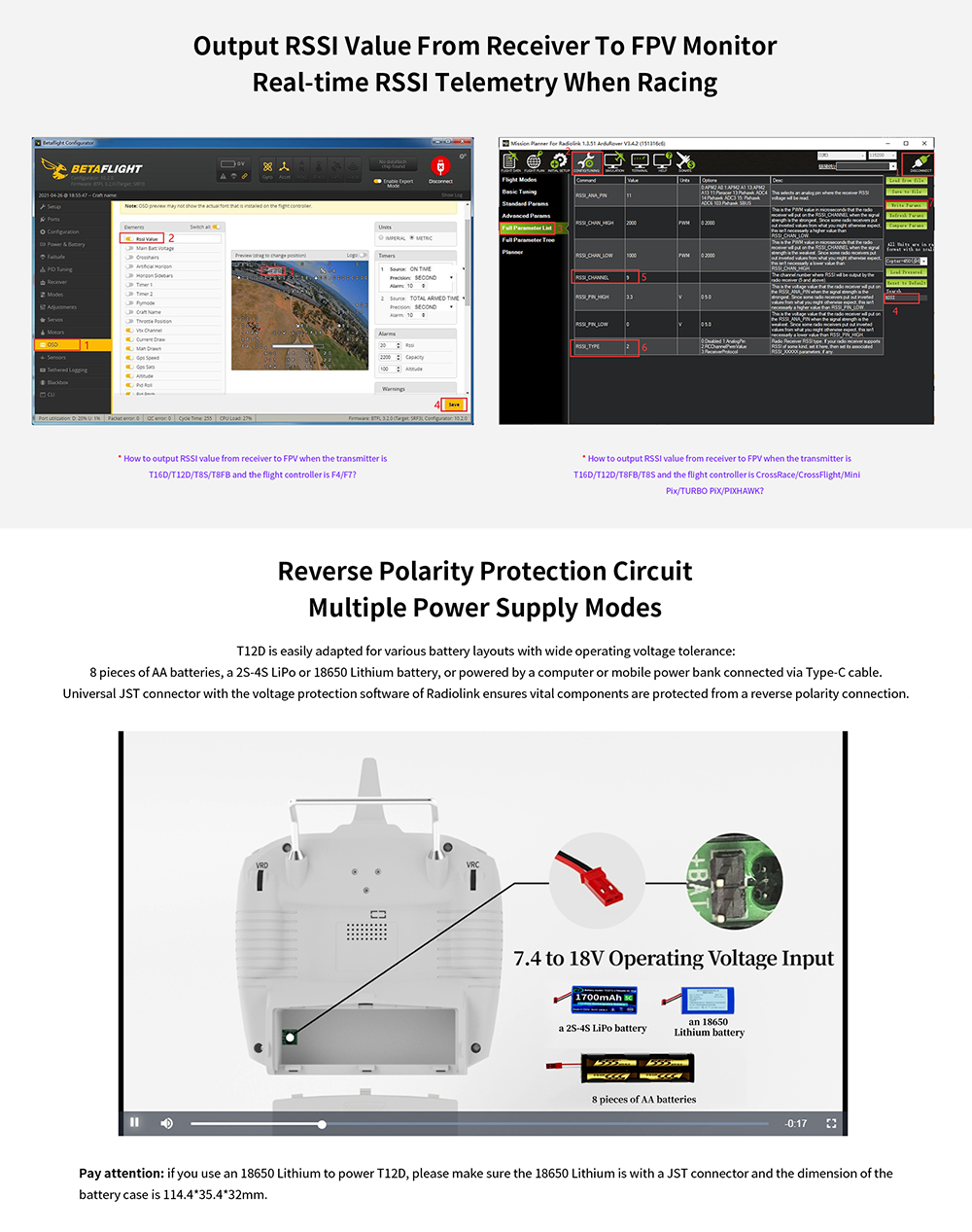
Figure 5: Receiver Firmware Upgrade via Type-C
6. Instruccions de funcionament
6.1. Encendre/apagar
To power on the transmitter, long press the power button. To power off, long press the power button again.
6.2. Pantalla d'iniciview
Upon powering on, the home screen displays critical information:
- A dalt a l'esquerra: Current model number (e.g., Model_03). The T12D can store up to 100 sets of model data.
- Top Center: Signal strength indicator (appears after successful binding) and transmitter battery voltage (e.g., 8.2V). A battery-shaped box shows the percentage de la bateria voltage.
- A dalt a la dreta: Module selection (INT for internal, EXT for external long-range modules).
- Costat esquerre: Current flight mode (e.g., NORMAL) and a picture indicating the current model type (e.g., fixed-wing).
- costat dret: Timers (Timer 1 and Timer 2).
- A baix: RSSI (Received Signal Strength Indication), RX_V (Receiver Voltage), EXT_V (External Voltage of the model). These will show 'NULL' if not bound or telemetry cable is not connected.
- Bottom Edges: Trim marks for Aileron, Elevator, Throttle, and Rudder.
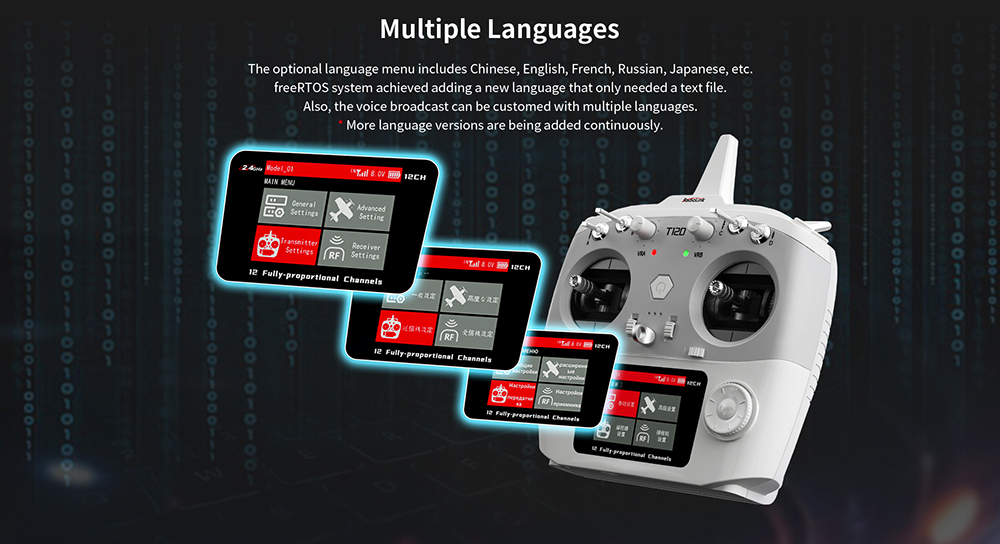
Figure 6: Navigation Reminder Parameter Setting Menu
6.3. Navegació i configuració
Use the push button and dial on the right side of the transmitter to navigate menus and adjust settings.
- Accedeix al menú principal: Short press the 'End' button.
- Configuració de RF: From the Main Menu, navigate to 'Receiver Settings' then 'RF SETTINGS' to select between 'Internal' and 'External' module.
- Battery Type Setting: From the Main Menu, navigate to 'Transmitter Settings' then 'SYSTEM SETTING' to select the correct 'BATTERY TYPE' (e.g., 2S for a 2-cell LiPo). Incorrect selection will lead to inaccurate battery percentagvisualització.
6.4. Temporitzadors
The home screen displays two timers. To operate them:
- Inici/Parada: Move the cursor to Timer 1 or Timer 2 and short press the push button.
- Restablir: Long press the push button when the cursor is on a timer.
6.5. Screen Lock/Unlock
To prevent accidental changes, you can lock the screen:
- Bloquejar/Desbloquejar: Move the cursor to the lock icon at the bottom of the screen and long press the push button.
- When locked, the lock icon turns red, and most button functions are disabled, except for short pressing the 'End' button to quickly view the monitor interface.
6.6. Interfície de monitor
De ràpida view the monitor interface, short press the 'End' button from the home screen. This displays real-time channel outputs.
6.7. Trim Levers
Pushing the trim levers will adjust the trim values for Aileron, Elevator, Throttle, and Rudder. The adjusted values will be displayed on the screen.
6.8. Programmable Mix Control
All 12 channels can be programmed for advanced mixing, supporting V-shaped tail models, Delta-wing mix, track mix, gyro mode, rate/curve, etc. These can be turned on with one button, simplifying complex settings for various pilot needs.
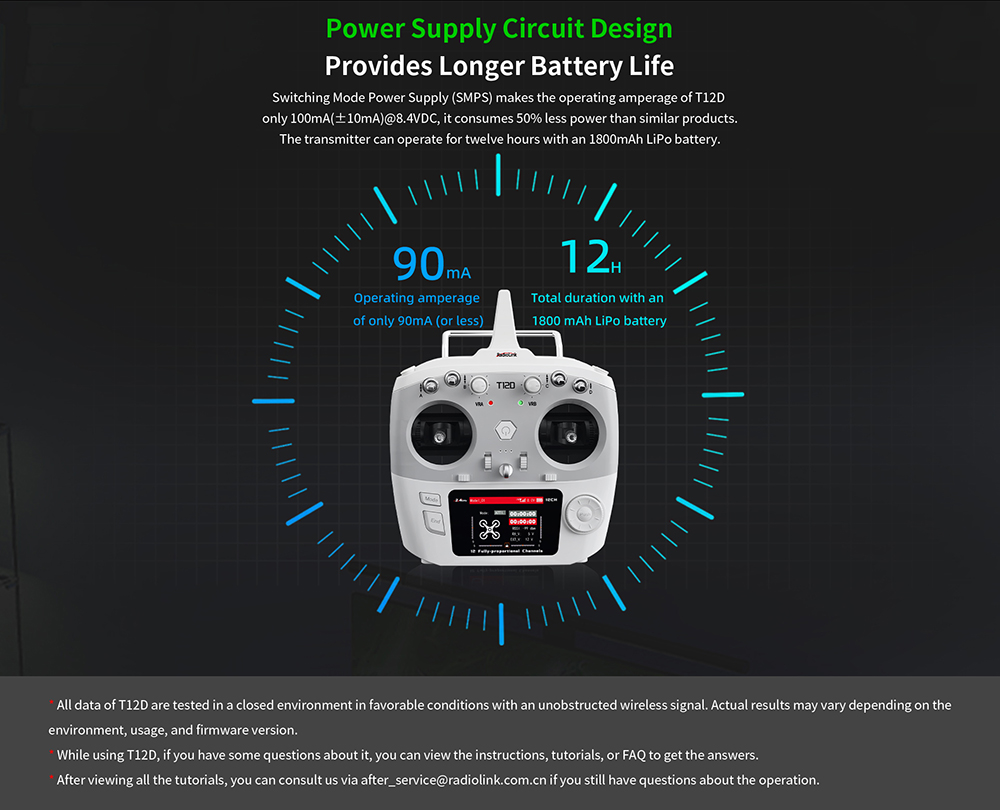
Figure 7: Programmable Mix Control Interface
6.9. Telemetry Functionality
The T12D, when paired with a telemetry-enabled receiver like the R16FG and a correctly connected telemetry cable, displays real-time data such as RSSI, receiver voltage (RX_V), and external model battery voltage (EXT_V). The R16F also has built-in data transmission functions to send back information like latitude, longitude, distance, number of satellites, and heading when connected to flight control systems.
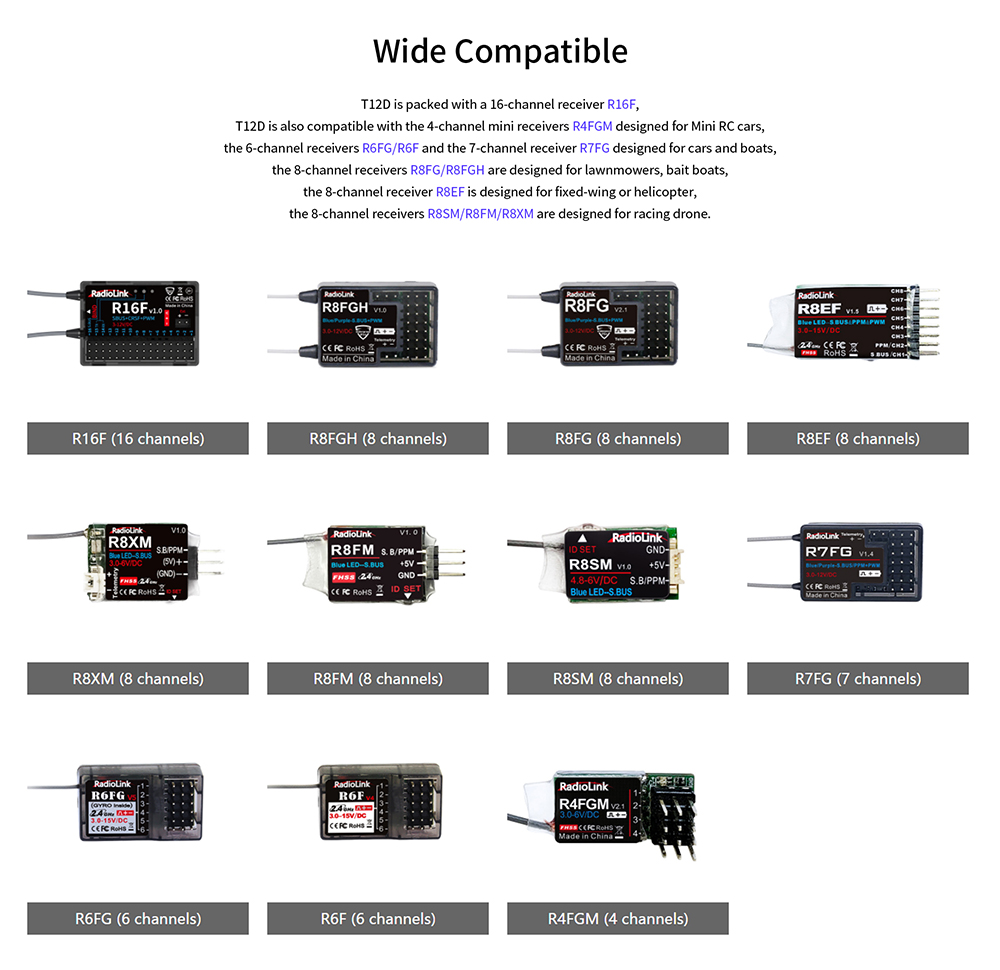
Figure 8: Real-time Telemetry with R16FG Receiver
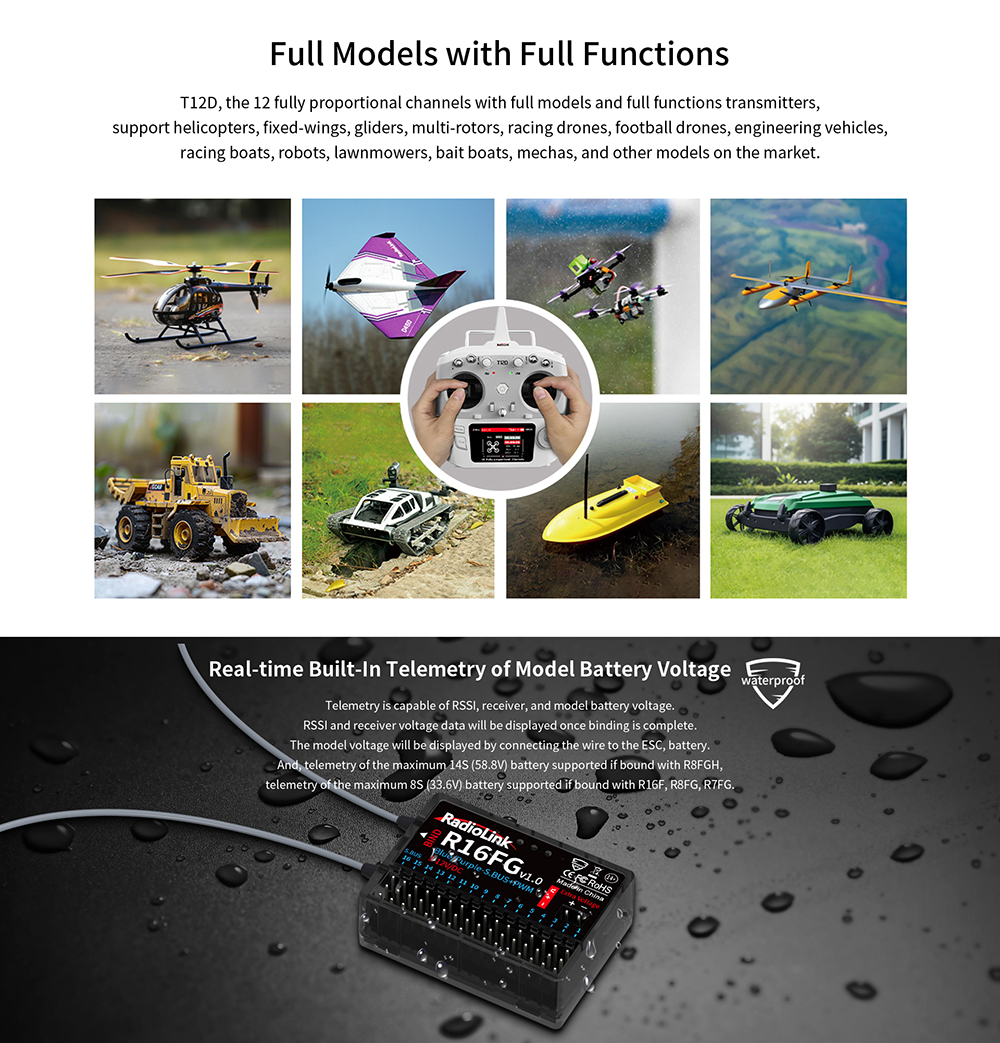
Figure 9: Outputting RSSI to FPV Monitor
6.10. External Long-Range Modules
The T12D fully supports external long-range modules such as ELRS and TBS Crossfire. This allows for adjustment of aircraft parameters like protocol, baud rate, and WIFI mode, combining the user interface of the T12D with the functions of open-source long-range modules.
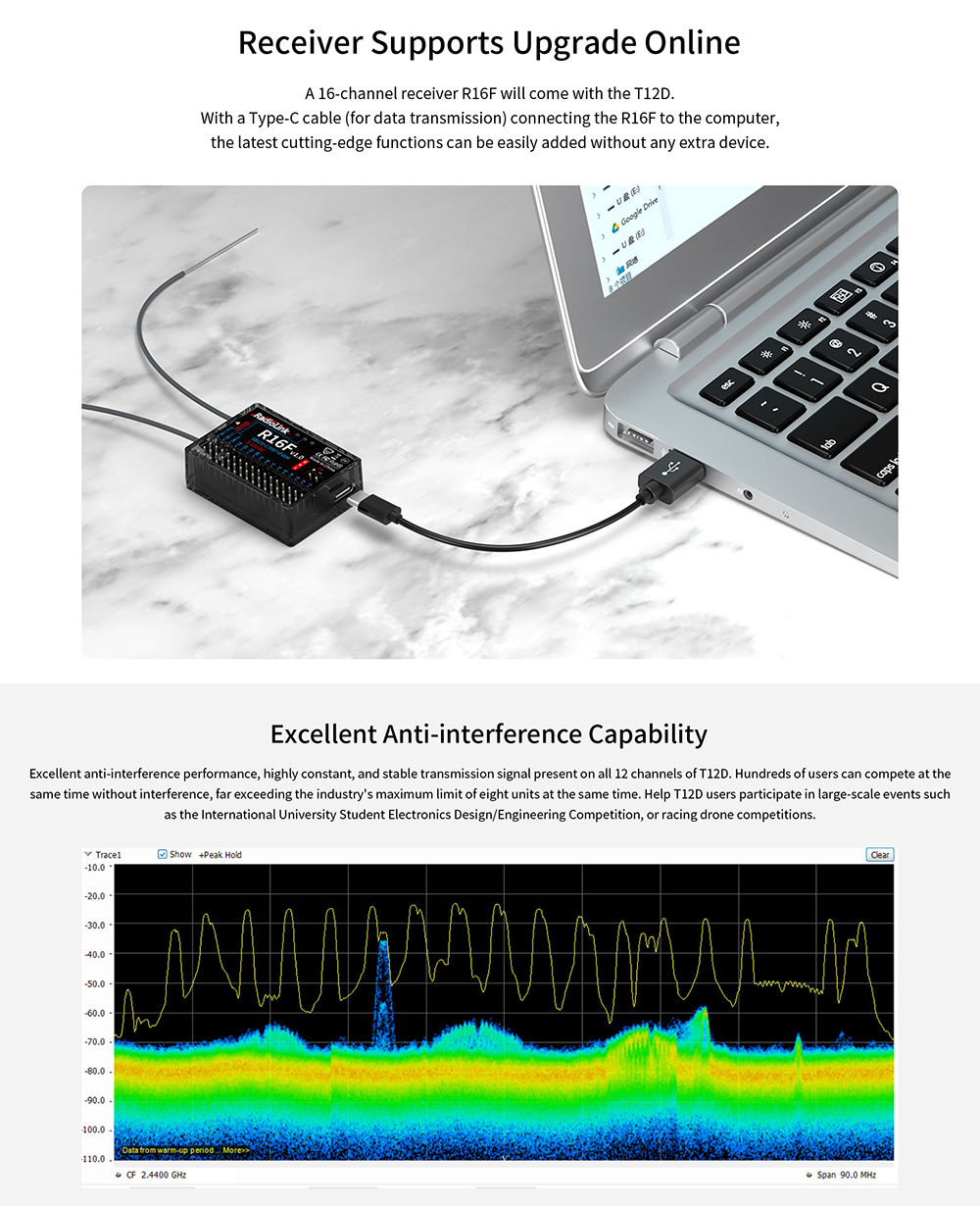
Figure 10: External Long-Range Module Support
6.11. Video Tutorial: Home Screen Introduction
Video 1: A detailed introduction to the T12D/T16D home screen, explaining various indicators and basic navigation.
7. Manteniment
- Neteja: Use a soft, dry cloth to clean the transmitter and receiver. Avoid using solvents or abrasive cleaners.
- Emmagatzematge: Store the transmitter and receiver in a cool, dry place away from direct sunlight and extreme temperatures. Remove batteries if storing for extended periods.
- Cura de la bateria: Follow proper charging and discharge procedures for your chosen battery type. Do not overcharge or over-discharge LiPo batteries.
- Actualitzacions de firmware: Regularly check the RadioLink official website for the latest firmware updates for both the transmitter and receiver to ensure optimal performance and access to new features.
8. Solució De Problemes
| Problema | Causa possible | Solució |
|---|---|---|
| El transmissor no s'encén. | Piles baixes o gastades; instal·lació incorrecta de la bateria. | Replace or recharge batteries; ensure correct polarity. |
| No signal tower icon or 'NULL' for RSSI/RX_V/EXT_V. | Transmitter and receiver not bound; receiver not powered; telemetry cable disconnected. | Perform binding procedure; check receiver power; ensure telemetry cable is correctly connected. |
| Percentatge de bateria inexactetagvisualització. | Incorrect battery type selected in system settings. | Go to 'Transmitter Settings' > 'SYSTEM SETTING' and select the correct 'BATTERY TYPE'. |
| Controls not responding or erratic behavior. | Interference; low transmitter/receiver battery; incorrect model settings. | Operate in an interference-free area; check battery levels; verify model settings and trims. |
| Screen is locked and buttons are unresponsive. | Screen lock feature is active. | Move cursor to the lock icon at the bottom of the screen and long press the push button to unlock. |
9. Consells d'usuari
- Always ensure your transmitter and receiver batteries are fully charged before use to avoid unexpected power loss during operation.
- When using external long-range modules, verify that the 'MODULE SELE' setting in 'RF SETTINGS' is correctly set to 'External'.
- Avançanttage of the 100 model storage slots to save configurations for all your different RC vehicles.
- Utilize the simulator function to practice new maneuvers or test settings without risking your physical model.
- Regularly check the telemetry data (RSSI, voltages) during flight to monitor the health and connection status of your model.
10. Garantia i Suport
For any technical assistance, warranty claims, or further inquiries regarding your RadioLink T12D transmitter or R16F receiver, please contact the manufacturer's customer support or the authorized dealer from whom you purchased the product. Refer to the official RadioLink website for the most up-to-date support information and resources.


