1. Introducció
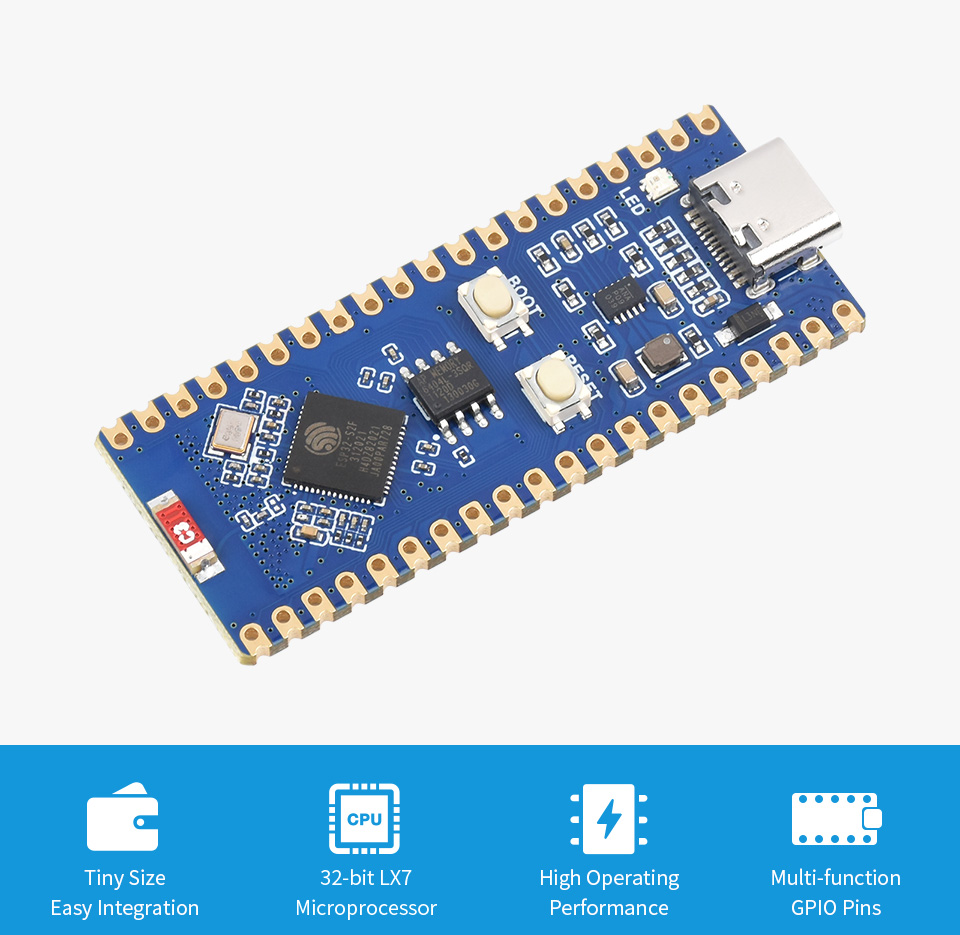
The Waveshare ESP32-S2-LCD-0.96 is a compact and versatile WiFi development board based on the ESP32-S2 microcontroller. It features a 240MHz Xtensa single-core 32-bit LX7 microprocessor and integrated 2.4 GHz WiFi connectivity. This board is designed for a wide range of IoT applications, mobile devices, wearable electronics, and smart home projects, offering a balance of communication distance, data rate, and power consumption.
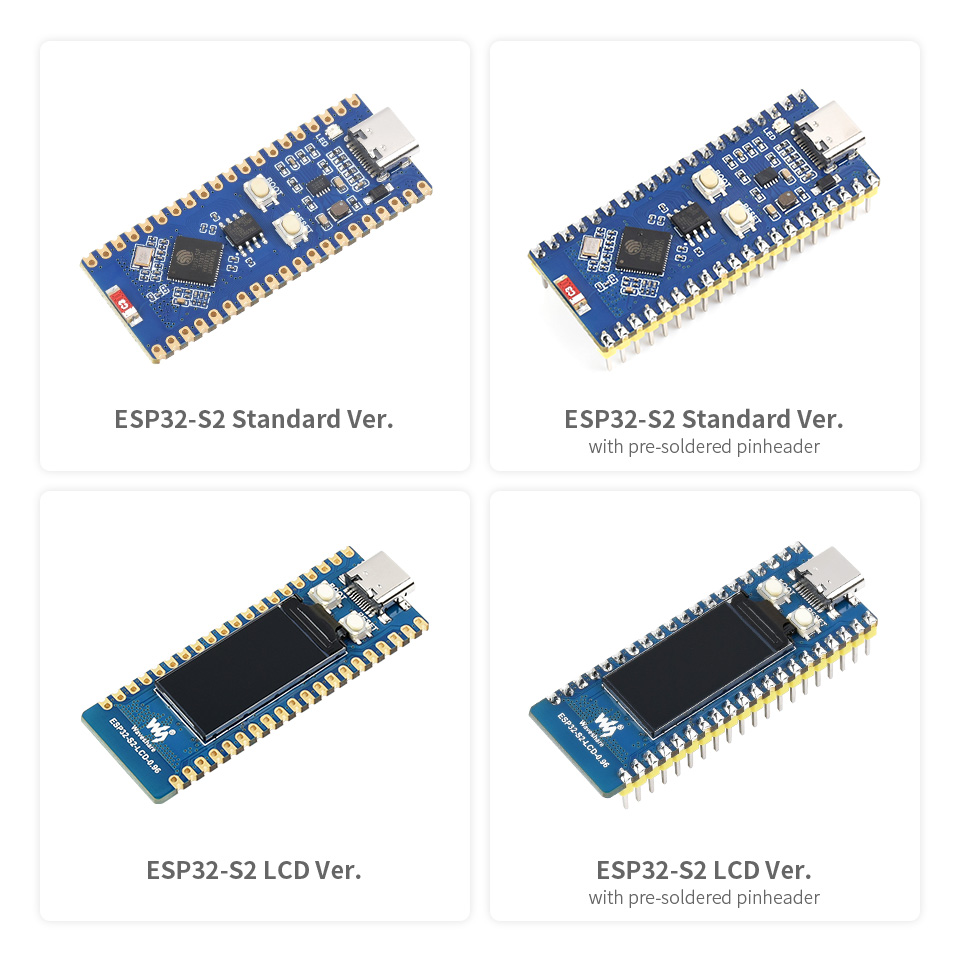
Two main variants are available:
- ESP32-S2-LCD-0.96 (SKU: 20658): The standard LCD version.
- ESP32-S2-LCD-0.96-M (SKU: 21179): The LCD version with pre-soldered pinheaders for easier integration.
Both versions support the Raspberry Pi Pico expansion board ecosystem, enabling creative IoT application development.
2. Característiques clau
2.1. ESP32-S2 Standard Version
- Microprocessador: Xtensa single-core 32-bit LX7 microprocessor (ESP32-S2FH4), up to 240 MHz.
- Memòria: Integrated 320KB SRAM, 128KB ROM, 8MB PSRAM, 4MB Flash memory.
- Connectivitat sense fils: IEEE802.11 b/g/n, on-board 2.4 GHz WiFi ceramic antenna, up to 150 Mbps data transfer rate.
- USB: USB Type-C connector for programming and serial communication; on-chip integrated full-speed USB OTG interface.
- Perifèrics: LCD interface (8-bit serial RGB/8080/6800), TWAI controller (ISO11898-1 compatible), capacitive sensor GPIO, temperature sensor, RMT (TX/RX).
- Gestió d'energia: Onboard DC-DC chip MP28164 (high efficiency buck-boost, max 2A load current).
- Low-Power Modes: Supports various low-power operating states.
- Factor de forma: Castellated module for direct soldering to user-designed carrier boards.
- Expansió: Compatible with Raspberry Pi Pico expansion board ecosystem.
2.2. ESP32-S2 LCD Version (ESP32-S2-LCD-0.96 / ESP32-S2-LCD-0.96-M)
- Includes all features of the ESP32-S2 Standard Version.
- Visualització: On-board 0.96-inch 160×80 pixels 65K color IPS LCD display.
- Suport de bateria: On-board single 3.7V lithium battery charge/discharge header (MX1.25 header), suitable for mobile IoT product design.
3. Especificacions
| Característica | Descripció |
|---|---|
| Microcontrolador | ESP32-S2FH4 (Xtensa single-core 32-bit LX7) |
| Freqüència del rellotge | Fins a 240 MHz |
| SRAM | 320 KB |
| ROM | 128 KB |
| PSRAM | 8 MB |
| Memòria Flash | 4 MB |
| Estàndard WiFi | IEEE802.11 b/g/n (2.4 GHz) |
| Velocitat de dades màxima | 150 Mbps |
| Connector USB | USB tipus C |
| Pins GPIO | 26 multi-function GPIO pins |
| On-board LCD (LCD Ver.) | 0.96-inch IPS, 160×80 pixels, 65K colors |
| Battery Support (LCD Ver.) | 3.7V Lithium battery charge/discharge (MX1.25 header) |
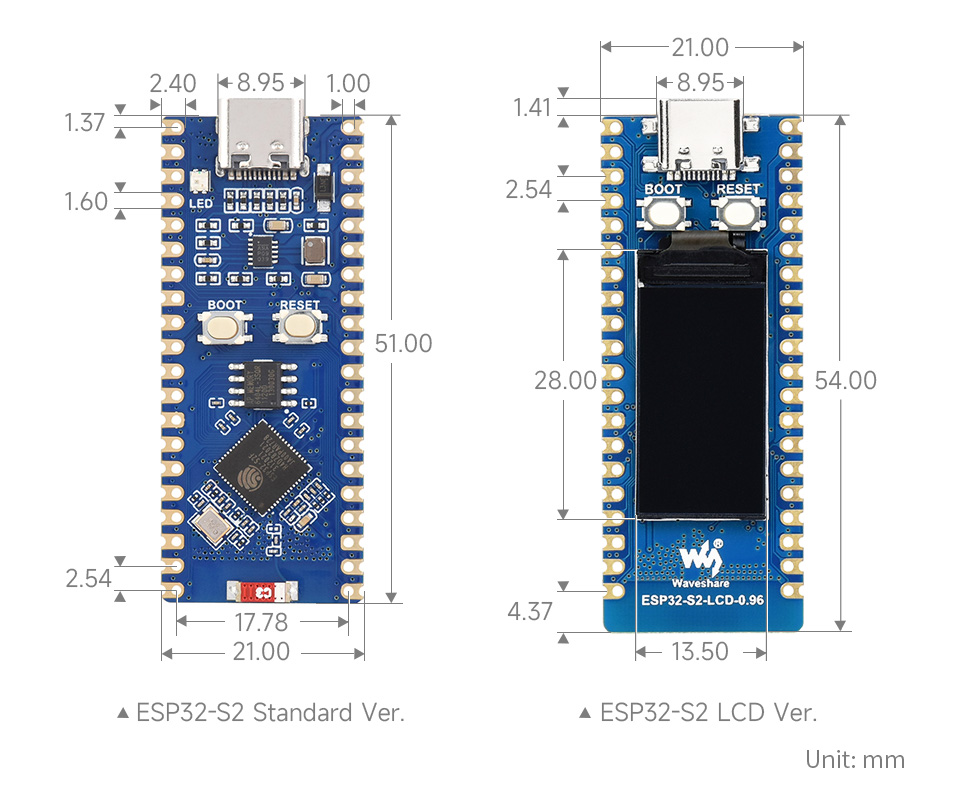
| Dimensions | Refer to Figure 7 for detailed outline dimensions. |
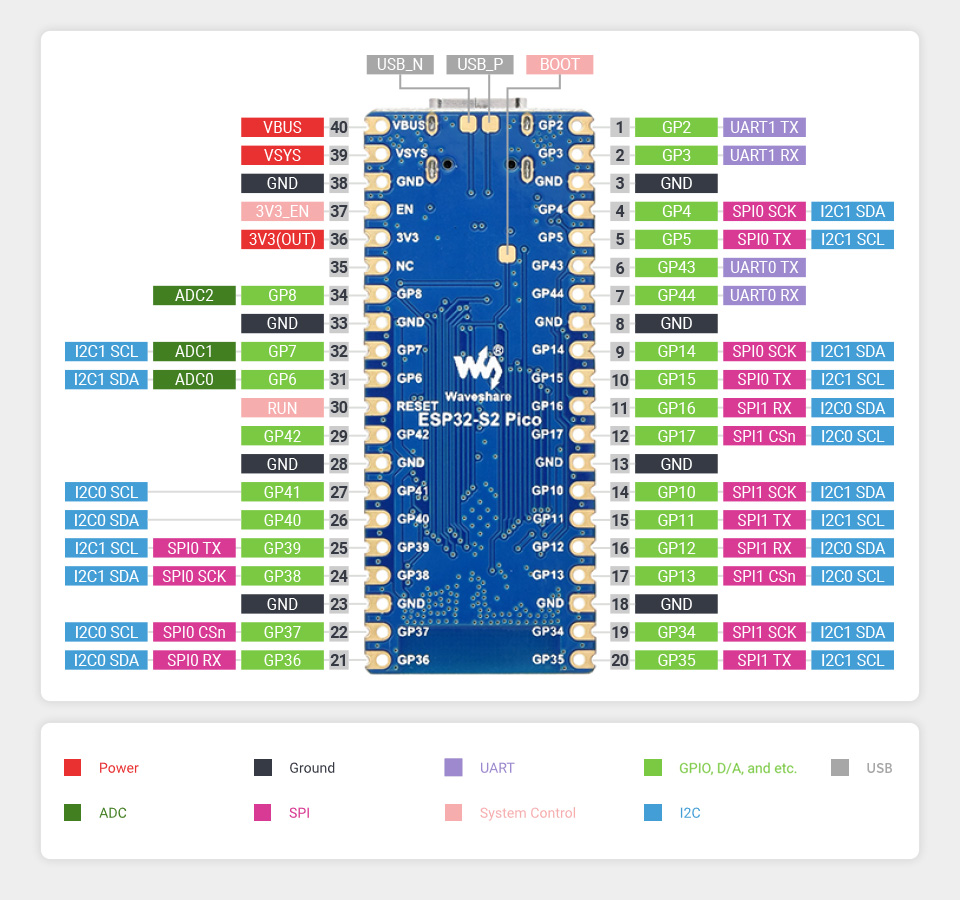
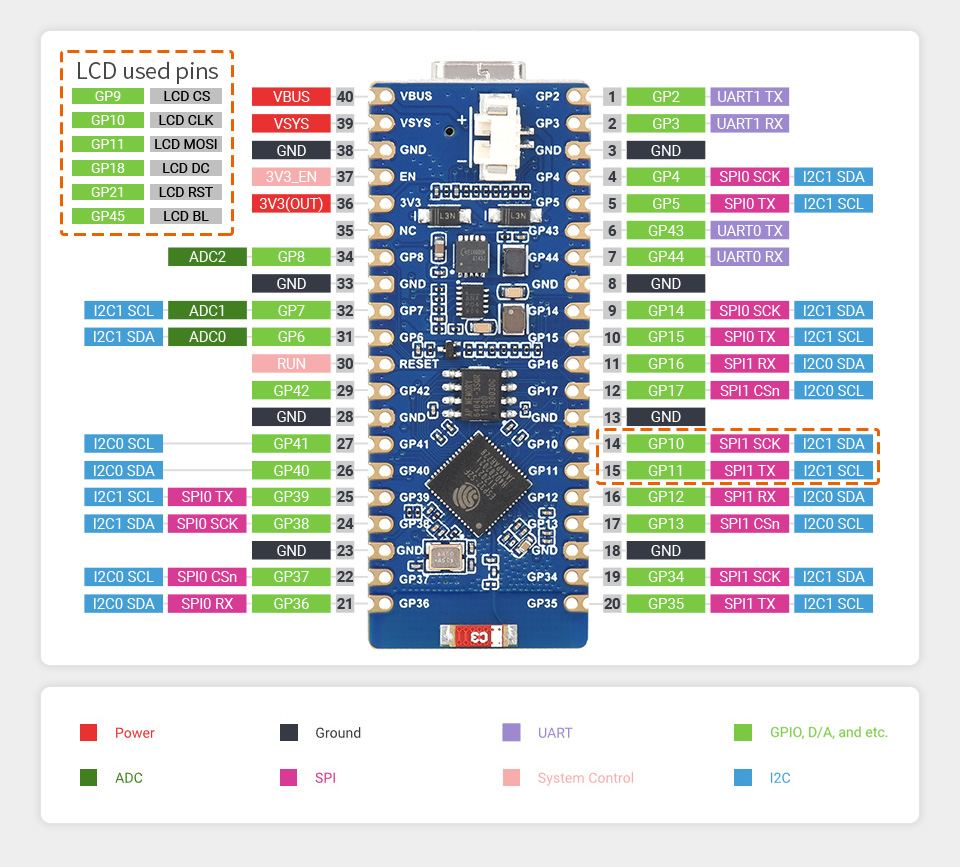
4. Pinout and On-Board Components
4.1. ESP32-S2 Standard Version Pinout and Components
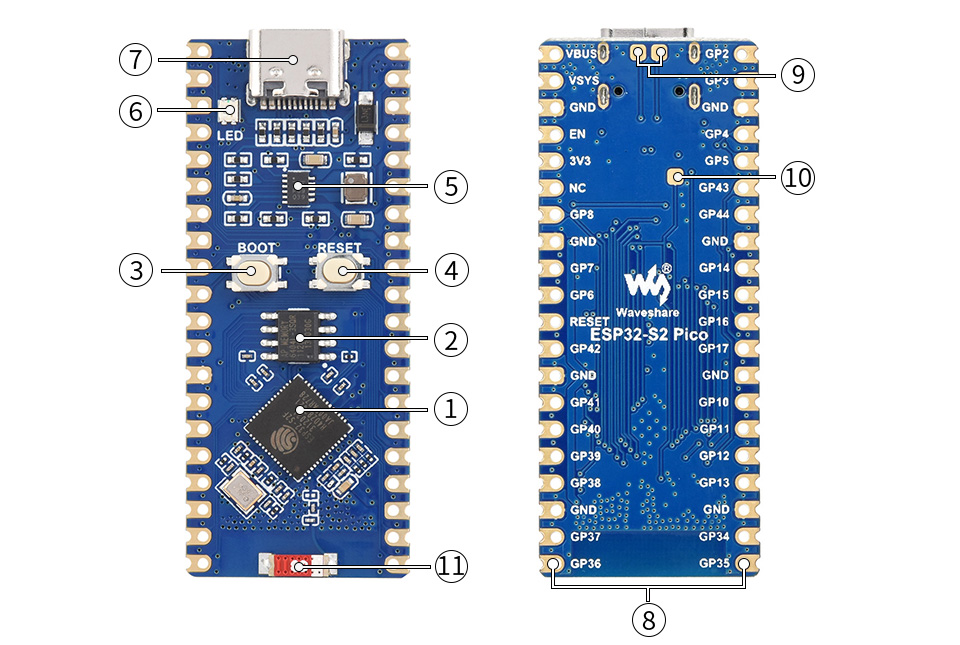
- ESP32-S2FH4: Xtensa single-core 32-bit LX7 microprocessor.
- APS6404L-3SQR-SN: 8MB PSRAM.
- Botó d'arrencada: Press BOOT and then RESET button to enter download mode.
- Botó de reset.
- MP28164: High efficiency DC-DC buck-boost chip.
- WS2812B: User RGB LED (not power indicator).
- USB Type-C connector: For programming, serial printing, etc.
- Pinout: Compatible with Raspberry Pi Pico.
- USB test points: Connecting to USB interface.
- BOOT test point: Connecting to BOOT button.
- WiFi ceramic antenna.
4.2. ESP32-S2 LCD Version Pinout and Components
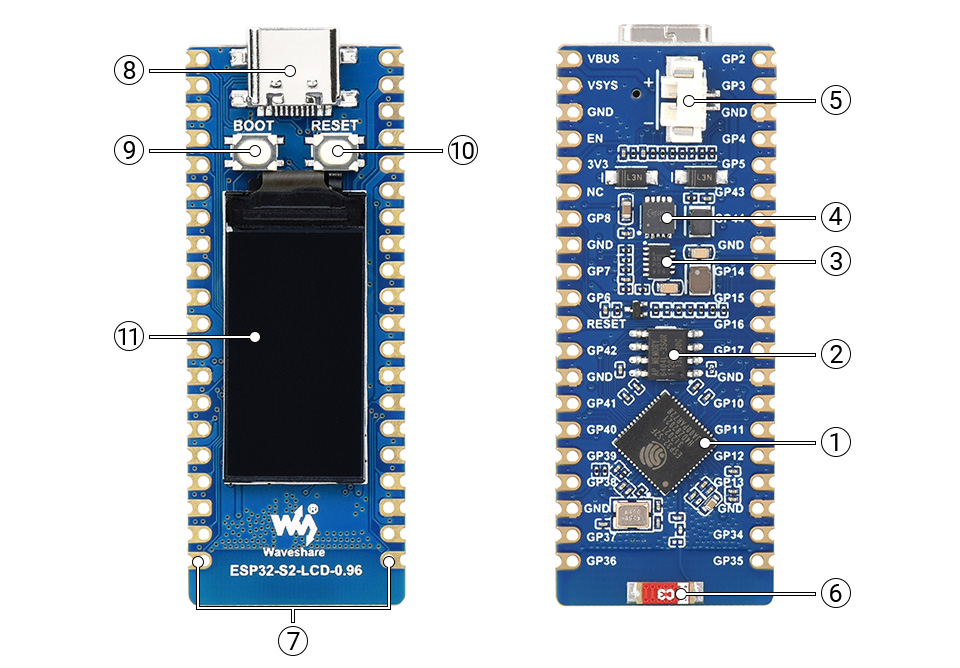
- ESP32-S2FH4: Xtensa single-core 32-bit LX7 microprocessor.
- APS6404L-3SQR-SN: 8MB PSRAM.
- MP28164: High efficiency DC-DC buck-boost chip.
- ETA6096: High efficiency Lithium battery recharge manager.
- Capçalera de la bateria: MX1.25 header, for 3.7V Lithium battery charging/discharging.
- WiFi ceramic antenna.
- Pinout: Compatible with Raspberry Pi Pico.
- USB Type-C connector: For programming, serial printing, etc.
- Botó d'arrencada: Press BOOT and then RESET button to enter download mode.
- Botó de reset.
- 0.96inch IPS LCD: 160×80 resolution, 65K colors.
5. Configuració inicial
To begin using your Waveshare ESP32-S2-LCD-0.96 development board, follow these general steps:
- Connexió a l'ordinador: Use a USB Type-C cable to connect the board to your computer. This will provide power and enable communication for programming and serial debugging.
- Instal·leu els controladors (si cal): Your operating system may automatically install necessary drivers. If not, you might need to install specific USB-to-serial drivers (e.g., CP210x or CH340, depending on the board's USB-UART bridge chip, though ESP32-S2 often uses its native USB).
- Prepare Development Environment: Install your preferred development environment (e.g., Arduino IDE with ESP32 board support, ESP-IDF, MicroPython, or CircuitPython). Refer to the respective documentation for detailed installation instructions.
- Enter Download Mode (for flashing firmware): To flash new firmware, press and hold the BARRETA , premeu i deixeu anar el botó RESET button, and finally release the BARRETA button. The board will then be in download mode, ready to receive new code.
- Powering the LCD Version: If you have the LCD version and plan to use it in a portable application, connect a 3.7V Lithium battery to the MX1.25 battery header. The board includes a charge/discharge manager for battery operation.
6. Instruccions de funcionament
The ESP32-S2-LCD-0.96 is a highly flexible development board. Operating procedures will largely depend on the specific application and development framework you choose.
- Programació: Upload your compiled code (e.g., Arduino sketch, ESP-IDF project, MicroPython script) to the board via the USB Type-C connection. Ensure the board is in download mode if required by your toolchain.
- Comunicació en sèrie: Use a serial monitor (available in most IDEs) to view debug messages and interact with your program running on the ESP32-S2.
- Connectivitat WiFi: Utilize the ESP32-S2's integrated WiFi capabilities to connect to networks, host web servers, or communicate with other devices over the internet.
- LCD Display (LCD Version): Program the 0.96-inch IPS LCD to display text, graphics, or sensor data. Libraries specific to the display controller (often ST7735 or similar) will be required.
- Ús de GPIO: Configure the 26 multi-function GPIO pins for various purposes such as digital input/output, analog input (ADC), I2C, SPI, UART, etc., according to your project needs.
7. Development Environments
The Waveshare ESP32-S2-LCD-0.96 supports several popular development environments:
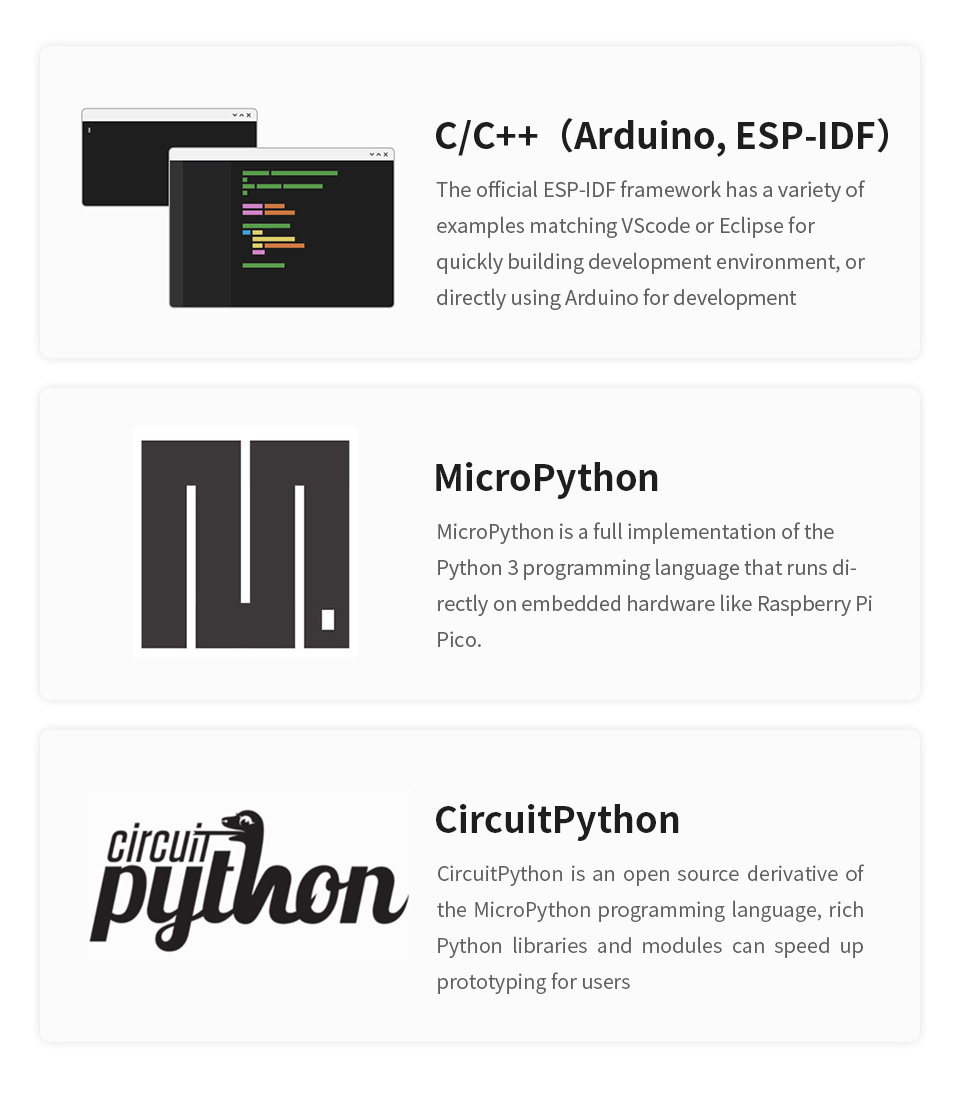
- C/C++ (Arduino, ESP-IDF): The official ESP-IDF (Espressif IoT Development Framework) provides a robust environment for C/C++ development, with examples compatible with VSCode or Eclipse. Arduino IDE also offers extensive support for ESP32 boards, making it easy to get started with C/C++ programming.
- MicroPython: A full implementation of the Python 3 programming language that runs directly on embedded hardware. It's ideal for rapid prototyping and projects where Python's simplicity is preferred.
- CircuitPython: An open-source derivative of MicroPython, designed for ease of use and education. It features a rich set of libraries and modules to speed up prototyping for users.
For detailed guides and resources, please refer to the official documentation for each development environment and Waveshare's product wiki.
8. Manteniment i cura
To ensure the longevity and proper functioning of your ESP32-S2-LCD-0.96 board, follow these maintenance guidelines:
- Manejar amb cura: Avoid dropping the board or subjecting it to physical shock.
- Descàrrega estàtica: Always handle the board in a static-safe environment to prevent damage from electrostatic discharge (ESD).
- Font d'alimentació: Use a stable and appropriate power supply (via USB-C or battery header for LCD version). Do not exceed the recommended voltage límits.
- Emmagatzematge: Store the board in a dry, cool place, away from direct sunlight and extreme temperatures. If storing for extended periods, use anti-static bags.
- Neteja: If necessary, gently clean the board with a soft, dry brush or compressed air to remove dust. Avoid using liquids or harsh chemicals.
- Connexions: Ensure all connections (USB, headers, battery) are secure and correctly oriented before powering on the board.
9. Solució De Problemes
Aquí teniu alguns problemes comuns i les seves possibles solucions:
- Board not recognized by computer:
- Ensure the USB Type-C cable is fully inserted and functional.
- Prova amb un port o cable USB diferent.
- Check if necessary USB-to-serial drivers are installed on your computer.
- Restart your computer and the development environment.
- Firmware upload fails:
- Verify that the board is in download mode (press BOOT, then RESET, then release BOOT).
- Check your development environment settings for correct board selection and serial port.
- Ensure your code compiles without errors.
- Prova amb un cable o port USB diferent.
- Problemes de connexió Wi-Fi:
- Double-check your WiFi credentials (SSID, password).
- Ensure the board is within range of the WiFi access point.
- Verify that your code correctly initializes and connects to WiFi.
- LCD display not working (LCD Version):
- Ensure the display is correctly initialized in your code.
- Check for any loose connections if the LCD is not integrated directly.
- Verify that the correct display library and pin configurations are used.
- La placa no s'encén:
- Check the USB cable connection and the power source.
- If using a battery (LCD version), ensure it is charged and correctly connected to the MX1.25 header.
If you encounter persistent issues, consult the Waveshare product wiki for your specific board model or seek assistance from relevant online communities and forums.
10. Garantia i Suport
For warranty information, technical support, and additional resources, please visit the official Waveshare website or the product page for the ESP32-S2-LCD-0.96. The website typically provides detailed documentation, example code, and community forums that can assist with development and troubleshooting.


