Introducció
This manual provides instructions for the setup, operation, and maintenance of your Logitech Wingman Force Joystick, model 963155-0403. This device is designed to enhance your PC gaming experience with force feedback technology and programmable controls.
Contingut del paquet
Comproveu que el vostre paquet contingui els elements següents:
- Logitech Wingman Force Joystick
- Adaptador d'alimentació
- USB Cable (integrated or separate)
- Software CD (if applicable, for WingMan Software)
- Manual d'usuari (aquest document)
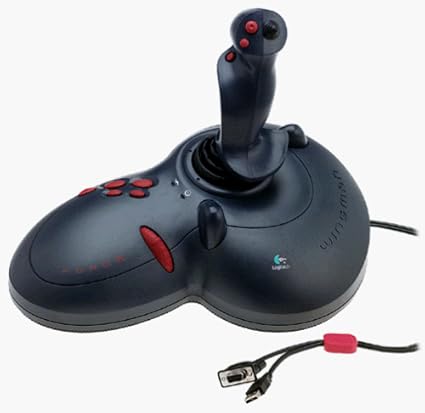
Figure 1: The Logitech Wingman Force Joystick packaging, showing the joystick and its features.
Configuració
- Connectar l'alimentació: Plug the power adapter into the joystick and then into a standard electrical outlet.
- Connexió al PC: Connect the joystick's USB cable to an available USB port on your computer. The joystick also supports serial interfaces.
- Instal·lar programari: Insert the WingMan Software CD (if provided) into your computer's CD-ROM drive and follow the on-screen instructions to install the drivers and WingMan Software. If no CD is provided, drivers may be automatically installed by your operating system or available for download from the Logitech support weblloc.
- Requisits del sistema: Ensure your computer runs a compatible Windows operating system.
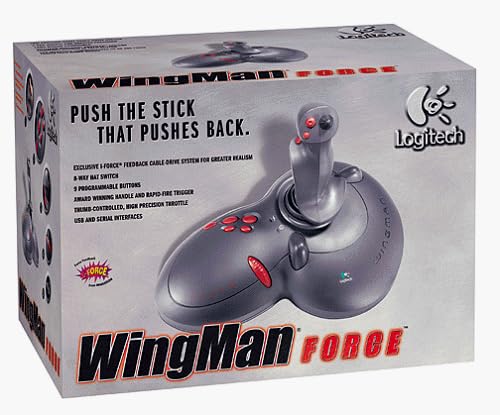
Figure 2: The Logitech Wingman Force Joystick, illustrating its ergonomic design and button layout.
Instruccions de funcionament
Controls acabatsview
- Joystick Handle: Provides precise control for in-game movement.
- 9 botons programables: Customize these buttons using the WingMan Software for various in-game actions.
- Interruptor de barret de 8 posicions: Located on top of the joystick, this switch allows for quick camera views or directional commands.
- Thumb-Controlled Throttle: Adjust speed or thrust with the integrated throttle control.
Tecnologia de retroalimentació de força
The Wingman Force Joystick utilizes Logitech's exclusive I-Force force feedback technology with a cable-drive system. This system provides realistic tactile feedback, such as vibrations from impacts, recoil from weapons, and resistance during maneuvers, enhancing immersion in compatible games.
Using WingMan Software
The WingMan Software allows you to:
- Program the 9 buttons for specific game functions.
- Crea i desa diversos professionalsfiles per a diferents jocs.
- Adjust force feedback intensity settings.
- Calibrate the joystick for optimal performance.
Refer to the WingMan Software's help documentation for detailed instructions on customization and profile gestió.
Manteniment
To ensure the longevity and optimal performance of your joystick:
- Neteja: Use a soft, dry cloth to wipe the surface of the joystick. Avoid using abrasive cleaners or solvents.
- Emmagatzematge: Store the joystick in a clean, dry environment away from extreme temperatures and direct sunlight.
- Cura del cable: Avoid bending or crimping the cables excessively.
Resolució de problemes
- Problem: Joystick not recognized by computer.
- Solució:
- Ensure the USB cable is securely connected to both the joystick and the computer.
- Proveu de connectar-vos a un port USB diferent.
- Verify that the power adapter is properly connected and the joystick is receiving power.
- Reinstall the WingMan Software drivers.
- Problem: Inconsistent or absent force feedback.
- Solució:
- Check the force feedback settings within the WingMan Software and ensure they are set to an appropriate level.
- Ensure the game you are playing supports force feedback and that it is enabled in the game's settings.
- Restart your computer and the game.
- Comproveu que totes les connexions siguin segures.
- Problem: Buttons or controls are unresponsive.
- Solució:
- Calibrate the joystick using the WingMan Software.
- Ensure the joystick drivers are up to date.
- Test the joystick in a different game or application to determine if the issue is game-specific.
Especificacions
| Característica | Detall |
|---|---|
| Número de model | 963155-0403 |
| Marca | Logitech |
| Tipus de controlador | Joystick |
| Tecnologia de connectivitat | USB, sèrie |
| Dispositius compatibles | PC Windows |
| Dimensions del producte | 13.5 x 9.63 x 9.25 polzades |
| Pes de l'article | 4.14 lliures |
| Feedback de força | I-Force feedback cable-drive system |
| Botons | 9 botons programables |
| Interruptor de barret | Interruptor de barret de 8 vies |
| Acelerador | Thumb-controlled, high precision throttle |
Garantia i Suport
For warranty information and technical support, please refer to the documentation included with your product or visit the official Logitech support weblloc. Normalment hi podeu trobar controladors, preguntes freqüents i informació de contacte del servei d'atenció al client.
Suport Logitech Weblloc: www.logitech.com/support


