1. Introducció
This manual provides instructions for the safe and effective use of your Olympus C-3000 3.2MP Digital Camera. Please read this manual thoroughly before using the camera and keep it in a safe place for future reference.
The Olympus C-3000 Zoom is a 3.2-megapixel digital camera featuring a 3x optical zoom lens and 2x digital zoom. It offers various shooting modes, including aperture and shutter priority, manual exposure, and creative image effects.

Imatge 1.1: Davant view of the Olympus C-3000 Digital Camera. The camera is gray and black, with the lens extending from the front. The flash and viewfinder are visible on the upper left.
2. Components de la càmera
Familiarize yourself with the main components of your camera.
2.1 Davant View
- Lent: 3x optical zoom lens (32-96mm equivalent).
- Flash: Built-in flash unit.
- Viewcercador: Òptic viewfinder for framing shots.
- Temporitzador automàtic Lamp: Indicates self-timer operation.
2.2 Darrera View

Imatge 2.1: posterior view of the Olympus C-3000 Digital Camera. The LCD screen is prominent in the center, with control buttons and a directional pad to the right.
- Monitor LCD: 1.8-inch display for viewing images and menu navigation.
- Botons de control: Various buttons for menu access, playback, and settings adjustment.
- Coixinet direccional: For navigating menus and selecting options.
- Viewfinder Eyepiece: For composing shots.
2.3 lateral View (Memory Card Slot)
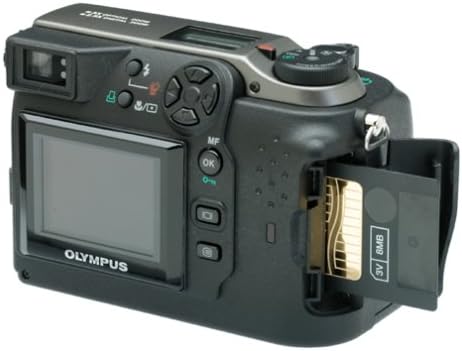
Imatge 2.2: lateral view of the Olympus C-3000 Digital Camera with the SmartMedia card slot open, showing an 8MB card inserted.
- SmartMedia Card Slot: For inserting and removing SmartMedia memory cards.
- Port USB: For connecting the camera to a computer.
3. Configuració
3.1 Instal·lació de la bateria
The camera operates on four AA batteries or two disposable lithium batteries. Ensure batteries are inserted with correct polarity.
- Open the battery compartment cover located on the bottom or side of the camera.
- Insert four AA batteries or two lithium batteries, matching the (+) and (-) indicators inside the compartment.
- Tanqueu bé la tapa del compartiment de la bateria.
Note: Using rechargeable NiMH batteries is recommended for extended use.
3.2 Instal·lació de la targeta de memòria
The camera uses SmartMedia cards for image storage. An 8 MB SmartMedia card is typically included.
- Locate the SmartMedia card slot cover on the side of the camera (refer to Image 2.2).
- Obriu la tapa.
- Insert the SmartMedia card with the correct orientation until it clicks into place.
- Tanqueu la coberta de manera segura.
Caution: Do not force the card. Incorrect insertion can damage the card or camera.
3.3 Encès inicial
After installing batteries and a memory card, you can power on the camera.
- Traieu la tapa de la lent.
- Slide the power switch to the "ON" position. The lens will extend.
- The LCD monitor will display the current settings.
Important: Always remove the lens cap before turning on the camera to prevent damage to the lens mechanism.
4. Funcionament de la càmera
4.1 Fotografia bàsica
Per fer una foto:
- Enceneu la càmera.
- Select your desired shooting mode using the mode dial (e.g., Program, Aperture Priority, Shutter Priority, Manual).
- Frame your shot using the optical viewfinder or the LCD monitor.
- Press the shutter button halfway down to activate autofocus and exposure.
- Once focus is achieved (indicated by a green light or beep), press the shutter button fully to capture the image.
4.2 Funció de zoom
The camera features a 3x optical zoom and 2x digital zoom.
- Zoom òptic: Use the zoom lever (typically around the shutter button) to zoom in (telephoto) or out (wide-angle). Optical zoom maintains image quality.
- Zoom digital: If enabled, digital zoom extends beyond the optical zoom range. Note that digital zoom can reduce image quality.
4.3 modes de flaix
The built-in flash offers several modes to suit different lighting conditions.
- Flash automàtic: Camera automatically determines if flash is needed.
- Reducció d'ulls vermells: Emet preflaix per reduir l'efecte d'ulls vermells.
- Fill Flash: Forces the flash to fire, useful for brightening shadows in bright conditions.
- Flash desactivat: Desactiva el flaix.
- Sincronització lenta: Combina el flaix amb una velocitat d'obturació lenta per a una exposició equilibrada del subjecte i el fons amb poca llum.
Refer to the camera's menu for selecting flash modes.
4.4 Control de l'exposició
The C-3000 offers comprehensive exposure control:
- Mode de programa (P): Camera sets both aperture and shutter speed for optimal exposure.
- Mode de prioritat d'obertura (A): You set the aperture (f-number), and the camera sets the shutter speed. Controls depth of field.
- Mode de prioritat d'obturació (S): You set the shutter speed, and the camera sets the aperture. Controls motion blur.
- Mode manual (M): Ajusteu tant l'obertura com la velocitat d'obturació.
4.5 Balanç de blancs
White balance adjusts color tones to appear natural under different light sources. The camera features an automatic white balance setting.
- Balanç de blancs automàtic: Camera automatically detects and adjusts for the light source.
4.6 Temporitzador automàtic
The self-timer allows for a delay before the shutter fires, typically 10 seconds.
- Activate the self-timer function via the camera's menu.
- Press the shutter button. The self-timer lamp will blink, and a countdown will begin.
- The picture will be taken after the set delay.
4.7 Enregistrament de vídeo
The camera can record short video clips (MJPEG format) at 15 frames per second at resolutions up to 320x240.
- Switch the camera to video mode (if available via mode dial or menu).
- Premeu el botó de l'obturador per començar a gravar.
- Torneu a prémer el botó de l'obturador per aturar la gravació.
4.8 Reproducció d'imatges
Per tornarview imatges i vídeos capturats:
- Switch the camera to playback mode (usually indicated by a play icon).
- Feu servir el botó direccional per navegar per les imatges.
- Press the "OK" button or a dedicated playback button to view details or play videos.
4.9 Connexió a un ordinador
Transfer images to your computer using the provided USB cable.
- Assegureu-vos que la càmera estigui apagada.
- Connect one end of the USB cable to the camera's USB port.
- Connecteu l'altre extrem a un port USB de l'ordinador.
- Turn on the camera. Your computer should recognize the camera as a removable storage device.
- Follow your computer's instructions to transfer files.
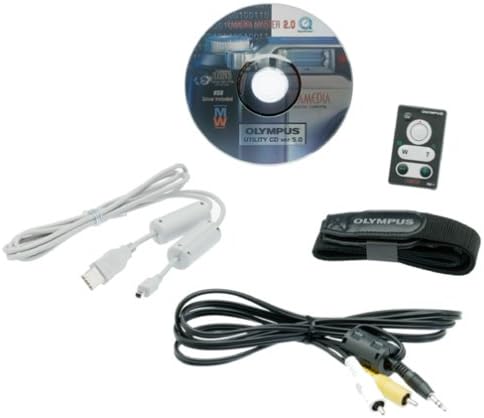
Imatge 4.1: Included accessories for the Olympus C-3000, featuring a USB cable, video cable, software utility CD, and a wrist strap.
5. Manteniment
5.1 Neteja de la càmera
- Cos de la càmera: Netegeu amb un drap suau i sec. Per a la brutícia persistent, utilitzeu un drap lleugerament humit.ampesbandit amb aigua i després assecar bé.
- Lent: Use a lens brush or a soft, clean lens cloth. Avoid touching the lens surface with your fingers. Do not use chemical cleaners.
- Monitor LCD: Netegeu suaument amb un drap suau i sec.
Caution: Never use organic solvents such as alcohol, benzene, or thinner to clean the camera.
5.2 Emmagatzematge
- When not in use for extended periods, remove batteries from the camera.
- Guardeu la càmera en un lloc fresc, sec i ben ventilat, allunyat de la llum solar directa, de les altes temperatures i de la humitat.
- Use a desiccant (e.g., silica gel) in the storage area to absorb moisture.
6. Solució De Problemes
| Problema | Possible causa/solució |
|---|---|
| La càmera no s'encén. |
|
| "Card Error" message appears. |
|
| Les imatges són borroses. |
|
| El flaix no es dispara. |
|
7. Especificacions
Key technical specifications for the Olympus C-3000 Digital Camera:
- Nom del model: Olympus C-3000
- Sensor d'imatge: CCD de 3.2 megapíxels (1/1.8 polzades)
- Resolució fixa efectiva: 3.3 MP
- Lent: 3x Optical Zoom (32-96mm equivalent), F2.8-F11 aperture
- Zoom digital: 2.5x
- Estabilització d'imatge: Òptic
- Tipus d'enfocament: Autofocus & Manual (TTL Contrast Detection)
- Velocitat d'obturació: 1/800 a 16 segons
- Sensibilitat ISO: Expanded ISO Minimum 100, Maximum 400
- Balanç de blancs: Automàtic
- Control de l'exposició: Manual, Aperture Priority, Program, Shutter Priority
- Modes de flaix: Auto, Red-Eye Reduction, Fill Flash, Flash Off, Slow Synch, Rear Curtain Synch
- Mitjans d'emmagatzematge: SmartMedia (8 MB card included)
- File Formats: JPEG, RAW
- Gravació de vídeo: MJPEG, 15 fps @ 320x240/160x120
- Monitor LCD: 1.8 Inches (no color screen)
- Connectivitat: USB
- Font d'alimentació: 4 AA batteries or 2 disposable lithium batteries
- Dimensions (aprox.): Alçada de l'article: 2.6 polzades
- Pes: 13.44 unces
8. Garantia i Suport
8.1 Informació de la garantia
The Olympus C-3000 Digital Camera comes with a standard warranty:
- Descripció de la garantia: 1 Year Parts/Labor
Si us plau, conserveu el comprovant de compra per a reclamacions de garantia. La garantia cobreix els defectes de fabricació i no cobreix els danys causats per mal ús, accidents o reparacions no autoritzades.
8.2 Atenció al client
For further assistance or technical support, please refer to the official Olympus support channels or visit their weblloc.
Note: Product support availability may vary depending on region and product age.


