1. Introducció
The D-Link DWL-500 is an 11 Mbps Wireless LAN PCI Network Card designed to provide wireless network connectivity for desktop personal computers. This card enables your desktop PC to connect to a wireless network, allowing you to share hard drives, printers, and access the internet without the need for physical network cables. It operates at a high-speed 11 Mbps Ethernet wireless standard and is compliant with PCI local bus 2.2 specifications.
This manual provides essential information for the proper installation, operation, and maintenance of your DWL-500 network card.
2. Contingut del paquet
- D-Link DWL-500 11Mb Wireless LAN PCI Network Card
- Guia d'instal·lació ràpida (si s'inclou)
- Driver CD (if included)
Please verify that all items are present. If any items are missing or damaged, contact your retailer.
3. Requisits del sistema
- Desktop PC with an available PCI slot
- Compatible operating system (e.g., Windows 98SE/ME/2000/XP)
- CD-ROM drive for driver installation (if using driver CD)
4. Configuració i instal·lació
4.1 Instal·lació de maquinari
- Apagueu l'ordinador: Abans de començar, assegureu-vos que l'ordinador estigui completament apagat i desendollat de la presa de corrent.
- Obriu la caixa de l'ordinador: Remove the side panel of your computer case to access the motherboard and PCI slots.
- Localitzeu una ranura PCI disponible: Identify an empty PCI slot on your motherboard. These are typically white or cream-colored slots.
- Traieu la coberta de la ranura: Traieu amb cura la tapa metàl·lica de la ranura corresponent a la ranura PCI escollida de la part posterior de la carcassa de l'ordinador.
- Insert the DWL-500 Card: Align the DWL-500 card with the PCI slot and firmly press it down until it is securely seated. Ensure the gold connectors are fully inserted into the slot.
- Assegureu la targeta: Use a screw to fasten the metal bracket of the DWL-500 card to the computer case.
- Tanqueu la carcassa de l'ordinador: Substitueix el panell lateral de la caixa de l'ordinador.
- Torneu a connectar l'alimentació: Plug your computer back into the wall outlet and power it on.
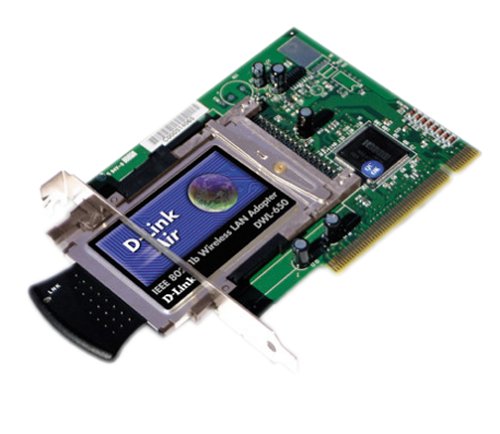
Image: The D-Link DWL-500 11Mb Wireless LAN PCI Network Card. This image shows the physical appearance of the network card, which is designed to be inserted into a PCI slot on a desktop computer's motherboard.
4.2 Instal·lació del controlador
After hardware installation, your operating system may automatically detect the new hardware. If it prompts for drivers, or if the device does not function correctly, you will need to install the drivers manually.
- Inseriu el CD del controlador: Place the D-Link DWL-500 driver CD into your computer's CD-ROM drive.
- Executa el programa d'instal·lació: If an auto-run window appears, select the option to install drivers or run the setup program. If not, navigate to the CD-ROM drive in 'My Computer' and locate and run the 'Setup.exe' or 'Install.exe' file.
- Seguiu les instruccions a la pantalla: Follow the prompts provided by the installation wizard. You may need to restart your computer after the installation is complete.
- Verifica la instal·lació: After restarting, check your computer's Device Manager to ensure the D-Link DWL-500 is listed correctly without any error symbols.
5. Operating the Wireless Card
5.1 Connexió a una xarxa sense fil
Once the drivers are installed, your DWL-500 card will enable your computer to detect available wireless networks.
- Access Wireless Network Settings: Depending on your operating system, access the wireless network connection utility. This is often found in the system tray (bottom right corner of the screen) or within the Network Connections section of the Control Panel.
- Escaneja per a xarxes: Use the utility to scan for available wireless networks.
- Selecciona la teva xarxa: Choose your desired wireless network (SSID) from the list of detected networks.
- Enter Security Key (if applicable): If the network is secured, you will be prompted to enter the network's security key or passphrase (e.g., WEP key).
- Connectar: Click 'Connect' to establish a connection to the wireless network.
The DWL-500 supports 11 Mbps data transfer rates, providing sufficient bandwidth for typical internet browsing and file sharing within its indoor range of 115 to 328 feet and outdoor range of 328 to 984 feet.
6. Manteniment
To ensure optimal performance and longevity of your D-Link DWL-500 wireless card, consider the following maintenance tips:
- Actualitzacions de controladors: Periodically check the official D-Link website for updated drivers. Keeping your drivers current can improve performance and compatibility.
- Neteja física: If your computer case accumulates dust, carefully clean around the PCI card and its antenna connection points using compressed air. Ensure the computer is powered off and unplugged before cleaning.
- Posició de l'antena: Ensure the antenna is positioned optimally for the best signal reception. Avoid placing the computer in locations where the signal might be obstructed by large metal objects or thick walls.
7. Solució De Problemes
If you encounter issues with your D-Link DWL-500, try the following troubleshooting steps:
- No Wireless Networks Detected:
- Ensure the card is properly seated in the PCI slot.
- Verify that the drivers are correctly installed in Device Manager.
- Check if your wireless router/access point is powered on and broadcasting its SSID.
- Move closer to the wireless access point to rule out range issues.
- Cannot Connect to a Specific Network:
- Double-check the security key (WEP/WPA) you are entering. It is case-sensitive.
- Ensure your network's security settings (e.g., WEP, WPA) are compatible with the DWL-500.
- Restart both your computer and the wireless router.
- Velocitat de connexió lenta:
- Ensure there are no major obstructions between your computer and the wireless access point.
- Check for sources of interference (e.g., cordless phones, microwave ovens).
- Update your wireless card drivers.
- Card Not Recognized by OS:
- Re-seat the card in the PCI slot.
- Try installing the card in a different PCI slot.
- Ensure your operating system is supported by the DWL-500 drivers.
8. Especificacions
| Marca | D-Link |
| Número de model | DWL-500 |
| Interfície del maquinari | Ethernet, PCI |
| Velocitat de transferència de dades | 11 megabits per segon |
| Gamma interior | De 115 a 328 peus |
| Gama exterior | De 328 a 984 peus |
| Dimensions del producte | 12.07 x 1.91 x 17.15 cm; 362.87 g |
| ASIN | B000051SHN |
| UPC | 790069232244, 790069232459 |
| Fabricant | D-Link Systems, Inc. |
| Data de primera disponibilitat | 19 de desembre de 2000 |
| Descatalogat pel fabricant | Sí |
9. Garantia i Suport
For detailed warranty information, please refer to the documentation included with your product at the time of purchase or visit the official D-Link weblloc web. Els termes i condicions de la garantia poden variar segons la regió i el producte.
For technical support, driver downloads, and additional product information, please visit the D-Link support website or contact D-Link customer service directly. Contact information can typically be found on the D-Link official weblloc: www.dlink.com


