1. Introducció
Welcome to the SoundMaster Radio DJ Console. This professional audio mixing system is designed for broadcasting, live events, and studio applications, offering intuitive controls and high-fidelity sound processing. This manual provides essential information for setting up, operating, maintaining, and troubleshooting your new console to ensure optimal performance and longevity.
2. Informació de seguretat
Si us plau, llegiu atentament totes les instruccions de seguretat abans de fer funcionar el dispositiu.
- Font d'alimentació: Connect the console only to the specified power supply. Ensure the voltage matches the requirements listed on the device.
- Ventilació: No bloquegeu les obertures de ventilació. Assegureu-vos que hi hagi un flux d'aire adequat al voltant de la unitat per evitar el sobreescalfament.
- Humitat: Keep the console away from water, rain, and excessive humidity. Do not operate with wet hands.
- Neteja: Desconnecteu l'alimentació abans de netejar. Feu servir un drap sec i suau. No utilitzeu netejadors líquids ni aerosols.
- Manteniment: No intenteu fer el manteniment de la unitat vosaltres mateixos. Envieu totes les tasques de manteniment a personal de servei qualificat.
- Col·locació: Place the console on a stable, level surface. Avoid placing it near heat sources or in direct sunlight.
3. Configuració
Follow these steps to set up your Radio DJ Console:
- Desembalatge: Carefully remove the console and all accessories from the packaging. Retain packaging for future transport or storage.
- Col·locació: Position the console on a sturdy desk or rack, ensuring easy access to all controls and connections.
- Connexió d'alimentació: Connect the provided power adapter to the DC IN port on the rear panel of the console, then plug it into a suitable power outlet.
- Connexions d'entrada d'àudio:
- Connect microphones to the XLR inputs.
- Connect CD players, turntables, or other line-level devices to the RCA or 1/4" TRS inputs.
- For digital audio sources, use the USB or S/PDIF inputs if available on your model.
- Connexions de sortida d'àudio:
- Connect the MAIN OUT (XLR or TRS) to your amplifier o altaveus alimentats.
- Connect headphones to the HEADPHONE output for monitoring.
- Use the REC OUT for connecting to a recording device.
- Encesa inicial: Before powering on, ensure all volume faders are at their minimum position. Press the POWER button. The power indicator light should illuminate.
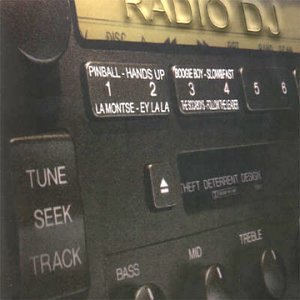
Figure 3.1: Front panel of the Radio DJ Console, showing input selection buttons, faders, EQ knobs, and the main display area. Labels like "TUNE", "SEEK", "TRACK", "BASS", "MID", "TREBLE" are visible, indicating control over audio parameters and track navigation. The display area shows track information and a "THEFT DETERRENT DESIGN" label.
4. Instruccions de funcionament
4.1 Funcionament bàsic
- Encès/apagat: Use the POWER button located on the front panel.
- Selecció d'entrada: Use the input selector buttons (e.g., CD, Line, Mic, USB) for each channel to choose your audio source.
- Control de volum: Adjust individual channel faders to control the volume of each input. The MASTER fader controls the overall output volume.
- Monitorització d'auriculars: Use the CUE buttons for each channel to send its audio to the headphones for pre-listening without affecting the main output. Adjust headphone volume with the dedicated knob.
4.2 Audio Mixing and Effects
- Equalització (EQ): Each channel features BASS, MID, and TREBLE knobs to adjust the frequency response of the audio source. Turn clockwise to boost, counter-clockwise to cut.
- Crossfader: Use the crossfader to smoothly transition between two selected channels (typically Channel 1 and Channel 2).
- Efectes: If your model includes built-in effects, refer to the dedicated effects section in the full manual for detailed operation. Common effects include Reverb, Delay, and Flanger.
4.3 Track Navigation (for integrated players)
- TUNE/SEEK: For radio tuner functions, use the TUNE knob or SEEK buttons to find radio stations.
- PISTA: For integrated CD/USB players, use the TRACK buttons to navigate between tracks.
5. Manteniment
Proper maintenance ensures the longevity and optimal performance of your console.
- Neteja: Regularly wipe the console's surface with a soft, dry, lint-free cloth. For stubborn dirt, slightly dampRenta el drap amb aigua. Evita productes de neteja o dissolvents abrasius.
- Eliminació de pols: Use a soft brush or compressed air to remove dust from faders, knobs, and ventilation grilles.
- Gestió de cables: Ensure cables are neatly organized and not under strain to prevent damage to connectors.
- Emmagatzematge: If storing the console for an extended period, disconnect all cables, clean the unit, and store it in its original packaging or a protective case in a cool, dry place.
6. Solució De Problemes
Aquesta secció tracta problemes comuns que podeu trobar.
| Problema | Causa possible | Solució |
|---|---|---|
| Sense poder | Power cable disconnected; Power outlet faulty; Console fuse blown. | Check power cable connection; Try a different outlet; Contact service for fuse replacement. |
| Sense sortida de so | Master volume too low; Input source not selected; Output cables disconnected/faulty; Amplifier/speakers off. | Increase master volume; Select correct input; Check all audio cables; Ensure amplifier/speakers are on and working. |
| Àudio distorsionat | Input gain too high; Output volume too high; Faulty cable/speaker. | Reduce input gain; Lower master volume; Check/replace cables and speakers. |
| Fader/knob crackling | Dust or dirt inside component. | Use compressed air to clean; If persistent, contact service. |
7. Especificacions
- Model: B000051TFX
- Entrades: 2 x XLR (Mic), 4 x RCA (Line/Phono), 1 x USB Type-B
- Sortides: 2 x XLR (Main Out), 2 x RCA (Rec Out), 1 x 1/4" TRS (Headphone)
- Resposta de freqüència: 20Hz - 20kHz (+/- 1dB)
- Ràtio senyal / soroll: > 90 dB
- Distorsió harmònica total (THD): <0.01%
- Font d'alimentació: CA 100-240V, 50/60Hz
- Dimensions (L x P x A): 482 mm x 260 mm x 100 mm (aprox.)
- Pes: 4.5 kg (aprox.)
- Data de primera disponibilitat: 11 de febrer de 2007
8. Garantia i Suport
Garantia: The SoundMaster Radio DJ Console (Model: B000051TFX) comes with a 1-year limited warranty from the date of purchase, covering defects in materials and workmanship under normal use. This warranty does not cover damage caused by misuse, accident, unauthorized modification, or external causes.
Suport tècnic: For technical assistance, troubleshooting beyond this manual, or warranty claims, please visit our official website or contact our customer support team. Please have your model number and purchase date ready when contacting support.
Recursos en línia: For the latest drivers, firmware updates, and additional resources, please visit www.soundmasteraudio.com/support (example link).


