Introducció
This manual provides instructions for the setup, operation, maintenance, and troubleshooting of your Microsoft Wireless Optical Mouse Blue, Model K80-00004. Please read this manual thoroughly before using your device.
Què hi ha a la caixa
Verifiqueu que tots els elements siguin presents al paquet:
- Microsoft Wireless Optical Mouse
- Receptor sense fil
- 2 AA Batteries (pre-installed or included separately)
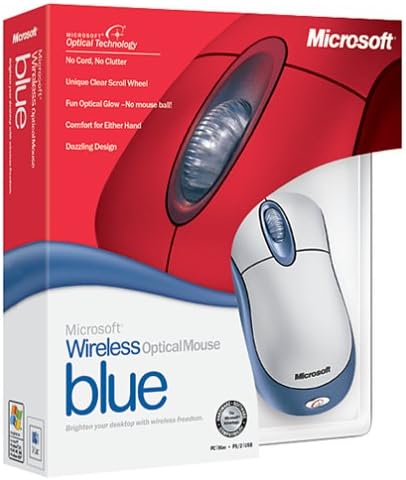
Image: Retail packaging of the Microsoft Wireless Optical Mouse Blue, showing the mouse and receiver.
Configuració
1. Instal·leu les bateries
- Localitzeu el compartiment de la bateria a la part inferior del ratolí.
- Obriu la tapa del compartiment de la bateria.
- Introduïu les dues piles AA, assegurant-vos de la polaritat correcta (+/-).
- Tanqueu la tapa del compartiment de la bateria.

Imatge: Frontal view of the Microsoft Wireless Optical Mouse Blue, showing the top buttons and scroll wheel. The battery compartment is on the underside.
2. Connect the Wireless Receiver
- Connecteu el receptor sense fil USB a un port USB disponible de l'ordinador.
- Allow your operating system to detect and install the necessary drivers. This process is usually automatic.
- For optimal performance, ensure the receiver is placed at least 12 inches away from other wireless devices or large metal objects.
3. Optional Software Installation (IntelliPoint)
- While not required for basic functionality, installing Microsoft IntelliPoint software provides advanced customization options for your mouse buttons and scroll wheel.
- Refer to the Microsoft support website for the latest IntelliPoint software compatible with your operating system.
4. Set Orientation (Calibration)
- After initial setup, it is recommended to perform an "Orientation Set" or calibration if available through the IntelliPoint software or your operating system's mouse settings. This helps optimize tracking performance.
Instruccions de funcionament
The Microsoft Wireless Optical Mouse Blue is designed for comfortable and precise navigation.
Funcions bàsiques
- Clic esquerre: Botó principal per seleccionar elements, obrir files, i interactuant amb el programari.
- Clic dret: Botó secundari per accedir als menús contextuals i a les opcions addicionals.
- Roda de desplaçament: Gireu la roda amunt o avall per desplaçar-vos pels documents i web pages. The scroll wheel may also function as a clickable button for additional commands, depending on software configuration.
Funcionament sense fil
- The mouse operates wirelessly up to 6 feet (approximately 1.8 meters) from its receiver.
- Optical technology scans the desktop surface for precise cursor movement without the need for a mouse pad on most surfaces.
- The mouse is designed for comfortable use with either the right or left hand.

Imatge: Anglesa view of the Microsoft Wireless Optical Mouse Blue, highlighting its ergonomic shape and blue/silver design.
Manteniment
Canvi de bateria
- The mouse requires two AA batteries.
- When battery power is low, your computer may display a notification (if IntelliPoint software is installed) or mouse performance may degrade.
- Replace batteries as described in the "Install Batteries" section under Setup.
- Always use fresh, high-quality batteries for optimal performance.
Neteja
- To clean the mouse, gently wipe the surface with a soft, damp tela.
- Eviteu utilitzar productes químics agressius o netejadors abrasius, ja que poden danyar l'acabat.
- Assegureu-vos que no entri líquid als components interns del ratolí.
Travel Considerations
- The Microsoft Wireless Optical Mouse is a transmitting device. When traveling by air, it is recommended to remove the batteries from the mouse before boarding to comply with airline regulations regarding electronic devices.
Resolució de problemes
Mouse Not Responding or Lagging
- Comproveu les bateries: Assegureu-vos que les piles estiguin instal·lades correctament i que tinguin la càrrega suficient. Substituïu-les si cal.
- Check Receiver Connection: Ensure the wireless receiver is securely plugged into a functioning USB port. Try a different USB port.
- Proximitat: Ensure the mouse is within 6 feet of the receiver. Reduce obstacles between the mouse and receiver.
- Interferència: Other wireless devices (e.g., Wi-Fi routers, cordless phones) can cause interference. Move the receiver away from such devices.
- Superfície: Ensure the mouse is used on a suitable surface. Highly reflective or transparent surfaces may affect optical tracking.
- Resincronització: Some wireless mice have a re-sync button on both the mouse and receiver. Consult the full product manual or Microsoft support for specific re-sync procedures for this model if issues persist.
Clicking Issues
- If clicks are not registering or require multiple presses, check for physical obstructions or debris around the buttons.
- Assegureu-vos que el ratolí estigui encès i connectat.
Compatibilitat de programari
- The IntelliPoint software may have specific operating system requirements. For example, older versions may not be compatible with newer operating systems like Windows Vista or later.
- Always download the latest software from the official Microsoft support weblloc web per al vostre sistema operatiu específic.
Especificacions
| Característica | Detall |
|---|---|
| Número de model | K80-00004 |
| Marca | Microsoft |
| Tecnologia de connectivitat | Sense fil |
| Detecció de moviment | Òptic |
| Color | Blue / Silver |
| Bateries | 2 piles AA (incloses) |
| Pes de l'article | 13.6 unces (aproximadament 385.5 grams) |
| Dimensions del producte | 9.3 x 8.9 x 2.1 polzades (aprox. 23.6 x 22.6 x 5.3 cm) |
| Primera data disponible | 1 d'agost de 2002 |
Informació de la garantia
According to the legal disclaimer, this product is sold without a warranty. Please refer to your point of purchase for any return or exchange policies.
Suport
For further assistance, driver downloads, or updated information regarding your Microsoft Wireless Optical Mouse Blue, please visit the official Microsoft support weblloc.
You can typically find support resources by searching for "Microsoft support" and your product model number (K80-00004).


