Introducció
The D-Link AirPlus DWL-650+ is an enhanced 802.11b CardBus adapter designed to provide wireless network connectivity for laptop computers. This device offers data transfer rates up to 22 Mbps when used with other D-Link AirPlus products and is fully compatible with the IEEE 802.11b standard, ensuring interoperability with existing 802.11b-compliant networks. It incorporates 256-bit WEP encryption for enhanced data security.
This manual provides essential information for the proper installation, operation, and maintenance of your DWL-650+ PC Card.
Producte acabatview
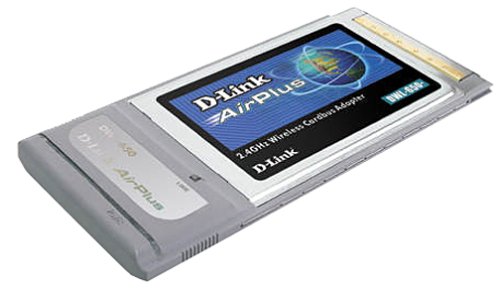
Image of the D-Link AirPlus DWL-650+ Wireless 22 Mbps PC Card, showing its compact design for laptop integration.
The DWL-650+ PC Card is designed for seamless integration into your laptop's CardBus slot, providing reliable wireless access. Key features include:
- Up to 22 Mbps data transfer rate with D-Link AirPlus products.
- Full compatibility with 802.11b wireless standard.
- Enhanced data encryption with 64/128/256-bit WEP.
- Designed specifically for laptop computers.
- Includes a configuration utility for network management.
Configuració
- Instal·lació del controlador: Before inserting the DWL-650+ PC Card, install the necessary drivers from the provided installation CD or download the latest drivers from the official D-Link support weblloc. Seguiu les instruccions que apareixen a la pantalla. Note: Some operating systems, particularly Windows XP, may require specific driver versions or updates to function correctly. Refer to D-Link's support resources for compatibility information.
- Insert the PC Card: With your laptop powered on, carefully insert the DWL-650+ PC Card into an available CardBus slot until it clicks into place.
- Reconeixement del sistema: Your operating system should detect the new hardware and complete the driver installation process. If prompted, direct the system to the drivers you installed in step 1.
- Utilitat de configuració: Once the card is recognized, launch the D-Link AirPlus configuration utility. This utility allows you to scan for available wireless networks, connect to them, and manage network profiles.
- Connexió a una xarxa: Use the utility to select your desired wireless network (SSID) and enter any required security keys (e.g., WEP key).
Important: Ensure your laptop's BIOS and operating system are up-to-date for optimal compatibility and performance. Disabling other network adapters temporarily during installation may prevent conflicts.
En funcionament
The DWL-650+ PC Card supports two primary operating modes:
- Mode d'infraestructura: Connects your laptop to a wireless access point (router) to access the internet or a local network. This is the most common mode for home and office use.
- Ad-Hoc Mode: Allows direct connection between two or more wireless cards without an access point. This is useful for creating a small, temporary network for file compartint.
To manage your wireless connection:
- Launch the Configuration Utility: Access the D-Link AirPlus utility from your system tray or Start Menu.
- Escaneja per a xarxes: Use the utility to refresh the list of available wireless networks.
- Connectar/Desconnectar: Select the desired network and click "Connect." To disconnect, select the active network and click "Disconnect."
- Profile Gestió: The utility allows you to create and save detailed connectivity profiles for frequently accessed networks, simplifying future connections.
- Seguretat: Ensure WEP encryption is enabled and configured correctly if your wireless network requires it. The DWL-650+ supports 64, 128, and 256-bit WEP.
Note: The card may not automatically switch to a stronger signal from a different router if it is already connected to a weaker one. Manual intervention via the configuration utility may be required in such scenarios.
Manteniment
- Actualitzacions de controladors: Comproveu periòdicament el suport de D-Link website for updated drivers. Keeping your drivers current can improve performance, stability, and compatibility.
- Cura física: Keep the PC Card clean and free from dust. Avoid exposing it to extreme temperatures or moisture. When not in use, store it in a protective case.
- Actualitzacions de programari: Ensure your operating system and any related network management software are up-to-date.
Resolució de problemes
- Cannot install drivers or card not recognized:
Ensure you are using the correct drivers for your operating system. Download the latest drivers from the D-Link support website. Verify your laptop's CardBus slot is functioning correctly. Some users have reported success after updating their laptop's BIOS or using specific older driver versions for Windows XP.
- Cannot connect to a wireless network:
Check that the wireless network (SSID) is broadcasting and that you have the correct security key (WEP). Ensure the card is in infrastructure mode if connecting to a router. Verify that other wireless devices can connect to the same network. Restart your laptop and the wireless router.
- Unstable connection or poor signal strength:
Move closer to the wireless access point. Check for sources of interference (e.g., cordless phones, microwaves). Update your card's drivers and your router's firmware. The DWL-650+ may not automatically switch to a stronger signal from a different access point; manually select the desired access point using the configuration utility.
- Slow data transfer rates:
Ensure you are connected to a D-Link AirPlus compatible access point to achieve the maximum 22 Mbps speed. Otherwise, speeds will be limited to standard 802.11b rates (up to 11 Mbps). Check for network congestion or interference.
For further assistance, visit the official D-Link support weblloc web o consulteu els seus recursos d'assistència tècnica.
Especificacions
| Número de model | DWL-650+ |
| Marca | D-Link |
| Protocol d'enllaç de dades | IEEE 802.11b |
| Velocitat de transferència de dades | Up to 22 Mbps (with AirPlus products), 11 Mbps (standard 802.11b) |
| Xifratge | WEP de 64/128/256 bits |
| Interfície | CardBus (PC Card) |
| Dispositius compatibles | Laptop computers with CardBus slot |
| Pes de l'article | 8.8 unces |
| Dimensions del paquet | 9.5 x 6.7 x 1.4 polzades |
| UPC | 790069244452 |
Informació de la garantia
The D-Link AirPlus DWL-650+ Wireless 22 Mbps PC Card comes with a Garantia limitada d'3 any. This warranty covers defects in materials and workmanship under normal use. For specific terms, conditions, and warranty claim procedures, please refer to the warranty card included with your product or visit the official D-Link weblloc.
Proof of purchase may be required for warranty service.
Suport
For technical support, driver downloads, firmware updates, and additional product information, please visit the official D-Link support weblloc:
També podeu trobar recursos útils i preguntes freqüents a les seves website to resolve common issues.


