Introducció
This manual provides detailed instructions for the proper setup, operation, and maintenance of your OLYMPUS Pearlcorder L400 Microcassette Recorder Kit. Please read this manual thoroughly before using the device to ensure optimal performance and longevity.
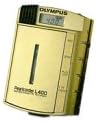
Image: The OLYMPUS Pearlcorder L400 Microcassette Recorder, a compact gold-colored device with an LCD display and control buttons.
Contingut del paquet
Verify that all items are present in your OLYMPUS Pearlcorder L400 Kit:
- OLYMPUS Pearlcorder L400 Microcassette Recorder
- Estoig de pell
- Auricular
- 1 piles AAA
- AC Cord (AC Adapter)
Configuració
1. Instal·lació de la bateria
- Localitzeu la tapa del compartiment de les piles a la part posterior de la gravadora.
- Feu lliscar la coberta oberta.
- Insert one AAA battery, ensuring correct polarity (+ and - terminals).
- Tanqueu bé la tapa del compartiment de la bateria.
2. Powering with AC Adapter
- Connect the AC cord to the DC input jack on the recorder.
- Plug the other end of the AC cord into a standard electrical outlet.
- The recorder can operate directly from AC power or charge rechargeable batteries (if applicable, not included).
3. Microcassette Tape Insertion
- Obriu la porta del compartiment del casset.
- Insert a microcassette tape with the open side facing the recorder's head.
- Premeu suaument la cinta fins que encaixi al seu lloc.
- Tanqueu la porta del compartiment del casset.
Instruccions de funcionament
Controls bàsics
- Record (REC): Press to begin recording.
- Play (PLAY): Press to listen to recordings.
- Stop (STOP): Press to halt any operation.
- Rebobinar (REW): Premeu per rebobinar la cinta.
- Avanç ràpid (FF): Premeu per avançar ràpidament la cinta.
- Eject (EJECT): Slide or press to open the cassette compartment.
Gravació
- Ensure a microcassette tape is inserted.
- Premeu el botó REC botó. L'indicador d'enregistrament s'il·luminarà.
- Speak clearly into the built-in microphone.
- Per aturar la gravació, premeu el botó STOP botó.
Variable Control Voice Actuation (VCVA)
The VCVA feature allows for hands-free recording by automatically starting and stopping recording based on sound detection. This conserves tape and battery life.
- Locate the VCVA switch or setting on your device.
- Activate VCVA.
- Premeu el botó REC button. The recorder will now only record when sound is detected above a certain threshold and pause when silence occurs.
- To deactivate VCVA, switch it off or press STOP.
Dual Tape Speeds
The Pearlcorder L400 supports two tape speeds: 2.4 cm/sec and 1.2 cm/sec. The slower speed (1.2 cm/sec) doubles the recording time on a single tape, while the faster speed (2.4 cm/sec) offers higher fidelity.
- Select the desired tape speed using the speed switch (usually located on the side or bottom of the unit).
- The selected speed will be active for both recording and playback.
Reproducció
- Ensure a recorded microcassette tape is inserted.
- Ús REW or FF to locate the desired starting point.
- Premeu el botó JUGAR botó.
- Adjust the volume using the volume control dial.
- Per aturar la reproducció, premeu el botó STOP botó.
- For private listening, connect the included earphone to the headphone jack.
Pantalla LCD
The LCD display provides visual feedback on the recorder's status:
- Tape Direction: Indicates forward or reverse movement.
- Mode de funcionament: Shows current mode (e.g., REC, PLAY, STOP).
- Comptador de cinta: Displays the elapsed time or tape position.
Manteniment
Neteja de la unitat
- Wipe the exterior of the recorder with a soft, dry cloth.
- No utilitzeu netejadors líquids ni materials abrasius.
- Periodically clean the recording head and pinch roller with a cotton swab lightly dampened with isopropyl alcohol to ensure optimal sound quality.
Cura de la bateria
- Remove the AAA battery if the recorder will not be used for an extended period to prevent leakage.
- Replace batteries when the power indicator dims or operation becomes inconsistent.
Cura de la cinta
- Store microcassette tapes away from direct sunlight, high temperatures, and strong magnetic fields.
- Avoid touching the tape surface.
Resolució de problemes
| Problema | Causa possible | Solució |
|---|---|---|
| La gravadora no s'encén. | Dead or incorrectly inserted battery; AC adapter not connected. | Replace battery or ensure correct polarity. Connect AC adapter securely. |
| Mala qualitat d'enregistrament o reproducció. | Dirty recording head; worn-out tape; low battery. | Clean the recording head. Try a new microcassette tape. Replace battery. |
| Tape does not move. | Tape jammed; battery low; mechanical issue. | Open compartment and re-insert tape. Replace battery. If issue persists, contact support. |
| VCVA not activating. | VCVA sensitivity too low; ambient noise too quiet. | Ensure VCVA is enabled. Speak closer to the microphone or increase volume. |
Especificacions
- Model: OLYMPUS Pearlcorder L400
- Dimensions: Aproximadament 2.9 x 2.0 x 0.8 polzades (7.4 x 6.4 x 1.3 cm)
- Pes: Approximately 3.2 ounces (90.7 grams) without battery
- Recording Medium: Microcassette Tape (e.g., XZ-90)
- Tape Speeds: 2.4 cm/sec and 1.2 cm/sec (up to 3 hours recording on XZ-90 tape at 1.2 cm/sec)
- Font d'alimentació: 1 x AAA Battery or AC Adapter (included)
- Durada de la bateria: Approximately 3 hours (recording)
- Característiques:
- Variable Control Voice Actuation (VCVA)
- LCD Display (Tape direction, operation mode, tape counter)
- Micròfon incorporat
- Conector d'auriculars de 3.5 mm
Informació de la garantia
OLYMPUS products are manufactured to high quality standards. This product is covered by a limited manufacturer's warranty. Please refer to the warranty card included with your purchase for specific terms, conditions, and duration. Retain your proof of purchase for warranty claims.
Suport
For further assistance, technical support, or service inquiries, please visit the official Olympus website or contact Olympus customer service. Contact information can typically be found on the Olympus weblloc web o a la documentació que s'inclou amb el producte.
Recursos en línia: www.olympus-imaging.com (Si us plau, tingueu en compte: URL may vary by region and product line. Cerca "Olympus support" for the most current information.)


