Introducció
Gràcies per la compraasing the GPX C3960 Personal CD/MP3 Player. This manual provides detailed instructions for the proper setup, operation, and maintenance of your device. Please read this manual thoroughly before use and retain it for future reference.
Contingut del paquet
Assegureu-vos que tots els elements siguin presents al paquet:
- GPX C3960 Personal CD/MP3 Player
- Auriculars estèreo
- Manual d'usuari (aquest document)
Producte acabatview
Familiarize yourself with the components and features of your GPX C3960 player.
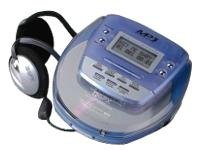
Image: The GPX C3960 Personal CD/MP3 Player, shown in a translucent blue casing, with a pair of silver over-ear headphones connected. The player features a small LCD screen and control buttons on its top surface.
Característiques principals:
- CD-R/RW and MP3 disc playback compatibility
- Anti-skip protection: 45 seconds for audio CDs, 120 seconds for MP3 CDs
- Dynamic Bass Boost (DBB) for enhanced audio output
- 24-track programmable memory
- Low battery alert indicator
- Funciona amb 2 piles AA
Configuració
1. Instal·lació de la bateria
- Locate the battery compartment on the bottom of the player.
- Obriu la tapa del compartiment de la bateria.
- Introduïu dues (2) piles AA, assegurant-vos de la polaritat correcta (+ i -) tal com s'indica a l'interior del compartiment.
- Tanqueu bé la tapa del compartiment de la bateria.
- Nota: Replace batteries when the low battery indicator appears on the display or when playback performance degrades.
2. Connexió d'auriculars
- Plug the stereo earbuds or your preferred headphones into the TELÈFONS jack located on the side of the player.
Instruccions de funcionament
1. Encès / apagat
- Per encendre, premeu el botó PLAY/PAUSE (►/‖‖) botó.
- Per apagar, premeu el botó ATURAR (■) button twice, or wait for the auto-power off feature to activate after a period of inactivity.
2. Loading a CD/MP3 Disc
- Premeu el botó OBERT botó per obrir la tapa del compartiment del disc.
- Carefully place a CD or MP3 disc onto the center spindle with the label side facing up.
- Premeu suaument el disc cap avall fins que encaixi al seu lloc.
- Close the disc compartment lid firmly until it latches.
3. Reproducció bàsica
- Reproduir/pausa: Premeu PLAY/PAUSE (►/‖‖) per iniciar o pausar la reproducció.
- Atura: Premeu ATURAR (■) per aturar la reproducció.
- Omet les pistes: Premeu ENDAVANT (►►) or SALTA ENRERE (◄◄) to move to the next or previous track.
- Cerca: Mantén premut ENDAVANT (►►) or SALTA ENRERE (◄◄) during playback to fast-forward or rewind within a track.
4. Control de volum
- Ajusteu el VOLUM dial located on the side of the player to increase or decrease the audio output level.
5. Dynamic Bass Boost (DBB)
- Premeu el botó DBB button to activate or deactivate the dynamic bass boost feature, which enhances low-frequency sounds.
6. Anti-Skip Protection
The GPX C3960 features electronic anti-skip protection to prevent audio interruptions during movement. This provides approximately 45 seconds of protection for standard audio CDs and 120 seconds for MP3 CDs.
7. Programming Tracks
- With the player stopped, press the PROG button. The program indicator will flash.
- Utilitza el ENDAVANT (►►) or SALTA ENRERE (◄◄) botons per seleccionar la pista desitjada.
- Premeu PROG again to add the selected track to the program memory.
- Repeat steps 2 and 3 for up to 24 tracks.
- Premeu PLAY/PAUSE (►/‖‖) to start playback of the programmed sequence.
- To clear the program, open the disc compartment or press ATURAR (■) dues vegades.
Manteniment
Neteja de la unitat
- Wipe the exterior of the player with a soft, slightly damp tela. No utilitzeu netejadors abrasius ni dissolvents.
- Never open the disc compartment while the player is operating.
- Keep the lens clean. If the lens becomes dirty, use a soft camera lens brush to gently remove dust.
Cura de la bateria
- Traieu les piles si no heu d'utilitzar la unitat durant un període prolongat per evitar fuites.
- No barregeu piles velles i noves, o diferents tipus de piles.
Manipulació del disc
- Handle discs by their edges to avoid fingerprints and scratches.
- Emmagatzemeu els discs als seus estoigs quan no els feu servir.
- Netegeu els discos amb un drap suau i sense borrissol, netejant des del centre cap a fora.
Resolució de problemes
| Problema | Causa possible | Solució |
|---|---|---|
| Sense poder | Les piles estan gastades o incorrectament inserides. | Substituïu les piles per unes de noves, assegurant la polaritat correcta. |
| El disc no es reprodueix / Error "NO DISC" | El disc està brut, ratllat o inserit incorrectament. | Clean the disc. Reinsert the disc with the label side up. Try a different disc. |
| Sound skipping or distorted | Disc is dirty, scratched, or player is subjected to excessive vibration. | Clean the disc. Ensure the player is on a stable surface or reduce movement. |
| No hi ha so dels auriculars | Headphones not properly connected or volume too low. | Assegureu-vos que els auriculars estiguin ben connectats. Augmenteu el volum. Proveu amb uns altres auriculars. |
Especificacions
- Marca: GPX
- Model: C3960
- Mitjans suportats: CD, CD-R, CD-RW, MP3-CD
- Protecció anti-salta: 45 seconds (CD), 120 seconds (MP3-CD)
- Font d'alimentació: 2 x piles AA
- Característica especial: Portàtil
- Pes de l'article: Aproximadament 726 g
- Dimensions: Aproximadament 40.64 x 38.1 x 30.48 cm (dimensions del paquet)
Garantia i Suport
For warranty information or technical support, please refer to the documentation included with your purchase or visit the official GPX weblloc web. Conserveu el comprovant de compra per a reclamacions de garantia.


