Introducció
This manual provides essential instructions for the safe and efficient operation of your Sharper Image SO226 Compact CD Stereo with AM/FM Digital Tuner. Please read this manual thoroughly before using the unit and retain it for future reference.
Instruccions importants de seguretat
- Llegiu totes les instruccions abans d’utilitzar l’aparell.
- Conserveu aquest manual com a referència futura.
- No utilitzeu aquest aparell prop de l'aigua.
- Netegeu només amb un drap sec.
- No bloquegeu cap obertura de ventilació. Instal·leu-ho d'acord amb les instruccions del fabricant.
- No instal·leu a prop de cap font de calor com ara radiadors, registres de calor, estufes o altres aparells (inclosos amplificadors) que produeixen calor.
- Eviteu que el cable d'alimentació sigui trepitjat o pessigat, especialment als endolls, els endolls i el punt on surten de l'aparell.
- Utilitzeu només accessoris/accessoris especificats pel fabricant.
- Demaneu tot el servei a personal de servei qualificat. Cal fer servei quan l'aparell s'hagi fet malbé d'alguna manera.
Contingut del paquet
Verifiqueu que hi hagi tots els elements en desempaquetar:
- Sharper Image SO226 Compact CD Stereo Unit
- AC Power Adapter (if applicable, check packaging)
- Manual d'usuari (aquest document)
Producte acabatview
Familiarize yourself with the components and controls of your SO226 unit.
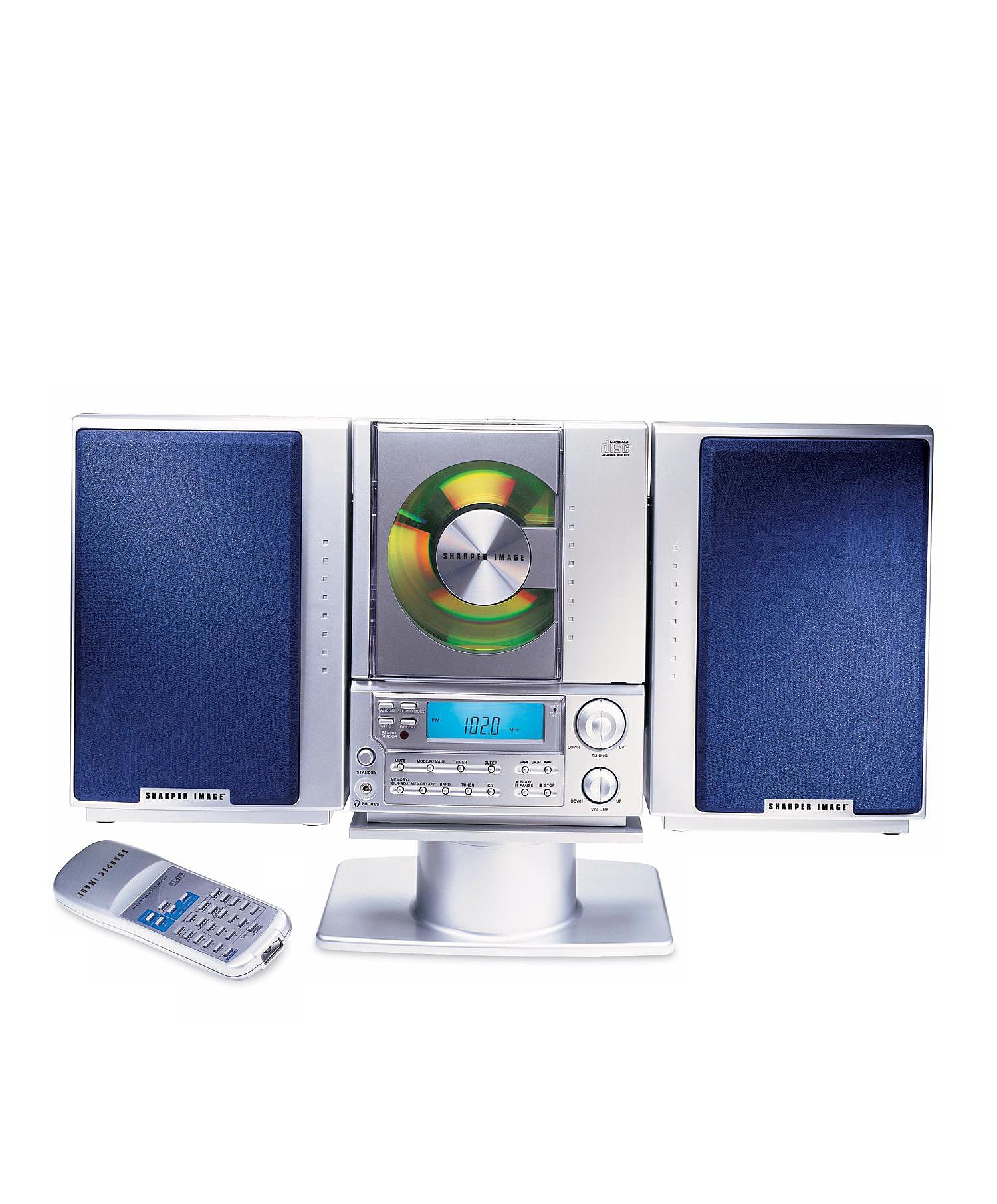
This image displays the front panel of the Sharper Image SO226 Compact CD Stereo. Visible features include the top-loading CD compartment, the digital display for radio frequencies and CD track information, and various control buttons for power, volume, CD playback, and radio tuning.
Tauler de control (disseny típic)
- Botó d'encendre: Encén o apaga la unitat.
- Botó FUNCIÓ/MODE: Switches between CD, AM, and FM modes.
- Botons de VOLUM +/-: Ajusta el nivell de sortida d'àudio.
- Botó REPRODUCIR/PAUSA: Inicia o posa en pausa la reproducció de CD.
- Botó STOP: Atura la reproducció de CD.
- Botons SALTAR/CERCA (◀◀ / ▶▶): Salta pistes d'un CD o sintonitza freqüències de ràdio.
- Botó PROGRAMA: S'utilitza per programar pistes de CD.
- Botó SLEEP: Activa la funció del temporitzador de son.
- Botons TUNING +/-: Fine-tunes radio frequencies.
- PRESET Buttons: Emmagatzema i recupera les emissores de ràdio preferides.
- Pantalla LCD: Shows current mode, track number, frequency, and time.
Configuració
Connexió d'alimentació
- Assegureu-vos que la unitat estigui col·locada sobre una superfície plana i estable.
- If using batteries (not included), open the battery compartment on the bottom or back of the unit and insert the required batteries, observing correct polarity.
- Alternatively, connect the AC power adapter (if supplied) to the DC IN jack on the unit and then plug the adapter into a standard wall outlet.
Configuració de l'antena
- For FM reception, extend the telescopic antenna fully. Adjust its position for optimal reception.
- For AM reception, the unit has a built-in ferrite bar antenna. Rotate the entire unit for best AM reception.
Instruccions de funcionament
Funcionament del reproductor de CD
- Premeu el botó PODER per engegar la unitat.
- Premeu el botó FUNCIÓ/MODE repetidament fins que aparegui «CD» a la pantalla.
- Obriu la tapa del compartiment del CD.
- Col·loqueu un CD amb l'etiqueta cap amunt al compartiment.
- Close the CD compartment cover. The unit will read the CD, and the total number of tracks will be displayed.
- Premeu el botó REPRODUCCIÓ/PAUSA per iniciar la reproducció.
- Per fer una pausa, premeu REPRODUCCIÓ/PAUSA de nou. Premeu-lo una vegada més per reprendre.
- Per aturar la reproducció, premeu el botó STOP botó.
- Per passar a la pista següent, premeu el botó SKIP/SEARCH ▶▶ botó.
- To go back to the beginning of the current track or to the previous track, press the SKIP/SEARCH ◀◀ botó.
- To fast forward or rewind within a track, press and hold the SKIP/SEARCH ▶▶ or ◀◀ botó durant la reproducció.
Funcionament de la ràdio AM/FM
- Premeu el botó PODER per engegar la unitat.
- Premeu el botó FUNCIÓ/MODE repetidament fins que aparegui 'AM' o 'FM' a la pantalla.
- Sintonització manual: Premeu el botó TUNING +/- botons per ajustar la freqüència pas a pas.
- Escaneig automàtic: Manteniu premut el botó TUNING +/- buttons for a few seconds. The tuner will scan and stop at the next strong station.
- Emmagatzematge de valors predeterminats: Sintonitza l'emissora desitjada. Prem el botó PROGRAMA botó. El número preestablert parpellejarà. Feu servir el botó SALTAR/CERCAR botons per seleccionar un número preestablert i, a continuació, premeu PROGRAMA de nou per confirmar.
- Recordant presets: En mode de ràdio, premeu el botó PRESET buttons to cycle through your stored stations.
Funció Sleep Timer
The unit features a convenient sleep timer that automatically turns off the sound after a set period.
- Mentre la unitat està reproduint (CD o ràdio), premeu el botó DORMIR botó.
- Cada premsa de la DORMIR button will cycle through available sleep times (e.g., 10, 20, 30, 60, 90 minutes, or OFF).
- Select your desired sleep duration. The unit will automatically power off after the selected time has elapsed.
Manteniment
- Neteja de la unitat: Netegeu l'exterior de la unitat amb un drap suau i sec. No utilitzeu productes de neteja abrasius ni dissolvents.
- Cura de CD: Handle CDs by their edges. Keep them clean and free of scratches. If a CD is dirty, wipe it gently with a soft, lint-free cloth from the center outwards.
- Emmagatzematge: When not in use for extended periods, disconnect the power adapter and remove batteries. Store the unit in a cool, dry place.
Resolució de problemes
Si teniu problemes, consulteu els següents problemes i solucions habituals:
- Sense energia:
- Ensure the AC power adapter is securely plugged into both the unit and a working wall outlet.
- If using batteries, check if they are inserted correctly and are not depleted. - Sense so:
- Check the volume level and increase it if necessary.
- Ensure the correct function mode (CD/AM/FM) is selected. - CD Not Playing / Skipping:
- Ensure the CD is inserted correctly with the label side up.
- Clean the CD for any dirt or scratches.
- Try a different CD to rule out a faulty disc.
- Ensure the CD compartment cover is fully closed. - Mala recepció de ràdio:
- For FM, fully extend and adjust the telescopic antenna.
- For AM, rotate the entire unit for better signal.
- Move the unit away from other electronic devices that may cause interference. - Botons que no responen:
- Try turning the unit off and on again.
- Disconnect power for a few minutes, then reconnect.
Especificacions
| Número de model | SO226 |
| Dimensions del producte (L x A x A) | 1.3 x 19 x 5.5 polzades (3.3 x 48.3 x 14 cm) |
| Pes de l'article | 5 lliures (2.27 kg) |
| Tipus d'altaveu | estèreo |
| Font d'alimentació | Battery Powered (AC adapter typically included or sold separately) |
| Color (as per specific variant) | Blau |
Garantia i Suport
For warranty information and customer support, please refer to the documentation included with your purchase or visit the official Sharper Image weblloc web. Conserveu el comprovant de compra per a reclamacions de garantia.


