1. Introducció
This manual provides comprehensive instructions for the safe and efficient operation, setup, and maintenance of your BenQ PB7200 DLP Video Projector. Please read this manual thoroughly before using the projector and retain it for future reference.
2. Producte acabatview
The BenQ PB7200 is a high-performance DLP video projector designed for various applications, offering clear and vibrant image projection.
Característiques clau
- 1,024 x 768 native resolution for sharp images.
- 2,200 ANSI lumens of brightness for clear viewen diferents condicions d'il·luminació.
- 2000:1 contrast ratio for distinct dark and light areas.
- Includes a remote control with a laser pointer and wireless mouse functionality.
- Compatible with both PC and Mac systems.
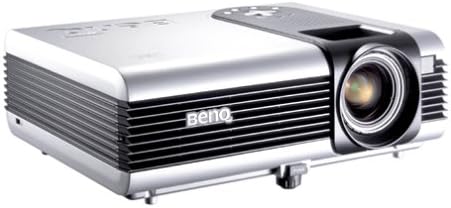
Figura 2.1: Un angle view of the BenQ PB7200 DLP Video Projector, showcasing its silver casing, ventilation grilles on the side, and the prominent lens assembly on the front right.
3. Guia de configuració
3.1 Desembalatge
Carefully remove the projector and all accessories from the packaging. Verify that all components are present according to the packing list. Retain the original packaging for future transport or storage.
3.2 Col·locació
Position the projector on a stable, flat surface. Ensure adequate ventilation around the unit to prevent overheating. The distance from the screen will determine the image size. Adjust the projector's height and angle to achieve the desired projection area.
3.3 Connexions
Connect your video source (e.g., computer, DVD player) to the appropriate input port on the projector. The BenQ PB7200 supports various connectivity options, including Display Port. Connect the power cord to the projector and then to a grounded electrical outlet.
4. Instruccions de funcionament
4.1 Encès/Apagat
To power on the projector, press the power button on the control panel or the remote control. The power indicator light will illuminate. To power off, press the power button again. Allow the projector to cool down completely before unplugging it.
4.2 Ajust de la imatge
- Anell de focus: Gireu l'anell d'enfocament de l'objectiu per augmentar la nitidesa de la imatge projectada.
- Palanca de zoom: Adjust the zoom lever to change the size of the projected image without moving the projector.
- Correcció Keystone: Use the keystone correction function (usually via remote or menu) to correct trapezoidal distortion if the projector is not perfectly perpendicular to the screen.
4.3 Selecció de la font
Press the "Source" button on the projector's control panel or remote control to cycle through available input sources (e.g., PC, Video). Select the input corresponding to your connected device.
4.4 Funcions de control remot
The remote control allows for convenient operation from a distance. It includes buttons for power, source selection, menu navigation, volume control, and a laser pointer for presentations. Refer to the remote control diagram (not provided in this document) for specific button layouts.
5. Manteniment
5.1 Lamp Substitució
El projector lamp té una vida útil finita. Quan la lamp life is nearing its end, a warning message may appear. To replace the lamp, ensure the projector is powered off and cooled down. Follow the specific instructions in the full service manual for safe lamp module replacement. Use only genuine BenQ replacement lamps (Manufacturer Part #: 60.J5016.CB1) to ensure optimal performance and safety.
5.2 Neteja
- Projector Casing: Netegeu el casinNetegeu amb un drap suau i sec. No utilitzeu productes de neteja abrasius ni dissolvents.
- Lent de projecció: Netegeu suaument la lent amb un drap o paper de neteja de lents. Eviteu tocar la superfície de la lent amb els dits.
- Filtres d'aire: Regularly check and clean the air filters to maintain proper ventilation and prevent dust buildup. Refer to the full service manual for filter access and cleaning procedures.
6. Solució De Problemes
This section addresses common issues you might encounter with your BenQ PB7200 projector. For more complex problems, contact BenQ customer support.
- Sense imatge a la pantalla:
- Ensure the projector is powered on and the power indicator is lit.
- Verify that the video source is properly connected and powered on.
- Comproveu que s'ha seleccionat la font d'entrada correcta al projector.
- Confirmeu que la lamp is functioning; if not, it may need replacement.
- La imatge està borrosa:
- Ajusteu l'anell de focus de la lent del projector.
- Assegureu-vos que la superfície de projecció sigui plana i que el projector estigui estable.
- La imatge està distorsionada (forma trapezoidal):
- Adjust the keystone correction feature in the projector's menu or via the remote control.
- Reposition the projector to be as perpendicular to the screen as possible.
- Sobreescalfament del projector:
- Assegureu-vos que les reixetes de ventilació no estiguin bloquejades.
- Clean the air filters if they are dusty.
- Feu funcionar el projector en un entorn amb un flux d'aire adequat.
7. Especificacions tècniques
| Característica | Especificació |
|---|---|
| Resolució nativa | 1024 x 768 |
| Brillantor | 2,200 lúmenes ANSI |
| Relació de contrast | 2000:1 |
| Tecnologia de connectivitat | Port de visualització |
| Usos recomanats | Home Cinema |
| Característica especial | Altaveus integrats |
| Pes de l'article | 8.86 lliures |
| Dimensions del paquet | 12.99 x 10.67 x 8.46 polzades |
| Número de model | PB7200 |
| Fabricant | BenQ |
| Data de primera disponibilitat | 17 de novembre de 2003 |
8. Garantia i Suport
8.1 Informació de la garantia
The BenQ PB7200 DLP Video Projector is covered by a Garantia limitada d'3 any des de la data de compra. Aquesta garantia cobreix els defectes de materials i de fabricació en condicions d'ús normal. Conserveu el comprovant de compra per a reclamacions de garantia.
8.2 Atenció al client
For technical assistance, warranty service, or further inquiries, please visit the official BenQ support website or contact their customer service department. You can find more information and support resources on the Botiga BenQ a Amazon or the official BenQ weblloc.


