Introducció
Gràcies per la compraasing the Thomson CS500 Compact System. This micro audio system offers a versatile listening experience with its 5-CD changer, FM radio, Bluetooth connectivity, and multiple input options including USB, SD card, and docking for various Apple and Android devices. Please read this manual carefully to ensure proper setup, operation, and maintenance of your new system.
Contingut del paquet
- Thomson CS500 Compact System Unit
- Altaveus (2 unitats)
- Control remot
- Power Cable (AC 220V)
- Antena FM
- Manual d'usuari (aquest document)
Configuració
1. Desembalatge i col·locació
Carefully remove all components from the packaging. Place the main unit and speakers on a stable, flat surface. Ensure adequate ventilation around the unit to prevent overheating. Keep the unit away from direct sunlight, heat sources, and moisture.
2. Connexió dels altaveus
Connect the speaker wires from the main unit to the corresponding terminals on the back of each speaker. Ensure correct polarity (positive to positive, negative to negative) for optimal sound quality. The system features 2-way bass reflex speakers with titanium bass boomers.
3. Connexió de l'antena FM
Connect the supplied FM antenna to the FM antenna input on the rear of the main unit. Extend the antenna fully and position it for best reception.
4. Connexió d'alimentació
Plug the power cable into the AC IN socket on the rear of the main unit, then plug the other end into a standard AC 220V wall outlet.
5. Instal·lació de la bateria del control remot
Open the battery compartment on the back of the remote control and insert the required batteries (not included), observing the correct polarity markings.
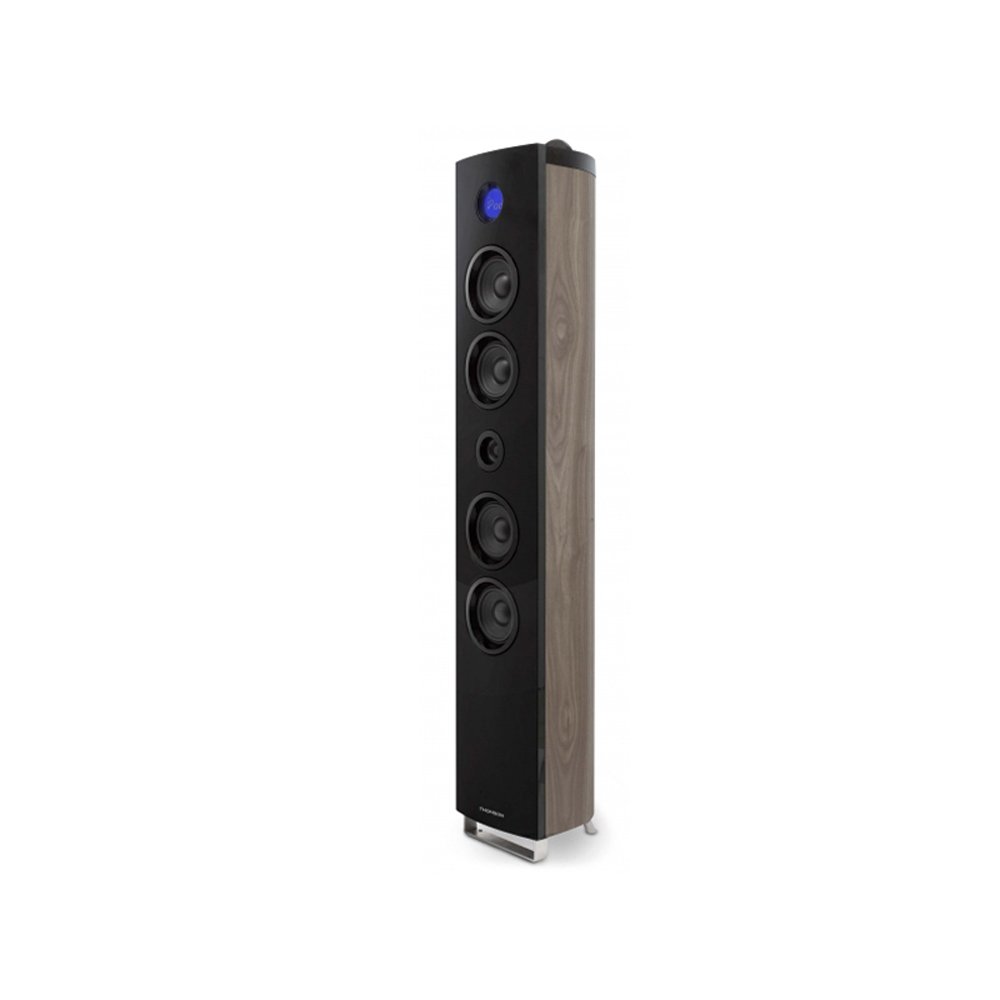
Image: The Thomson CS500 Compact System, showing the main unit and two speakers. This illustrates the primary components after initial setup.
Instruccions de funcionament
1. Encendre/apagar
Premeu el botó PODER botó del panell frontal o del comandament a distància per encendre o apagar el sistema.
2. Selecció de la font
Premeu el botó FONT button repeatedly to cycle through available input modes: CD, FM Radio, Bluetooth, USB, SD, AUX, iPod/iPhone/iPad Dock, Micro USB.
3. Control de volum
Ajusteu el volum amb el botó VOLUM +/- botons de la unitat o del comandament a distància.
4. Funcionament del reproductor de CD
- Premeu el botó CD botó per seleccionar el mode CD.
- Open the CD tray and place up to 5 CDs.
- Premeu REPRODUCCIÓ/PAUSA per iniciar la reproducció.
- Ús SALTAR botons per navegar per pistes.
- The system is compatible with CD-R and CD-RW discs.
5. Funcionament de la ràdio FM
- Premeu el botó FM botó per seleccionar el mode de ràdio FM.
- Utilitza el TUNE +/- botons per sintonitzar manualment una emissora.
- Mantén premut TUNE +/- for automatic station scanning.
- The system supports RDS (Radio Data System) for displaying station information.
- Save your favorite stations using the preset functions (refer to the remote control section for details).
6. Connectivitat Bluetooth
- Premeu el botó BLUETOOTH button to select Bluetooth mode. The display will show "PAIRING".
- Enable Bluetooth on your mobile device and search for "Thomson CS500".
- Selecciona el dispositiu que vols emparellar. Un cop connectat, pots reproduir àudio en streaming sense fil.
7. Reproducció des d'USB i targeta SD
Insert a USB drive into the USB port or an SD card into the SD card slot. The system will automatically switch to the respective mode and begin playback of compatible audio files.
8. Device Docking (iPod, iPhone, iPad, Micro USB)
The vertical speaker features docking for iPod, iPhone, and iPad devices. Additionally, a Micro USB port is available for Android/Samsung devices. Carefully dock your device into the appropriate connector. The system will automatically switch to the docking input mode.
9. Entrada AUX
Connect an external audio device (e.g., MP3 player) to the 3.5mm AUX input using a stereo audio cable (not supplied). Select AUX mode to listen to audio from the connected device.
10. Configuració de so
- Equalitzador: The system includes an equalizer with 5 sound presets. Press the EQ button on the remote control to cycle through these presets (e.g., Flat, Rock, Pop, Jazz, Classic).
- Baix Ampmés viu: Activate the bass amplifier function for enhanced low-frequency sound. Refer to the remote control for the specific button.
11. Clock and Sleep Timer
The LCD display with blue backlight shows the current time. Use the remote control to set the clock and activate the sleep timer function, which automatically turns off the system after a set period.
Manteniment
1. Neteja de la unitat
Wipe the exterior of the unit with a soft, dry cloth. Do not use abrasive cleaners, waxes, or solvents as they may damage the finish. Ensure the unit is unplugged before cleaning.
2. CD Player Care
Handle CDs by their edges to avoid fingerprints and scratches. If a CD is dirty, wipe it gently with a soft, lint-free cloth from the center outwards. Do not use solvents or abrasive cleaners on CDs.
3. Manipulació general
Avoid placing heavy objects on the unit. Do not block ventilation openings. If the unit will not be used for an extended period, unplug it from the power outlet.
Resolució de problemes
-
Sense energia:
Ensure the power cable is securely connected to both the unit and the wall outlet. Check if the outlet is functional by plugging in another device.
-
Sense so:
Check speaker connections for correct polarity. Ensure the volume is not set to minimum or muted. Verify the correct input source is selected. If using an external device via AUX, ensure its volume is also up.
-
El control remot no funciona:
Check and replace batteries if necessary. Ensure there are no obstructions between the remote and the unit's sensor. Point the remote directly at the unit.
-
El CD no es reprodueix:
Ensure the CD is clean and free of scratches. Check that the CD is inserted correctly with the label side up. Try a different CD to rule out disc issues.
-
Problemes de connexió Bluetooth:
Ensure the unit is in Bluetooth pairing mode. Delete "Thomson CS500" from your device's Bluetooth list and try pairing again. Move your device closer to the system.
-
Mala recepció de ràdio:
Adjust the position of the FM antenna. Move the unit away from other electronic devices that may cause interference.
Especificacions
| Model: | CS 500 |
| Marca: | Thomson |
| Potència de sortida: | 2 x 45 Watts (speakers) + 90 Watts (subwoofer) = 200 Watts Total Music Performance |
| Configuració del canal de so envoltant: | 2 (estèreo) |
| Tecnologia de connectivitat: | Bluetooth, USB, SD Card, AUX (3.5mm), iPod/iPhone/iPad Dock, Micro USB |
| Tipus de suports admesos: | CD, CD-R, CD-RW |
| Bandes de ràdio admeses: | FM (with RDS) |
| Ponents: | 2-way Bass Reflex with Titanium Bass Boomers, Subwoofer |
| Mètode de control: | Control remot |
| Font d'alimentació: | 220 V CA |
| Dimensions del producte (unitat principal): | 30 x 30 x 120 cm |
| Pes de l'article: | 1 quilograms |
| Color: | Marró fosc |
| Components inclosos: | Control remot |
Garantia i Suport
Informació de la garantia
The Thomson CS500 Compact System comes with a limited warranty. Please retain your proof of purchase for any warranty claims. For specific terms and conditions of the warranty, refer to the documentation provided at the time of purchase or contact Thomson customer support.
Atenció al client
For technical assistance, troubleshooting beyond this manual, or warranty inquiries, please contact Thomson customer support. Contact details can typically be found on the official Thomson weblloc web o a l'embalatge del producte.


