Introducció
This manual provides detailed instructions for the safe and effective use of your Olympus VN-240 PC Digital Voice Recorder. Please read this manual thoroughly before using the device to ensure proper operation and to maximize its features.
Producte acabatview
The Olympus VN-240 PC is a digital voice recorder designed for capturing audio and facilitating the transfer of recordings to a personal computer. Key features include:
- Enllaç de PC: Download recordings to your PC for editing, emailing, or archiving.
- Four-Hour Recording: Record up to 4 uninterrupted hours in LP (Long Play) mode.
- 3 Recording Modes: Utilize HQ (High Quality) mode for superior sound, and LP and SP (Standard Play) modes for extended recording durations.
- 4 Folders: Three dedicated file folders plus a convenient schedule folder provide organized storage for your recordings.
- Llarga vida útil de la bateria: Enjoy up to 33 hours of continuous operation with two AAA batteries.

Davant view of the Olympus VN-240 PC Digital Voice Recorder, showing the display screen and control buttons.
Configuració
1. Instal·lació de la bateria
The VN-240 PC operates on two AAA batteries.
- Localitzeu la tapa del compartiment de la bateria a la part posterior del dispositiu.
- Feu lliscar la coberta oberta.
- Introduïu dues piles AAA, assegurant-vos de la polaritat correcta (+/-) tal com s'indica a l'interior del compartiment.
- Tanqueu bé la tapa del compartiment de la bateria.
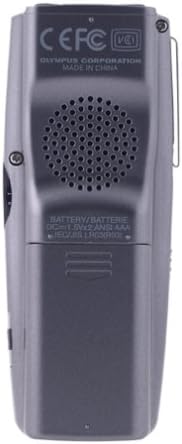
posterior view of the Olympus VN-240 PC Digital Voice Recorder, highlighting the battery compartment and speaker.
2. Engegada inicial
Manteniu premut el botó PODER botó fins que la pantalla s'il·lumini.
The device may prompt you to set the date and time upon first use. Follow the on-screen instructions to complete this setup.
Instruccions de funcionament
1. Gravació d'àudio
Per començar a gravar:
- Select a folder (A, B, C, or D) using the CARPETA botó.
- Premeu el botó REC button (red button) to start recording. The REC l’indicador s’encendrà.
- Per aturar la gravació, premeu REC botó de nou. Premeu-lo una vegada més per reprendre.
- Per aturar la gravació, premeu el botó STOP botó.
2. Reproducció
Per reproduir una gravació:
- Select the desired folder and file utilitzant el CARPETA i avançar/rebobinar botons.
- Premeu el botó JUGAR botó.
- Ajusteu el volum amb el botó +/- botons.
- Per aturar la reproducció, premeu el botó STOP botó.
3. Modes d'enregistrament
The VN-240 PC offers three recording modes:
- HQ (High Quality): For superior sound clarity, suitable for important lectures or meetings.
- SP (Standard Play): A balanced mode for general use.
- LP (Long Play): Maximizes recording time, suitable for extended sessions where absolute sound fidelity is less critical.
To change the recording mode, access the menu settings. Refer to the on-screen menu for navigation.
4. File Gestió
The device allows organization of recordings into four folders (A, B, C, D).
Erasing Files
To erase a single file:
- Seleccioneu el file you wish to erase.
- Premeu el botó ESBORRA botó.
- Confirmeu l'eliminació quan se us demani.
To erase an entire folder, navigate to the folder and select the "Erase All" option within the menu.
En moviment Files
Files can be moved between folders using the menu options. Consult the on-screen menu for specific steps.
5. PC Link Functionality
The VN-240 PC can connect to a computer to transfer recordings.
- Install the provided software on your PC.
- Connect the recorder to your PC using a compatible USB cable.
- Follow the software instructions to download, edit, or archive your audio files.

lateral view of the Olympus VN-240 PC Digital Voice Recorder, showing the 'HOLD' switch and external ports.
Manteniment
Neteja
Wipe the device with a soft, dry cloth. Do not use liquid cleaners or solvents, as these may damage the device.
Canvi de bateria
Replace batteries when the low battery indicator appears on the display. Always use fresh AAA alkaline batteries for optimal performance.
Emmagatzematge
Store the recorder in a cool, dry place away from direct sunlight and extreme temperatures. Remove batteries if storing for extended periods to prevent leakage.
Resolució de problemes
Sense poder
- Check battery installation and ensure batteries are fresh and correctly inserted.
- Verify that the device is not in 'HOLD' mode (if applicable).
Poor Recording Quality
- Assegureu-vos que el micròfon no estigui obstruït.
- Select HQ recording mode for the best quality.
- Record in a quiet environment, minimizing background noise.
- Ensure the recording level is appropriate for the sound source.
No es pot connectar a l'ordinador
- Verify the USB cable connection is secure at both ends.
- Ensure the PC software is correctly installed and updated.
- Restart both the recorder and the PC.
- Proveu un port USB diferent a l'ordinador.
Recordings Disappear
- Comproveu si files were accidentally erased.
- Comproveu si files were moved to a different folder (A, B, C, or D).
- Ensure the device has sufficient memory capacity.
Especificacions
| Característica | Detall |
|---|---|
| Model | VN-240 PC |
| Número de model de l'article | 141712 |
| Marca | Olympus (OM SYSTEM) |
| Capacitat d’enregistrament | Up to 4 hours (LP mode) |
| Modes d'enregistrament | HQ, SP, LP |
| Carpetes | 4 (A, B, C, D) |
| Font d'alimentació | 2 x piles AAA |
| Durada de la bateria | Fins a 33 hores (funcionament continu) |
| Dispositius compatibles | Ordinador personal |
| Interfície del maquinari | USB 2.0 |
| Micròfon | Integrat |
| Conector d'auriculars | 3.5 mm |
| Pes de l'article | 10.4 unces (aprox. 0.65 lliures) |
| Dimensions del paquet | 9 x 6 x 2 polzades |
| Primer disponible | 1 de març de 2004 |
| Fabricant | Olimp |
| Mida de la pantalla | 3.5 polzades (diagonal) |
Garantia i Suport
Informació de la garantia
For specific warranty details regarding your Olympus VN-240 PC Digital Voice Recorder, please refer to the warranty card included with your product packaging or visit the official Olympus support weblloc.
Atenció al client
For further assistance, technical support, or to inquire about service, please visit the official Olympus support weblloc web o contacteu directament amb el seu departament d'atenció al client.
An official user manual (PDF) is available for download: Descarrega el manual d'usuari (PDF)


