1. Introducció
The Midland Powermax Ultra Mount is a robust and versatile vehicle mounting solution designed for secure placement of various electronic devices. Constructed from durable nylon and stainless steel, this mount offers high resistance and reliability for your transceivers, GPS units, and other mobile or marine accessories.
Les característiques clau inclouen:
- Compatibility with most transceivers, GPS, and other mobile and marine accessories.
- Flexible installation options, allowing attachment to the top or bottom of your vehicle's dash.
- Full 360° rotation and up to 30° inclination for optimal viewangles d'ajust.
- A simple and rapid removal system for convenience.
- Durable construction using nylon and specially treated stainless steel for high resistance.
- Water-resistant design for enhanced durability.
2. Configuració i instal·lació
This section provides general guidelines for installing your Midland Powermax Ultra Mount. Always ensure the mounting surface is clean and stable before installation.
- Identificar la ubicació de muntatge: Choose a suitable flat surface on your vehicle's dashboard, either top or bottom, that provides clear visibility and easy access to your device without obstructing your view o controls del vehicle.
- Secure the Flange: The mount includes one flange. Position the flange at your chosen location. Use appropriate fasteners (not included, refer to your vehicle's manual or consult a professional for suitable hardware) to securely attach the flange to the dashboard. Ensure it is firmly fixed to prevent movement.
- Enganxeu el muntatge: Once the flange is secure, align the main body of the Powermax Ultra Mount with the flange. Engage the rapid removal system mechanism to lock the mount onto the flange. Ensure it clicks into place or is otherwise firmly seated.
- Munta el teu dispositiu: Place your transceiver, GPS, or other compatible device onto the mount's cradle or attachment point. Adjust any clamps or securing mechanisms on the mount to hold your device firmly.
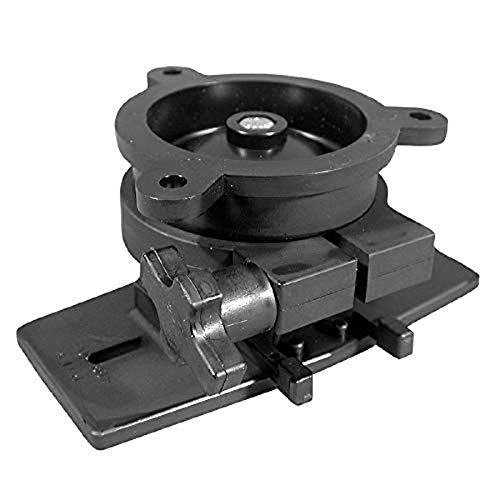
Image showing the Midland Powermax Ultra Mount, a black vehicle mount designed for transceivers, GPS, and other mobile and marine accessories. The mount features a robust design for secure device placement.
3. Funcionament de la muntura
The Powermax Ultra Mount offers flexible positioning to optimize your device's visibility and accessibility.
- Ajustant Viewangle: The mount can be inclined up to 30 degrees. Gently tilt the mounted device to achieve your desired vertical angle. The mount is designed to hold its position once set.
- Rotating the Device: For horizontal adjustment, the mount allows for a full 360-degree rotation. Carefully turn your device on the mount to orient it as needed.
- Posició de seguretat: After adjusting, ensure the mount's mechanisms are tightened (if applicable) or that the friction holds the device firmly in the desired position.
- Rapid Removal: To quickly remove your device or the mount itself from the flange, engage the rapid removal system. Refer to the specific mechanism on your mount for proper disengagement.
4. Manteniment
Proper maintenance ensures the longevity and optimal performance of your Midland Powermax Ultra Mount.
- Neteja: Periodically clean the mount with a soft, damp cloth. Avoid using harsh chemicals or abrasive cleaners, as these can damage the nylon and stainless steel finish.
- Inspecció: Regularly inspect the mount for any signs of wear, damage, or loose components. Ensure all connections to the dashboard and to your device remain secure.
- Resistència a l'aigua: While the mount is water-resistant, it is not fully waterproof. Avoid prolonged exposure to heavy rain or submersion to prevent potential damage. Dry the mount thoroughly if it becomes wet.
5. Solució De Problemes
If you encounter issues with your Powermax Ultra Mount, consider the following common solutions:
- Mount Not Holding Position: Ensure all adjustment points are tightened. If the mount continues to slip, check for excessive weight on the mount or wear in the adjustment mechanisms.
- El dispositiu no s'ajusta correctament: Verify that your device is compatible with the mount's dimensions and attachment points. Adjust any clamps or cradles to firmly grip your device.
- Mount Detaching from Dash: Re-check the installation of the flange. Ensure fasteners are tight and the mounting surface is robust enough to support the mount and device.
- Difficulty with Rapid Removal System: Ensure the mechanism is clean and free of debris. Apply gentle, even pressure as instructed by the specific design of the removal system.
6. Especificacions
| Característica | Detall |
|---|---|
| Número de model | 21-200 |
| Marca | Midland |
| Dispositius compatibles | Transceivers, GPS, Mobile and Marine Accessories |
| Material | Niló i acer inoxidable |
| Ajustabilitat | 360° Rotation, 30° Inclination |
| Nivell de resistència a l'aigua | Resistent a l'aigua |
| Components inclosos | 1 x Flange |
| Pes de l'article | 13.9 unces |
| Dimensions del paquet | 9.41 x 7.68 x 2.83 polzades |
| Color | Negre |
| Fabricant | Midland Consumer Radio |
| UPC | 046014212008 |
7. Informació de la garantia
Specific warranty details for the Midland Powermax Ultra Mount (Model 21-200) are not provided in this manual. For comprehensive warranty information, including terms, conditions, and duration, please refer to the documentation included with your purchase or visit the official Midland weblloc web. Conserveu el comprovant de compra per a qualsevol reclamació de garantia.
8. Atenció al client
If you require further assistance, have questions about installation, operation, or troubleshooting that are not covered in this manual, please contact Midland customer service. Contact information can typically be found on the official Midland weblloc web o a l'embalatge del producte.


