1. Introducció
This manual provides essential information for the safe and effective installation, operation, and maintenance of your Compaq PDP100 ATX 200W Power Supply. Please read this manual thoroughly before attempting any installation or maintenance procedures.
2. Informació de seguretat
Always observe the following safety precautions to prevent electric shock, personal injury, or damage to the equipment:
- Disconnect the computer from the main power outlet before installing or removing the power supply.
- No obriu la font d'alimentació casing. Alt volumtagHi ha aparells a l'interior, fins i tot quan la unitat està desendollada. No hi ha peces que l'usuari pugui reparar a l'interior.
- Assegureu-vos d'una connexió a terra adequada del vostre sistema informàtic.
- Avoid operating the power supply in high humidity or extreme temperature environments.
- Do not block the ventilation openings of the power supply.
3. Configuració i instal·lació
The Compaq PDP100 is an ATX form factor power supply designed for personal computers. Follow these general steps for installation:
- Prepareu el vostre sistema: Ensure your computer is powered off and unplugged from the wall outlet. Open the computer case according to your system's manufacturer instructions.
- Traieu la font d'alimentació antiga (si escau): Disconnect all cables from the old power supply to the motherboard, drives, and other components. Unscrew and remove the old power supply from the case.
- Install New Power Supply: Carefully place the Compaq PDP100 power supply into the designated power supply bay in your computer case. Ensure the fan faces the correct direction for optimal airflow (typically facing inwards or downwards, depending on case design). Secure the power supply with screws provided with your computer case or the power supply itself.
- Connectar els cables:
- 20/24-pin ATX Main Power Connector: Connect this large connector to the corresponding port on your motherboard.
- 4-pin or 8-pin CPU Power Connector: Connect this to the CPU power port on your motherboard.
- Connectors d'alimentació SATA: Connect these to your SATA hard drives, SSDs, and optical drives.
- Molex (4-pin Peripheral) Connectors: Connect these to older drives or case fans if needed.
- PCIe Power Connectors (if present and needed): Connect these to your graphics card if it requires additional power.
Refer to your motherboard and component manuals for specific cable connection requirements.
- Tanqueu la carcassa i engegueu-la: Once all connections are secure, close your computer case. Plug the computer's power cord into the power supply and then into a wall outlet. Power on your computer.
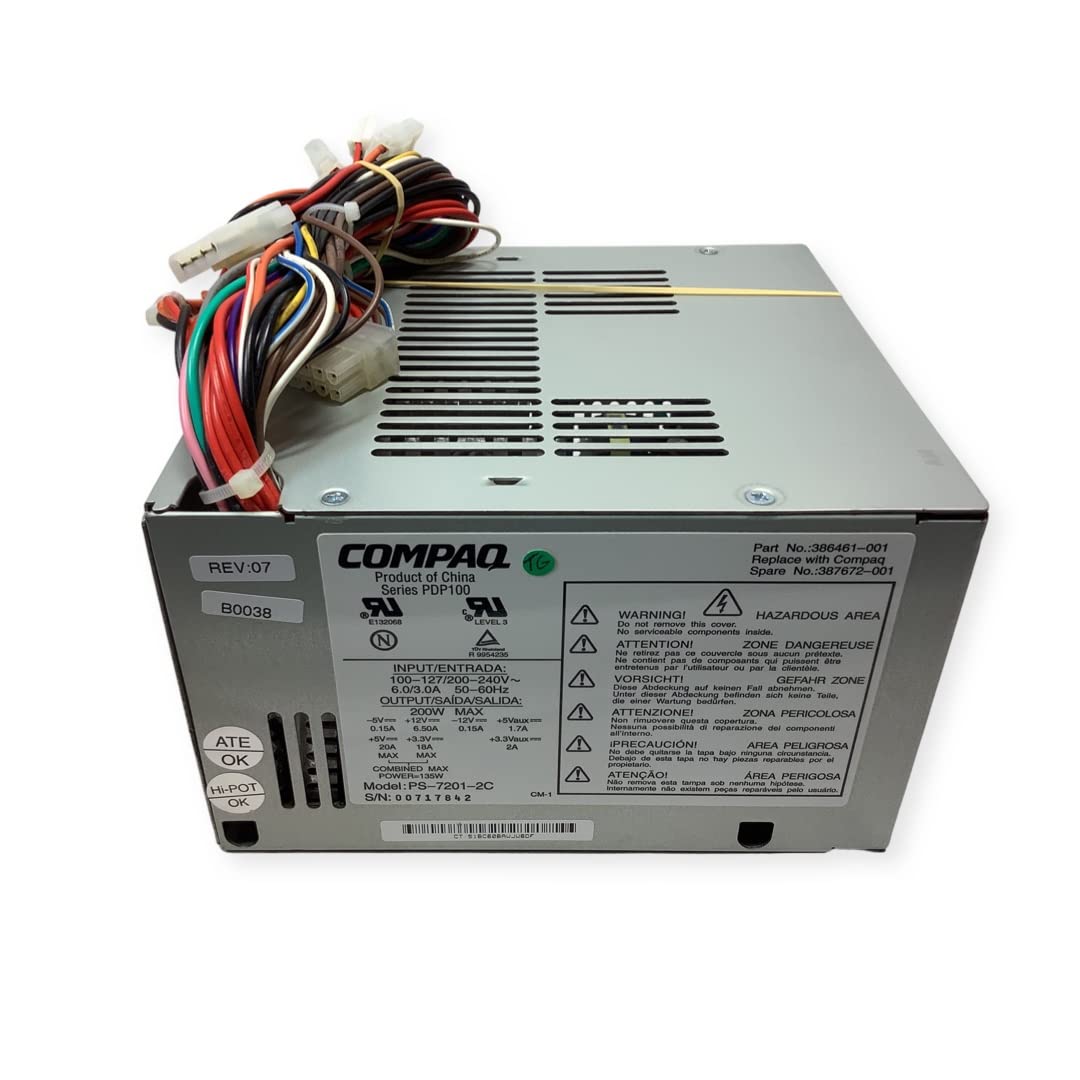
Image: The Compaq PDP100 ATX 200W Power Supply, showing its compact design and various connectors. This image illustrates the general appearance of the power supply unit before installation.
4. Funcionament
The Compaq PDP100 ATX 200W Power Supply operates automatically once installed correctly and connected to a power source. Its primary function is to convert AC power from your wall outlet into stable DC power required by your computer's components. There are no user-adjustable settings for its operation.
- Ensure the power switch on the back of the power supply (if present) is in the 'ON' position before powering on your computer.
- The power supply will provide power to your motherboard, CPU, graphics card, storage drives, and other peripherals as needed.
5. Manteniment
Proper maintenance ensures the longevity and stable operation of your power supply:
- Neteja de pols: Periodically (e.g., every 6-12 months), power off and unplug your computer. Open the case and use compressed air to gently clean dust from the power supply's fan and ventilation grilles. Dust accumulation can hinder cooling and lead to overheating.
- Ventilació: Ensure your computer case has adequate airflow and that the power supply's vents are not obstructed by cables or other components.
- Gestió de cables: Organize internal cables to prevent them from blocking airflow around the power supply.
6. Solució De Problemes
Si teniu problemes amb la font d'alimentació, tingueu en compte els passos següents per resoldre'ls:
- Sense energia:
- Check if the power cord is securely plugged into both the power supply and the wall outlet.
- Ensure the power switch on the back of the power supply is in the 'ON' position.
- Proveu la presa de corrent amb un altre dispositiu per confirmar que tingui corrent.
- Verify all internal power connectors (20/24-pin ATX, CPU, SATA, etc.) are firmly seated.
- Inestabilitat del sistema/aturades aleatòries:
- This could indicate an overloaded or failing power supply. Ensure the total wattage draw of your components does not exceed the power supply's 200W capacity.
- Check for proper ventilation and ensure the power supply is not overheating.
- If the issue persists, consider testing with a known good power supply or consulting a qualified technician.
- El ventilador no gira:
- Some power supply fans only spin when under load or when a certain temperature is reached.
- If the fan never spins and the system is overheating, ensure there are no obstructions and clean any dust.
Si aquests passos no resolen el problema, poseu-vos en contacte amb l'atenció al client o amb un tècnic qualificat.
7. Especificacions
| Característica | Especificació |
|---|---|
| Marca | Compaq |
| Nom del model | PDP100 |
| Número de part | 386461-001 |
| Potència de sortidatage | 200 watts |
| Factor de forma | ATX |
| Tipus de connector | ATX |
| Dispositius compatibles | Ordinador personal |
| Pes de l'article | 5 lliures |
| UPC | 788490574446 |
| Data de primera disponibilitat | 28 de setembre de 2010 |
8. Garantia i Suport
This Compaq PDP100 ATX 200W Power Supply includes a warranty. For specific warranty terms and conditions, please refer to the documentation provided at the time of purchase or contact your retailer. For technical support or service inquiries, please contact Compaq customer service or the vendor from whom you purchased the product.


