Introducció
Thank you for choosing the Tapco by Mackie S.5 Active Studio Monitors. These monitors are designed to provide professional sound quality for various audio applications, including home recording studios, video editing suites, and home theater systems. The S.5 monitors feature a two-way bass reflex design, active crossovers, and dual 60-watt power amplifiers, delivering a transparent and accurate sound reproduction.
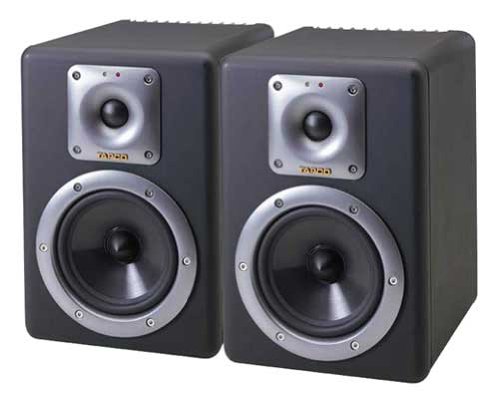
Image: Tapco by Mackie S.5 Active Studio Monitors (Pair)
Informació important de seguretat
Please read these instructions carefully before operating your S.5 Studio Monitors. Keep this manual for future reference.
- Font d'alimentació: Connect the monitors only to a power supply of the type described in this manual or marked on the unit.
- Ventilació: Assegureu-vos que la ventilació sigui adequada. No bloquegeu cap obertura de ventilació. Instal·leu-ho d'acord amb les instruccions del fabricant.
- Calor: No instal·leu a prop de cap font de calor com ara radiadors, registres de calor, estufes o altres aparells (inclosos amplificadors) que produeixen calor.
- Aigua i humitat: No utilitzeu aquest aparell a prop de l'aigua. No l'exposeu a goteigs o esquitxades.
- Neteja: Netegeu només amb un drap sec.
- Manteniment: No intenteu atendre aquest producte vosaltres mateixos. Consulteu tots els serveis a personal de servei qualificat.
- Blindatge magnètic: The S.5 monitors feature magnetic shielding to protect nearby electronic equipment like computer displays or televisions from interference.
Contingut del paquet
Verifiqueu que tots els elements que s'enumeren a continuació siguin presents al vostre paquet:
- Two (2) Tapco by Mackie S.5 Active Studio Monitors
- Two (2) AC Power Cords
- Manual d'usuari (aquest document)
Configuració
1. Desembalatge
Carefully remove the monitors from their packaging. Retain the original packaging for future transport or storage.
2. Col·locació
Proper placement of your S.5 monitors is crucial for optimal sound reproduction. Consider the following:
- Stereo Imaging: Position the monitors to form an equilateral triangle with your listening position. The tweeters should ideally be at ear level.
- Acústica de l'habitació: Avoid placing monitors directly against walls or in corners, as this can exaggerate bass frequencies. If necessary, use the built-in calibration controls to adjust for room acoustics.
- Estabilitat: Place monitors on stable surfaces or stands to prevent unwanted vibrations.
3. Connexions
Before making any connections, ensure both the monitors and your audio source are powered off.
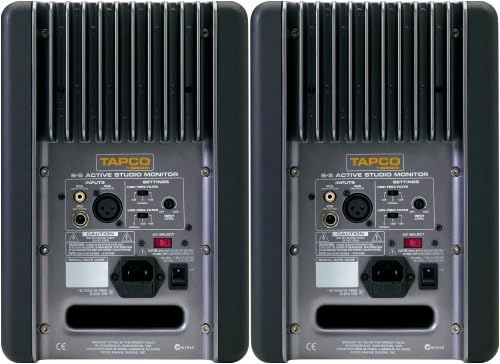
Image: Rear Panel Connections of the S.5 Monitor
The S.5 monitors offer various input options:
- Entrada XLR: For balanced audio signals from professional audio interfaces or mixers.
- Entrada TRS: For balanced or unbalanced 1/4-inch audio signals.
- Entrada RCA: For unbalanced audio signals from consumer-grade equipment.
Connect the appropriate audio cables from your source (e.g., audio interface, mixer) to the input jacks on the rear panel of each monitor. Then, connect the supplied AC power cords to the power inlet on each monitor and plug them into a grounded electrical outlet.
Instruccions de funcionament
1. Encès / apagat
After all connections are made, ensure the volume control on your audio source is turned down. Flip the power switch located on the rear panel of each S.5 monitor to the "ON" position. The power indicator LED on the front panel will illuminate. Always power on your monitors last and power them off first to prevent pops or thumps.
2. Controls i ajustos
The S.5 monitors feature fine calibration controls on the rear panel to help optimize their sound for your specific listening environment.
- Low Frequency Adjustment: This control allows you to boost bass frequencies by +2 dB or +4 dB below 100Hz. This is useful for compensating for room acoustics that may absorb low-end or for personal preference.
- High Frequency Adjustment: This control allows you to adjust high frequencies by +/- 2 dB above 5kHz. Use this to tailor the treble response to your room or to match other monitoring systems.
Start with these controls in their flat (0 dB) position and make small adjustments while listening to familiar audio material. The goal is to achieve a neutral and accurate sound representation in your listening space.
Manteniment
To ensure the longevity and optimal performance of your S.5 Studio Monitors, follow these maintenance guidelines:
- Neteja: Disconnect the power before cleaning. Use a soft, dry, lint-free cloth to wipe the exterior surfaces. Do not use liquid cleaners, aerosols, or solvents.
- Ventilació: Mantingueu les reixetes de ventilació netes de pols i deixalles per evitar el sobreescalfament.
- Emmagatzematge: If storing the monitors for an extended period, place them back in their original packaging in a dry, temperature-controlled environment.
- Eviteu condicions extremes: Do not expose the monitors to extreme temperatures, humidity, or direct sunlight.
Resolució de problemes
If you encounter issues with your S.5 Studio Monitors, refer to the following common problems and solutions:
- Sense energia:
- Assegureu-vos que el cable d'alimentació estigui connectat correctament tant al monitor com a una presa de corrent que funcioni.
- Check the power switch on the rear panel is in the "ON" position.
- Verify the outlet is supplying power (test with another device).
- Sense so:
- Check all audio cable connections between your source and the monitors.
- Ensure the volume on your audio source is turned up.
- Verify the correct input is selected on your audio source (if applicable).
- Test with a different audio source or cable to rule out faulty equipment.
- So distorsionat:
- Redueix el nivell d'entrada de la font d'àudio.
- Comproveu si hi ha cables d'àudio danyats.
- Ensure the monitors are not overdriven.
- Overheating / Monitor Shuts Down:
- The S.5 monitors are equipped with thermal switches that activate and shut down amplifiers if they get too hot.
- Ensure adequate ventilation around the monitors. Do not block the rear heat sinks.
- Allow the monitors to cool down before resuming operation.
- Woofer Protection (Over-excursion):
- An over-excursion filter protects the woofer from damage when low-end is driven to the maximum. If you hear unusual sounds from the woofer at high volumes, reduce the bass level or overall volume.
Especificacions
| Marca | Mackie |
| Número de model | S.5 |
| Tipus d'altaveu | Monitor |
| Altaveu AmpTipus de lificació | Actius |
| Potència de sortida màxima dels altaveus | 60 Watts (per monitor) |
| Font d'alimentació | Elèctric amb cable |
| Tipus de muntatge | Muntatge de taula |
| Configuració del canal de so envoltant | 2.0 |
| Pes de l'article (parell) | 41.6 lliures |
| Dimensions del paquet | 21.9 x 16.2 x 12.5 polzades |
| UPC | 663961004847 |
| Data de primera disponibilitat | 13 d'abril de 2004 |
Garantia i Suport
For information regarding the warranty period and terms for your Tapco by Mackie S.5 Active Studio Monitors, please refer to the warranty card included with your product or visit the official Mackie weblloc.
For technical support, service, or additional product information, please contact Mackie customer support or visit their official weblloc:


