1. Introducció
The 3ware Escalade 7006-2 is a high-performance Parallel ATA RAID Controller designed to provide advanced storage technology and industry-leading performance for cost-effective ATA solutions. This controller is ideal for applications requiring high levels of sustained read and write operations, such as enterprise storage, NAS/SAN, web servers, near-line backup, archival, and streaming video.
This manual provides essential information for the proper installation, operation, and maintenance of your 3ware Escalade 7006-2 RAID Controller.
2. Producte acabatview
The 3ware Escalade 7006-2 is a PCI 64-bit card featuring an integrated RISC processor, PCI bridge, and XOR RAID engine. It supports up to two ATA 133/100 drives.
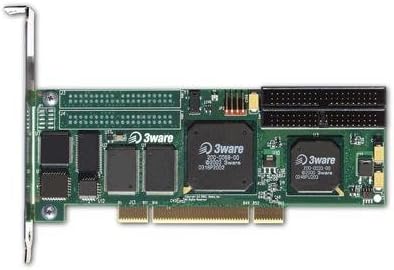
Figura 2.1: Frontal view of the 3ware Escalade 7006-2 RAID Controller card, showing the PCI connector, main chips, and two ATA connectors.
Característiques principals:
- Supports up to 2 ATA 133/100 drives.
- Ultra ATA/133 interface.
- StorSwitch point-to-point non-blocking architecture.
- On-board processor for true hardware-based RAID.
- Bootable array support for enhanced fault tolerance.
- BIOS setup utility and 3ware Disk Manager (3DM) web-based management software.
- Windows and Linux operating systems support.
3. Configuració i instal·lació
3.1 Instal·lació de maquinari
- Sistema d'apagada: Ensure your computer system is completely powered off and unplugged from the power source before beginning installation.
- Caixa d'ordinador oberta: Traieu la coberta de la carcassa de l'ordinador per accedir als components interns.
- Localitza la ranura PCI: Identify an available 32-bit/66MHz PCI 2.2 compliant slot on your motherboard.
- Insert Controller Card: Carefully align the 3ware Escalade 7006-2 card with the chosen PCI slot and firmly press it down until it is securely seated.
- Targeta segura: Secure the card with the retaining screw or clip provided by your computer case.
- Connecta les unitats: Connect your ATA 133/100 drives to the controller card using the provided ATA cables. Ensure proper master/slave configuration if using multiple drives on a single channel.
- Tanca el cas: Replace the computer case cover and reconnect all cables.
3.2 Instal·lació del programari
After hardware installation, power on your system. The 3ware Escalade 7006-2 features an on-board processor, making the RAID transparent to the operating system, which simplifies driver requirements.
- Suport del sistema operatiu: Drivers are available for Windows and Linux operating systems. Refer to the included driver CD or the manufacturer's weblloc per als darrers controladors.
- BIOS Setup Utility: Access the controller's BIOS setup utility during system boot-up (usually by pressing a specific key like F2 or Ctrl+A when prompted) to configure initial RAID settings before the operating system loads.
- 3ware Disk Manager (3DM): Install the 3DM web-based management software on your operating system for advanced configuration, monitoring, and management of your RAID arrays.
4. Funcionament del controlador
4.1 Configuració RAID
The 3ware Escalade 7006-2 supports various RAID levels to suit different performance and data redundancy needs:
- RAID 0 (striping): Offers maximum performance by striping data across both drives. Provides no data redundancy.
- RAID 1 (mirall): Provides data redundancy by mirroring data across both drives. Offers excellent data protection but uses half the total drive capacity.
- JBOD (Només un grapat de discs): Treats each drive as an independent disk, without RAID functionality.
Configuration of RAID arrays is primarily done through the BIOS setup utility during boot or via the 3ware Disk Manager (3DM) software within your operating system.
4.2 Funcions avançades
- Bootable Array Support: The controller allows you to create bootable RAID arrays, enhancing system fault tolerance and ensuring your operating system can boot from a redundant storage configuration.
- Hot-Swap and Hot-Spare Capability: While the 7006-2 (2-port controller) does not support hot-spare functionality, other models in the Escalade series do. Hot-swap allows for replacing drives without powering down the system, provided your drive enclosures support this feature.
5. Manteniment
Regular maintenance helps ensure the longevity and optimal performance of your 3ware Escalade 7006-2 RAID Controller.
- Mantenir els controladors actualitzats: Periodically check the LSI (formerly 3ware/AMCC) support website for updated drivers and firmware for your controller.
- Supervisar l'estat de la unitat: Use the 3ware Disk Manager (3DM) software to regularly monitor the health and status of your connected drives and RAID arrays.
- Assegureu-vos una ventilació adequada: Ensure adequate airflow within your computer case to prevent overheating of the controller and drives.
- Inspecció física: Occasionally inspect the card for dust accumulation. If necessary, carefully clean with compressed air (ensure system is powered off and unplugged).
6. Solució De Problemes
If you encounter issues with your 3ware Escalade 7006-2 RAID Controller, consider the following troubleshooting steps:
- No Detection of Card:
- Ensure the card is fully seated in the PCI slot.
- Try a different PCI slot if available.
- Verify your motherboard's BIOS settings for PCI slot configuration.
- Unitats no detectades:
- Check all ATA cable connections to both the controller and the drives.
- Verify drive power connections.
- Ensure proper master/slave jumper settings on the drives if applicable.
- Check drive health individually if possible.
- Problemes del sistema operatiu:
- Ensure the correct drivers for your operating system are installed.
- Verify that the RAID array is properly configured in the controller's BIOS or 3DM software.
- Problemes de rendiment:
- Confirm that the PCI slot is operating at its full speed (66MHz).
- Check for background processes or other hardware conflicts.
For more complex issues, consult the detailed documentation provided with your controller or visit the LSI support weblloc.
7. Especificacions
| Característica | Descripció |
|---|---|
| Número de model | 7006-2 |
| Interface/Bus | 32-bit/66MHz PCI 2.2 compliant |
| Unitats compatibles | Up to 2 ATA 133/100 drives |
| Factor de forma | PCI MD2 low profile |
| Nivells RAID | 0, 1, JBOD |
| Ús objectiu | Workstations, Entry-level Servers |
| Dimensions (L x A x A) | 7.1 x 12 x 2.7 polzades |
| Pes de l'article | 1.05 lliures |
| Fabricant | 3Ware/AMCC Storage |
| Marca | LSI |
8. Garantia i Suport
For information regarding product warranty, please refer to the documentation included with your purchase or visit the official LSI (now Broadcom) support website. Support resources, including drivers, firmware updates, and technical documentation, are typically available online.
When contacting support, please have your product model number (7006-2) and any relevant system information ready.
Fabricant: 3Ware/AMCC Storage (now part of LSI/Broadcom)


