Introducció
This manual provides comprehensive instructions for the setup, operation, and maintenance of your X-10 UR73A 5-in-1 RF/IR Non-Learning Remote Control. This universal remote is designed to consolidate control of up to five audio/video components and X10 home automation devices into a single unit, simplifying your home entertainment and control experience.
Producte acabatview
The X-10 UR73A remote combines Infrared (IR) technology for standard audio/video equipment with Radio Frequency (RF) technology for X10 home automation. It is a non-learning remote, meaning it operates using pre-programmed codes for various devices.
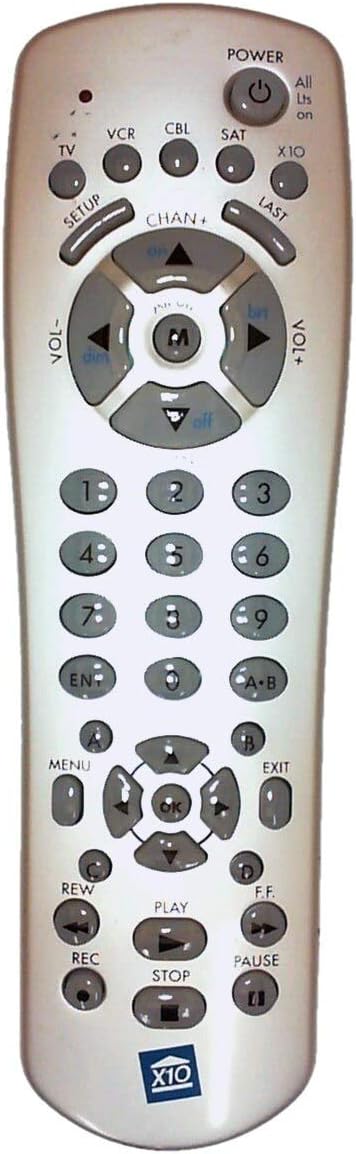
Figure 1: X-10 UR73A Remote Control Layout
This image displays the X-10 UR73A remote control. It is a light-colored, elongated device with numerous gray buttons.
Secció superior:
- POTÈNCIA: Large circular button at the top right with a power symbol.
- Device Select Buttons: Small circular buttons labeled TV, VCR, CBL (Cable), SAT (Satellite), and X10.
- CONFIGURACIÓ: Button below TV.
- ÚLTIM: Button below X10.
Middle Section (Navigation and Volume):
- CHAN+ / CHAN-: Channel up/down buttons.
- VOL+ / VOL-: Volume up/down buttons.
- Coixinet direccional: A central circular pad with up, down, left, right arrows, and an 'M' button in the center (likely for Mute). The arrows also have labels like 'on', 'dim', 'brt', 'off' for X10 control.
Bloc numèric:
- Standard numeric keypad (0-9).
- ENT: botó Enter.
- AB: Button for A-B repeat or similar function.
Lower Section (Menu and Playback):
- MENÚ: Button on the left.
- SORTIDA: Button on the right.
- D'ACORD: Central button within a second directional pad.
- Botons de colors: Four small circular buttons labeled A, B, C, D (likely for specific functions or teletext).
- Controls de reproducció: REW (Rewind), PLAY, F.F. (Fast Forward), REC (Record), STOP, PAUSE.
- X10 Logo: A blue X10 logo is present at the bottom of the remote.
Configuració
1. Instal·lació de la bateria
- Localitzeu el compartiment de la bateria a la part posterior del comandament a distància.
- Feu lliscar la tapa de la bateria.
- Insert four (4) AAA batteries, ensuring correct polarity (+ and -) as indicated inside the compartment.
- Col·loqueu la tapa de la bateria de manera segura.
Nota: Les piles no estan incloses i s'han de comprar per separat.
2. Programming IR Devices (TV, VCR, CBL, SAT)
The X-10 UR73A uses a library of pre-programmed codes to control your audio/video equipment. You will need to find the correct code for each device you wish to control.
- Engegueu el dispositiu que voleu programar (per exemple, el televisor).
- Manteniu premut el botó CONFIGURACIÓ button until the indicator light on the remote illuminates.
- Premeu el botó del dispositiu que voleu programar (per exemple, TV). The indicator light will blink once and remain lit.
- Enter the 3 or 4-digit code for your device's brand using the number pad. Refer to the code list provided with your remote (if available) or search online for "X-10 UR73A codes" for your specific device brand.
- After entering the code, the indicator light should turn off.
- Proveu el comandament a distància prement el botó PODER button. If the device turns off, the code is correct. If not, repeat the process with the next code for your brand.
- Repeat this process for your VCR, Cable Box, and Satellite Receiver using their respective device buttons.
If you cannot find a working code, the remote may not be compatible with your specific device model.
3. Setting Up X10 RF Control
The X-10 UR73A can control X10 home automation modules (lights, appliances) via Radio Frequency (RF). This requires an X10 wireless transceiver (e.g., TM751, RR501), which is sold separately and acts as a bridge between the remote and your X10 modules.
- Ensure your X10 modules are installed and set to the desired House Code and Unit Code.
- Ensure your X10 wireless transceiver is plugged in and operating correctly.
- Premeu el botó X10 device button on the remote.
- Use the directional pad's 'on', 'off', 'dim', 'brt' (brighten) functions to control your X10 modules. The 'M' button in the center may also function as a master ON/OFF for X10 devices depending on the transceiver setup.
Refer to your X10 transceiver and module manuals for specific setup and addressing instructions.
Instruccions de funcionament
1. Controlling IR Devices (TV, VCR, CBL, SAT)
Once programmed, select the desired device by pressing its corresponding button (TV, VCR, CBL, or SAT). The remote will then send IR commands for that device.
- Potència: Premeu PODER to turn the selected device on or off.
- Canal: Ús CHAN+ i CHAN- per canviar de canal.
- Volum: Ús VOL+ i VOL- per ajustar el volum.
- Silenciar: The central 'M' button in the directional pad typically functions as Mute for IR devices.
- Bloc numèric: Use the numeric buttons (0-9) to directly enter channel numbers. Press ENT after entering multi-digit channels if required by your device.
- Menu/Navigation: Ús MENÚ, Sortida, and the directional arrows (around the OK button) to navigate device menus. Press OK per confirmar les eleccions.
- Controls de reproducció: For VCR or similar devices, use JUGAR, STOP, PAUSA, REW, F.F., i REC.
- ÚLTIM: Recorda el canal anterior.
2. Controlling X10 RF Devices
To control X10 modules, first press the X10 device button. The remote will then send RF commands.
- On/Off: Use the 'on' and 'off' labels on the directional pad to turn X10 modules on or off.
- Atenuar/Il·luminar: Use the 'dim' and 'brt' labels on the directional pad to adjust the brightness of X10 dimmer modules.
- All Lights On: The "All Lts on" label near the POWER button suggests a function to turn all X10 lights on. This typically requires specific X10 transceiver configuration.
Manteniment
- Neteja: Netegeu el comandament a distància amb un drap suau i sec. No utilitzeu netejadors líquids ni materials abrasius.
- Substitució de la bateria: Replace batteries when the remote's indicator light becomes dim or the remote stops responding. Always replace all four AAA batteries at the same time.
- Emmagatzematge: Si guardeu el comandament a distància durant un període prolongat, traieu-ne les piles per evitar fuites.
Resolució de problemes
- El comandament a distància no respon:
- Comproveu la instal·lació de la bateria i substituïu-la si cal.
- Ensure there are no obstructions between the remote and the device (for IR control).
- Verify that the correct device button (TV, VCR, CBL, SAT, X10) is selected.
- Device not responding to IR commands:
- Re-program the device with a different code from the code list.
- Assegureu-vos que el comandament a distància estigui apuntat directament al receptor d'infrarojos del dispositiu.
- X10 devices not responding:
- Assegureu-vos el X10 es prem el botó.
- Verify that your X10 wireless transceiver is properly installed and powered on.
- Check the House Code and Unit Code settings on your X10 modules and ensure they match the commands being sent.
- Ensure the remote is within range of the X10 transceiver.
Especificacions
| Número de model | UR73A |
| Marca | X10 |
| Tecnologia de connectivitat | Infraroig (IR), Radiofreqüència (RF) |
| Tipus de controlador | Control de botons |
| Dispositius compatibles | TV, VCR, Cable Box, Satellite Receiver, X10 Home Automation Modules (via transceiver) |
| Font d'alimentació | 4 piles AAA (no incloses) |
| Pes de l'article | 4 unces |
| Fabricant | X-10 (USA) Inc. |
Garantia i Suport
For specific warranty information and technical support, please refer to the documentation included with your purchase or visit the official X10 weblloc web. Conserveu el comprovant de compra per a reclamacions de garantia.


