Introducció
The Logitech Cordless Desktop MX 5000 Laser is an advanced wireless keyboard and mouse combination designed to enhance your computing experience. This system features an LCD keyboard display, advanced Bluetooth wireless connectivity, a rechargeable laser mouse, and intuitive touch-sensitive media controls. It is engineered to provide seamless interaction with your PC, offering convenience and efficiency.

Image: Logitech Cordless Desktop MX 5000 Laser product packaging, showcasing the keyboard and mouse.
Contingut del paquet
Verifiqueu que tots els elements que s'enumeren a continuació s'inclouen al vostre paquet:
- MX 5000 keyboard for Bluetooth
- MX 1000 Laser mouse for Bluetooth
- USB Bluetooth mini-receiver
- Rapid-charging base station with AC adapter
- 4 piles alcalines AA (per al teclat)
- CD amb programari, pautes de confort i Centre d'ajuda
- Guia d'inici ràpid
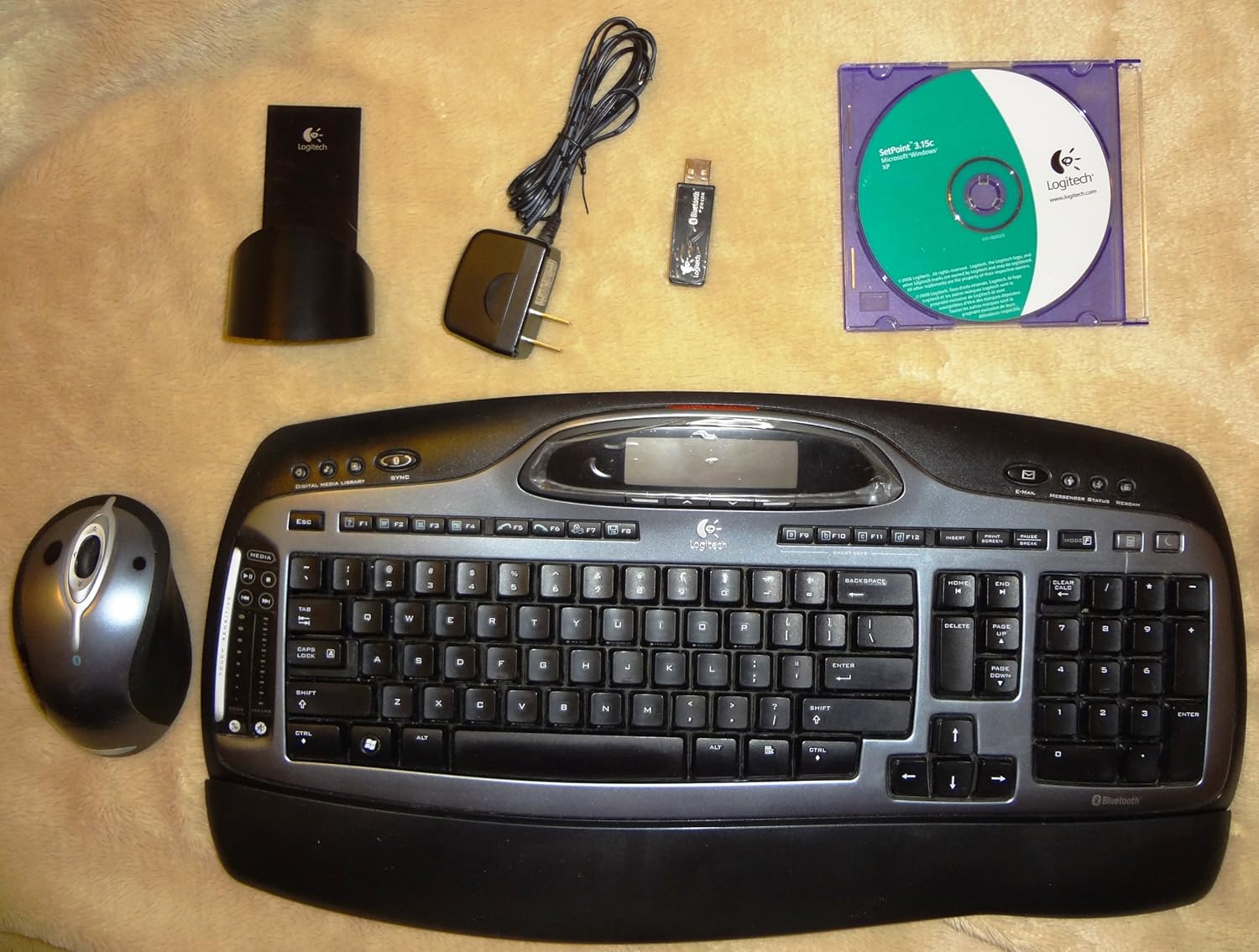
Image: All components of the Logitech Cordless Desktop MX 5000 Laser, including the keyboard, mouse, USB Bluetooth mini-receiver, rapid-charging base station, AC adapter, and software CD.
Configuració
Follow these steps to set up your Logitech Cordless Desktop MX 5000 Laser:
- Instal·leu les bateries: Insert the 4 AA alkaline batteries into the keyboard. Ensure correct polarity.
- Connect Charging Base: Plug the AC adapter into the rapid-charging base station, then plug the adapter into a power outlet.
- Charge Mouse: Place the MX 1000 Laser mouse onto the rapid-charging base station. Allow the mouse to charge fully before first use.
- Connect USB Bluetooth Mini-Receiver: Plug the USB Bluetooth mini-receiver into an available USB port on your computer.
- Instal·lar programari: Insert the provided software CD into your computer's CD-ROM drive. Follow the on-screen instructions to install the Logitech SetPoint software and drivers. This software is essential for full functionality and customization.
- SecureConnect Technology: Your keyboard and mouse are pre-paired with the wireless mini-receiver using Logitech's SecureConnect technology. This establishes a secure link automatically, allowing for immediate use after software installation.
Funcionament
This section details the various features and functionalities of your Cordless Desktop MX 5000 Laser.
Característiques del teclat
- LCD Keyboard Display: The integrated Dot Matrix LCD (102 x 42 pixels) provides instant feedback. It can display notifications for new instant messages or emails, application information, date and time, and Caps Lock status.
- Touch-Sensitive Media Controls: Utilize the touch-sensitive zone with 2 strips and 7 backlit controls for media management. Glide your finger to adjust volume or image size.
- Programmable Smart Keys: Customize specific keys to launch your favorite applications, websites, or folders for quick access.
- Windows Media Center Edition 2005 Compatibility: Seamlessly control your Windows Media Center PC from up to 60 feet away.
- Bluetooth Phone Synchronization: Perform one-touch synchronization of your PC calendar and address book with compatible mobile phones or PDAs.

Imatge: Primer pla view of the Logitech MX 5000 keyboard, showing the LCD display, touch-sensitive media controls, and key layout.
Funcions del ratolí
- MX Laser Engine: The MX 1000 Laser mouse features an 800-dpi resolution and 5.8-Megapixel image processing for precise tracking on various surfaces.
- Rechargeable Li-ion Batteries: The mouse is powered by Li-ion batteries and recharges via the rapid-charging base station, ensuring it is always ready for use.
- Roda inclinable més zoom: The scroll wheel offers side-to-side scrolling functionality and in/out zoom capabilities for enhanced navigation.
Tecnologia sense fil Bluetooth 2.0
- Velocitat de dades millorada (EDR): Bluetooth 2.0 with EDR provides three times the speed of previous Bluetooth versions.
- Interval estès: Enjoy an extended wireless range of up to 60 feet, minimizing interference from other devices.
- Bluetooth Hub Functionality: The USB Bluetooth mini-receiver acts as a hub, allowing you to connect other Bluetooth devices such as headsets for Voice over IP, mobile phones for picture transfer, or headphones for music streaming.
Manteniment
Proper maintenance ensures the longevity and optimal performance of your Cordless Desktop MX 5000 Laser.
- Neteja: Use a soft, dry cloth to clean the keyboard and mouse. For stubborn dirt, slightly dampRenta el drap amb aigua. Evita utilitzar productes químics agressius o netejadors abrasius.
- Gestió de la bateria:
- The MX 1000 Laser mouse features a rapid-charging base station. Always return the mouse to its base when not in use to ensure it remains charged.
- Illuminated battery indicators on both the keyboard and mouse will alert you when it's time to recharge or replace batteries.
- For the keyboard, replace the 4 AA alkaline batteries when the low battery indicator illuminates.
- Emmagatzematge: Quan no l'utilitzeu durant períodes prolongats, guardeu el dispositiu en un lloc fresc i sec, allunyat de la llum solar directa i de temperatures extremes.
Resolució de problemes
If you encounter issues with your Logitech Cordless Desktop MX 5000 Laser, refer to the following common solutions:
- Sense connexió/Retard:
- Ensure the USB Bluetooth mini-receiver is securely plugged into a working USB port on your computer.
- Verify that the keyboard and mouse batteries are charged or replaced.
- Move the keyboard and mouse closer to the USB Bluetooth mini-receiver to rule out range issues. The maximum range is 60 feet, but obstacles can reduce this.
- Reinicieu l'ordinador.
- Re-establish the connection if prompted by the SetPoint software.
- Problemes de programari:
- Ensure the Logitech SetPoint software is correctly installed. Reinstall it from the provided CD or download the latest version from the Logitech support website if problems persist.
- Check for software updates for SetPoint.
- Mouse Not Tracking:
- Assegureu-vos que el ratolí estigui completament carregat.
- Clean the laser sensor on the bottom of the mouse.
- Intenta utilitzar el ratolí en una superfície diferent.
- Keyboard LCD Not Displaying:
- Check keyboard battery levels.
- Ensure the SetPoint software is running correctly, as it manages the LCD display.
- Requisits del sistema: Assegureu-vos que l'ordinador compleix els requisits mínims del sistema:
- PC amb processador Pentium o compatible
- Windows XP (Home, Pro, Tablet o Media Center Edition)
- Unitat de CD-ROM
- Port USB
Especificacions
Especificacions del producte
- Keyboard Display: Dot Matrix LCD at 102 x 42 pixels (supports Western characters only)
- Controls del teclat: Touch Sensitive Zone with 2 strips and 7 backlit controls
- Mouse Engine: MX Laser Engine with 800-dpi resolution and 5.8-Megapixel image processing
- Potència del ratolí: Li-ion batteries with Fast Charging Station
- Tecnologia sense fils: Bluetooth 2.0 EDR Technology
- Bluetooth Stack Support: Widcomm BTW 5.0 and Microsoft XPSP2 Bluetooth stacks
- Bluetooth Profiles: Porta d'àudio, AV, imatges bàsiques, xarxa telefònica, File Transferència, substitució de cable fix, auriculars, dispositiu d'interfície humana, xarxa d'àrea local, intercanvi d'objectes, port sèrie, sincronització
- Dimensions del producte: 18 x 8 x 3 polzades
- Pes de l'article: 4 lliures
- Bateries: 4 AA batteries required (for keyboard)
- Tecnologia de connectivitat: Bluetooth, USB
- Característica especial: Repòs de canell
- Dispositius compatibles: Ordinador personal, tauleta
Garantia i Suport
The Logitech Cordless Desktop MX 5000 Laser comes with a Garantia limitada de tres anys. For detailed warranty terms and conditions, please refer to the documentation included with your product or visit the official Logitech support weblloc.
For technical support, troubleshooting assistance, or to download the latest software and drivers, please visit the Logitech support weblloc o poseu-vos en contacte amb el seu servei d'atenció al client.


