Introducció
This manual provides essential instructions for the installation, operation, maintenance, and troubleshooting of the IBM 49P1599 FRU System Board. This system board is designed for personal computers, featuring a 400/533 Front Side Bus, integrated 10/100 Ethernet, and support for DDR2 memory.
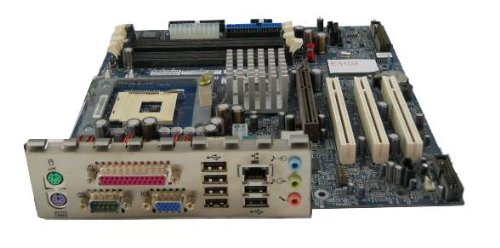
Image: The IBM 49P1599 FRU System Board. This image displays the main components and layout of the motherboard, including CPU socket, memory slots, and various connectors.
Configuració i instal·lació
Careful installation is crucial for the proper functioning of your system board. Always handle the board by its edges to avoid static discharge.
1. Preparació per a la instal·lació
- Ensure your computer case is compatible with the system board's form factor.
- Reuneix les eines necessàries: tornavís Phillips, corretja antiestàtica per al canell.
- Unplug the power supply from the wall outlet before beginning.
2. Installing the System Board
- Instal·leu la placa d'E/S a l'obertura posterior de la carcassa de l'ordinador.
- Carefully align the system board with the standoffs in the case.
- Secure the system board with screws, ensuring it is firmly seated.
3. Instal·lació de components
Processador (CPU)
This system board is supplied without a processor. Refer to your CPU's manual for specific installation instructions. Ensure the CPU is correctly oriented in the socket before securing the retention lever.
Memòria (RAM)
The board supports DDR2 RAM and has 2 memory slots.
- Obriu els clips dels dos extrems de la ranura de memòria.
- Alineeu el mòdul de memòria amb la ranura, assegurant-vos que l'osca del mòdul coincideixi amb la clau de la ranura.
- Premeu fermament els dos extrems del mòdul fins que els clips encaixin al seu lloc.
Targeta gràfica
The system board features an Integrated Graphics Card Interface and a PCI-Express x16 slot for dedicated graphics cards.
- Locate the PCI-Express x16 slot.
- Traieu la coberta de la ranura d'expansió corresponent de la carcassa.
- Insert the graphics card firmly into the slot until it clicks. Secure it with a screw to the case.
4. Cables de connexió
- Connectors d'alimentació: Connect the main 24-pin ATX power connector and the 4-pin CPU power connector from your power supply to the system board.
- Dispositius SATA: Connect SATA 3 data cables from your storage devices (hard drives, SSDs) to the SATA ports on the system board.
- Connectors del panell frontal: Connect the power button, reset button, HDD LED, power LED, and USB ports from your case to the corresponding headers on the system board. Refer to the board's silkscreen labels for correct orientation.
- Ethernet: The board has integrated 10/100 Ethernet. Connect your network cable to the RJ-45 port on the I/O panel.
Instruccions de funcionament
After completing the physical installation, you can proceed with the initial boot and operating system setup.
1. Initial Boot
- Assegureu-vos que tots els components estiguin connectats de manera segura.
- Connecteu el monitor, el teclat i el ratolí.
- Plug in the power supply and turn on the system.
- The system should power on, and you should see a display on your monitor.
2. Configuració de la BIOS/UEFI
During the initial boot sequence, press the designated key (commonly DEL, F2, F10, or F12) to enter the BIOS/UEFI setup utility. Here you can configure boot order, system time, and other hardware settings. Save changes before exiting.
3. Instal·lació del sistema operatiu
This system board is compatible with platforms such as Windows 10. Insert your operating system installation media (USB drive or DVD) and follow the on-screen prompts to install the operating system. Ensure all necessary drivers for the system board components are installed after the OS installation.
Manteniment
Regular maintenance helps ensure the longevity and stable performance of your system board.
- Neteja: Periodically clean dust from the system board and components using compressed air. Ensure the system is powered off and unplugged before cleaning.
- Actualitzacions de la BIOS: Check the official IBM support website for BIOS updates. BIOS updates can improve compatibility, stability, and performance. Follow the provided instructions carefully when updating the BIOS.
- Comprovació de components: Ensure all cables and components remain securely connected.
Resolució de problemes
Si teniu problemes, consulteu els passos habituals següents per a la resolució de problemes:
Sense poder
- Verify the power supply is connected to the wall outlet and turned on.
- Check that the 24-pin and 4-pin power connectors are securely attached to the system board.
- Ensure the front panel power button cable is correctly connected to the system board header.
Sense pantalla
- Confirm the monitor is powered on and connected to the correct video output (either integrated or dedicated graphics card).
- Reseat the graphics card (if applicable) and memory modules.
- Prova amb un monitor o cable de vídeo diferent si és possible.
System Fails to Boot
- Comproveu si hi ha cables o components solts.
- Ensure the CPU is properly seated and its cooler is installed correctly.
- Try booting with only one memory module installed, rotating through the modules and slots to identify a faulty one.
- Reset the BIOS to default settings (refer to your system board's specific instructions for clearing CMOS).
Especificacions
Garantia i Suport
For warranty information and technical support, please refer to the official IBM website or contact your point of purchase. Keep your proof of purchase for warranty claims. IBM provides resources and support for its products to ensure customer satisfaction.
Per obtenir més ajuda, visiteu el Suport d’IBM weblloc.
Documents relacionats - 49P1599 FRU
| Característica | Especificació |
|---|---|
| Número de model | 49P1599 FRU |
| Front Side Bus (FSB) | 400/533 MHz |
| Tecnologia de memòria RAM | DDR2 |
| Velocitat de rellotge de memòria | 2133 MHz |
| Ranures de memòria disponibles | 2 |
| Interfície de la targeta gràfica | Integrated, PCI-Express x16 |
| Estàndard de bus de sistema compatible | SATA 3 |
| Integrated Ethernet | 10/100 Mbps |
| Dispositius compatibles | Ordinador personal |
| Compatibilitat amb la plataforma | Windows 10 |
| Pes de l'article | 8 lliures |
 |
Sistema de visualització d'informació IBM 3270: Descripció de la unitat de control 3274 i guia del programador Un manual tècnic complet que detalla el sistema de visualització d'informació IBM 3270, amb un enfocament específic en la unitat de control IBM 3274. Cobreix aspectes funcionals i de programació, fluxos de dades, operacions i integració dins d'entorns IBM. |
 |
Sistema de monitorització de disc IBM 1130, versió 2: Guia del programador i de l'operador Un manual tècnic complet que detalla el sistema de monitorització de disc IBM 1130, versió 2. Aquesta guia cobreix la configuració del sistema, les tècniques de programació, els procediments operatius i els programes d'utilitat per al sistema informàtic IBM 1130, dirigit a programadors i operadors. |
 |
Sistema de monitorització de disc IBM 1130, versió 2: Guia de programació i de l'operador Aquesta guia completa proporciona els procediments essencials d'operació i manteniment per al sistema IBM 1130 Disk Monitor, versió 2. Inclou una secció introductòria per a nous usuaris, consells de programació i informació detallada sobre els registres de control del sistema de monitorització i els missatges d'error. |
 |
Guia d'instal·lació i proves de l'IBM 7094 Model 2 per a enginyers de clients Manual oficial d'instal·lació i proves per al sistema de processament de dades IBM 7094 Model 2. Cobreix els procediments CE, el cablejat, la configuració del sistema, la seguretat i els diagnòstics per a aquest vin.tagl'ordinador. |
 |
IBM 5150 Technical Reference This technical reference manual provides detailed hardware design, interface information, and BIOS support for the IBM 5150 Personal Computer. It is intended for programmers and engineers involved in hardware and software design. |
 |
Manual de referència tècnica de l'ordinador personal IBM AT Comprehensive technical reference guide for the IBM Personal Computer AT, detailing hardware specifications, system board, BIOS, keyboard, coprocessor, and power supply. |