1. Introducció
This manual provides essential information for the installation, operation, and maintenance of the Cisco 4400 Series Wireless LAN Controller, model AIR-WLC4404-100-K9. This device is designed to manage wireless access points and provide centralized control over your wireless network infrastructure.
2. Producte acabatview
The Cisco 4400 Series Wireless LAN Controller is a robust solution for managing enterprise-class wireless networks. It supports various wireless standards and offers high-speed data transmission capabilities.

Figura 2.1: Frontal view of the Cisco 4400 Series Wireless LAN Controller, showing the brand logo and general chassis design.
2.1 Característiques clau
- Centralized management for wireless access points.
- Support for 2.4 GHz IEEE 802.11b/g and 5 GHz IEEE 802.11a frequency bands.
- Transmission speeds up to 54Mbps with auto-fallback.
- Multiple Ethernet interfaces for network connectivity.
- Console port for direct management access.
3. Informació de seguretat
Always observe the following safety precautions when installing, operating, or maintaining the device:
- Assegureu-vos de tenir una connexió a terra correcta abans de connectar l'alimentació.
- No utilitzeu el dispositiu en mullat o damp condicions.
- Use only the specified power cables and adapters.
- Eviteu bloquejar les obertures de ventilació per evitar el sobreescalfament.
- Demaneu tot el servei a personal qualificat.
4. Configuració i instal·lació
4.1 Desembalatge i inspecció
Carefully unpack the controller and inspect it for any signs of damage during transit. Report any damage to your supplier immediately.
4.2 Instal·lació física
The Cisco 4400 Series Controller is designed for rack mounting. Ensure adequate ventilation around the unit.

Figura 4.1: superior view of the Cisco 4400 Series Wireless LAN Controller, showing the chassis and screw points for rack mounting.
4.3 Connexió de potència
Connect the appropriate power cables to the power inlets at the rear of the unit. Ensure the power switches are in the OFF position before connecting, then switch them ON after all connections are secure.
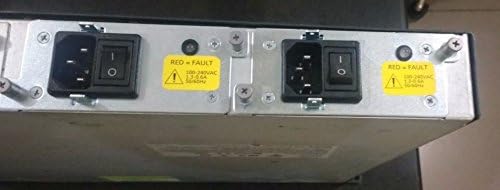
Figura 4.2: posterior view of the controller, highlighting the dual power input modules with power switches and fault indicators.
4.4 Network and Console Connections
Connect your network cables to the appropriate RJ-45 Ethernet ports. For initial configuration and direct management, connect a console cable to the DB-9 console port.

Figura 4.3: Part posterior detallada view of the controller, showing the SERVICE and UTILITY Ethernet ports, CONSOLE port, and multiple numbered Ethernet ports with associated LINK and ACT LEDs.
- Port de SERVEI: RJ-45 10/100Base-TX Ethernet port.
- UTILITY Port: RJ-45 10/100/1000Base-TX Ethernet port.
- Numbered Ports (1-4): Additional RJ-45 Ethernet ports.
- Port de la CONSOLA: DB-9 serial port for command-line interface (CLI) access.
5. Funcionament del controlador
5.1 Configuració inicial
After physical installation and power-up, access the controller via the console port using a terminal emulator (e.g., PuTTY, Tera Term) with appropriate serial settings (typically 9600 baud, 8 data bits, no parity, 1 stop bit, no flow control). Follow the on-screen prompts for initial setup, including IP address assignment and basic network parameters.
5.2 Web Interface and CLI Management
Once configured with an IP address, the controller can be managed via its web-based graphical user interface (GUI) or through the command-line interface (CLI) via SSH/Telnet or the console port. Refer to the Cisco documentation for detailed configuration guides on managing access points, creating WLANs, and setting up security policies.
6. Manteniment
6.1 Neteja
Regularly clean the exterior of the controller with a soft, dry cloth. Ensure ventilation openings are free from dust and debris to maintain optimal airflow and prevent overheating.
6.2 actualitzacions de microprogramari
Consulteu periòdicament el suport tècnic de Cisco website for firmware updates. Keeping the controller's firmware up-to-date ensures access to the latest features, security patches, and performance improvements. Follow Cisco's official procedures for firmware upgrades to avoid system disruption.
7. Solució De Problemes
7.1 Indicadors LED
The controller features various LED indicators to provide status information:
- LED ESTAT: Indicates the operational status of the controller.
- LED ALARMA: Illuminates when a system alarm or fault is detected.
- LED LINK/ACT (per port): Indicate network link status and activity for each Ethernet port.
7.2 Problemes comuns
- Sense energia: Check power cable connections and power switches. Verify power outlet functionality.
- Sense connectivitat de xarxa: Check Ethernet cable connections, port LEDs, and network configuration.
- Controller Unresponsive: Attempt to access via console port. If unresponsive, power cycle the unit.
Per a una resolució de problemes més avançada, consulteu la documentació de Cisco o poseu-vos en contacte amb el suport tècnic de Cisco.
8. Especificacions
| Característica | Detall |
|---|---|
| Fabricant | Cisco Systems, Inc. |
| Número de model | AIR-WLC4404-100-K9 |
| Tipus de producte | Controlador de LAN sense fil |
| Bandes de freqüència | 2.4 GHz (IEEE 802.11b/g ISM Band), 5 GHz (IEEE 802.11a) |
| Velocitat de transmissió | 54Mbps (IEEE 802.11a/g auto-fallback), 11Mbps (IEEE 802.11b auto-fallback) |
| Interfícies Ethernet | 1 x RJ-45 10/100Base-TX, 1 x RJ-45 10/100/1000Base-TX, Multiple additional RJ-45 ports |
| Interfície de consola | 1 x DB-9 Console Management |
| Dimensions (A x A x P) | 30,5 cm x 8,9 cm x 6,3 cm (dimensions del producte: 30,5 cm x 7,6 cm) |
| Pes | 15.3 lliures (15.3 lliures) |
| ASIN | B000E120GC |
| Data de primera disponibilitat | 4 d'octubre de 2006 |
9. Garantia i Suport
Specific warranty terms and conditions for the Cisco 4400 Series Wireless LAN Controller are not detailed in this manual. Please refer to the official Cisco website or your purchase documentation for comprehensive warranty information.
For technical support, software downloads, and additional documentation, visit the official Cisco Support weblloc web o poseu-vos en contacte amb el vostre distribuïdor autoritzat de Cisco.
Podeu trobar més informació a Botiga Cisco a Amazon.


