1. Introducció
Welcome to the user manual for your new Singing Machine SMVG-620 CD+G Karaoke System. This system is designed to provide hours of entertainment with its CD+G playback capabilities, built-in camera, 5.5-inch monitor, and AM/FM radio. Please read this manual thoroughly before operating your unit to ensure proper use and to maximize your enjoyment.
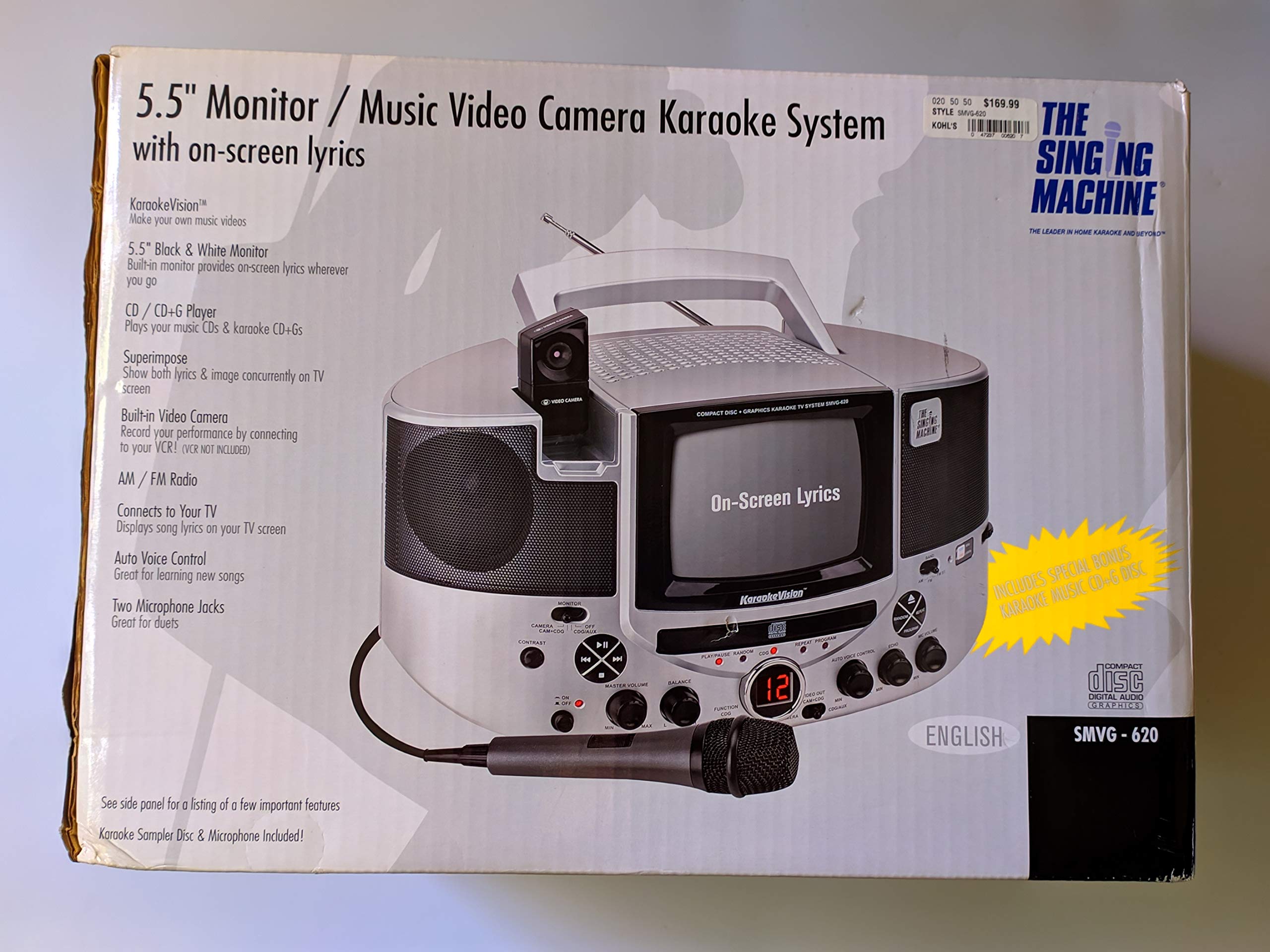
Figura 1.1: The Singing Machine SMVG-620 CD+G Karaoke System.
For optimal performance and safety, always follow the instructions and warnings provided.
2. Informació important de seguretat
- Llegeix les instruccions: S'han de llegir totes les instruccions de seguretat i operació abans d'utilitzar l'aparell.
- Instruccions de conservació: Les instruccions de seguretat i funcionament s'han de conservar per a futures consultes.
- Compte amb les advertències: S'han de respectar totes les advertències de l'aparell i de les instruccions d'ús.
- Seguiu les instruccions: S'han de seguir totes les instruccions d'ús i funcionament.
- Aigua i humitat: No utilitzeu aquest aparell prop de l'aigua.
- Neteja: Netegeu només amb un drap sec.
- Ventilació: No bloquegeu cap obertura de ventilació. Instal·leu-ho d'acord amb les instruccions del fabricant.
- Calor: No instal·leu a prop de cap font de calor com ara radiadors, registres de calor, estufes o altres aparells (inclosos amplificadors) que produeixen calor.
- Protecció del cable d'alimentació: Eviteu que el cable d'alimentació sigui trepitjat o pessigat, especialment als endolls, els endolls i el punt on surten de l'aparell.
- Adjunts/Accessoris: Utilitzeu només accessoris/accessoris especificats pel fabricant.
- Llamp: Desendolleu aquest aparell durant les tempestes amb llamps o quan no l'utilitzeu durant llargs períodes de temps.
- Manteniment: Demaneu tot el servei a personal de servei qualificat. Cal fer servei quan l'aparell s'hagi fet malbé d'alguna manera.
3. Contingut del paquet
Carefully unpack your Singing Machine SMVG-620 system and ensure all items listed below are present and in good condition.
- SMVG-620 CD+G Karaoke System
- One (1) Microphone
- Sampler CD+G Disc
- Audio/Video RCA Cables
- Adaptador de corrent alterna
- Manual d'instruccions

Figura 3.1: Contents of the box, including the microphone, RCA cables, and the instruction manual.
4. Producte acabatview
Familiarize yourself with the various parts and controls of your SMVG-620 Karaoke System.

Figura 4.1: posterior view of the product packaging highlighting key features and components of the SMVG-620 system.
Característiques principals:
- 5.5" Black & White Monitor: For on-screen lyrics from CD+G discs.
- Built-in Color Camera: Allows you to see yourself on the monitor or connected TV.
- Dual Microphone Jacks: Connect two microphones for duets (one microphone included).
- Ràdio AM/FM: Sintonitza les teves emissores de ràdio preferides.
- Reproductor de CD+G: Plays standard audio CDs and CD+Graphics discs.
- Control automàtic de veu (AVC): Helps maintain vocal balance by automatically reducing the main vocal track when you sing.
- Control d'eco: Adds depth and resonance to your voice.
- Professional Style Microphone: For clear vocal pickup.
- Sortida d'àudio/vídeo: Connects to your TV for larger screen display and enhanced audio.
5. Configuració
5.1 Connexió d'alimentació
- Assegureu-vos que la unitat estigui col·locada sobre una superfície plana i estable.
- Connect the AC power adapter to the DC IN jack on the back of the SMVG-620 unit.
- Connecteu l'altre extrem de l'adaptador de corrent altern a una presa de corrent estàndard (120 V ~ 60 Hz).
5.2 Connexió a un televisor
A view lyrics on a larger screen and enhance audio, connect the SMVG-620 to your television using the supplied Audio/Video RCA cables.
- Locate the AUDIO OUT (white and red) and VIDEO OUT (yellow) jacks on the back of the SMVG-620.
- Connect the white plug of the RCA cable to the white AUDIO OUT jack on the karaoke system and to the white AUDIO IN jack on your TV.
- Connect the red plug of the RCA cable to the red AUDIO OUT jack on the karaoke system and to the red AUDIO IN jack on your TV.
- Connect the yellow plug of the RCA cable to the yellow VIDEO OUT jack on the karaoke system and to the yellow VIDEO IN jack on your TV.
- Turn on your TV and select the correct A/V input source (e.g., AV1, Video 1) that corresponds to the jacks you used.
5.3 Connexió del micròfon
Plug the microphone into either the MIC 1 or MIC 2 jack on the front of the SMVG-620 unit.
6. Funcionament
6.1 Engegada/apagada
Premeu el botó PODER button located on the front panel to turn the unit ON or OFF.
6.2 CD+G Playback
- Open the CD compartment door and carefully place a CD+G disc (or standard audio CD) onto the spindle with the label side facing up. Close the door.
- Seleccioneu CD+G mode using the FUNCTION selector.
- Premeu el botó REPRODUCCIÓ/PAUSA per iniciar la reproducció.
- Ajusteu el MÀSTER VOLUM el botó al nivell d'escolta desitjat.
- Utilitza el SALTAR botons (<< or >>) per navegar entre pistes.
- Per fer una pausa, premeu REPRODUCCIÓ/PAUSA de nou. Premeu de nou per reprendre.
- Per aturar la reproducció, premeu el botó STOP botó.
6.3 Ús del micròfon
- Ensure the microphone is connected to a MIC jack.
- Ajusteu el VOLUM MIC botó per controlar el nivell de sortida del micròfon.
- Gireu el ECO botó per afegir un efecte d'eco a la teva veu.
- El AUTO VOICE CONTROL (AVC) switch can be toggled ON/OFF. When ON, the original vocal track on a CD+G disc will be reduced when you sing into the microphone.
Ràdio 6.4 AM/FM
- Seleccioneu AM or FM mode using the FUNCTION selector.
- Esteneu l'antena FM per a una millor recepció.
- Gireu el TUNING botó per seleccionar l'emissora de ràdio desitjada.
- Ajusteu el MÀSTER VOLUM perilla.
6.5 Funció de la càmera
The built-in camera allows you to display your image on the 5.5-inch monitor or a connected TV.
- Ensure the unit is powered on and connected to a TV if you wish to use an external display.
- The camera feed will automatically display when the unit is in CD+G or Video mode, or when no other video source is active.
7. Manteniment
7.1 Neteja de la unitat
- Desconnecteu sempre la unitat de la presa de corrent abans de netejar-la.
- Utilitzeu un drap suau i sec per netejar les superfícies exteriors.
- No utilitzeu netejadors abrasius, ceres o dissolvents, ja que poden danyar l'acabat.
- Per a la lent del CD, feu servir un disc netejador de lents de CD especialitzat.
7.2 Cura del CD
- Manipuleu els CD per les vores per evitar que deixeu empremtes dactilars a la superfície de reproducció.
- Keep discs in their cases when not in use to prevent scratches.
- Netegeu els discos amb un drap suau i sense borrissol, netejant des del centre cap a fora.
8. Solució De Problemes
If you encounter any issues with your SMVG-620, please refer to the following common problems and solutions.
| Problema | Causa possible | Solució |
|---|---|---|
| Sense poder | El cable d'alimentació no està connectat correctament. | Ensure the AC adapter is securely plugged into the unit and a working wall outlet. |
| No hi ha so dels altaveus | Master Volume is too low. S'ha seleccionat un mode de funció incorrecte. | Increase the MASTER VOLUME. Select the correct FUNCTION (CD+G, AM, FM). |
| No hi ha so del micròfon | Microphone not connected. MIC VOLUME is too low. Microphone switch is OFF. | Plug microphone into MIC 1 or MIC 2 jack. Increase the MIC VOLUME. Ensure microphone switch is ON. |
| No video on TV / No lyrics | Cables RCA no connectats correctament. Entrada de TV incorrecta seleccionada. Not a CD+G disc. | Check all RCA cable connections (yellow for video). Select the correct A/V input on your TV. Ensure you are playing a CD+G disc for lyrics. |
| Salt de CD | El disc està brut o ratllat. La unitat es troba en una superfície inestable. | Clean the disc or try another disc. Place the unit on a stable, vibration-free surface. |
9. Especificacions
| Número de model | SMVG-620 (SIN SMVG620) |
| Font d'alimentació | AC 120V ~ 60Hz (via AC Adapter) |
| Monitor | 5.5-inch Black & White |
| Recompte de parlants | 2 |
| Dispositius compatibles | Televisió |
| Tipus de suport | CD, CD+G |
| Dimensions del producte (LxWxH) | 35.8 x 20.8 x 19.3 cm (14.1 x 8.2 x 7.6 polzades) |
| Pes de l'article | 3.9 kg (8.6 lliures) |
10. Garantia i Suport
For warranty information and customer support, please refer to the warranty card included with your product or contact The Singing Machine directly. You may also consult your retailer for details regarding their return and warranty policies.
Fabricant: LA MÀQUINA DE CANT


