Instruccions importants de seguretat
- Llegeix aquestes instruccions: Before operating the microphone, read and understand all safety and operating instructions.
- Keep these instructions: Conserveu les instruccions de seguretat i operació per a futures consultes.
- Compte amb totes les advertències: Seguiu totes les advertències del producte i de les instruccions d'ús.
- Seguiu totes les instruccions: Adhere to all operating and usage instructions.
- Aigua i humitat: Do not use this apparatus near water. Avoid exposing the microphone to rain or moisture.
- Neteja: Netegeu només amb un drap sec.
- Calor: No instal·leu a prop de cap font de calor com ara radiadors, registres de calor, estufes o altres aparells (inclosos amplificadors) que produeixen calor.
- Adjunts/Accessoris: Utilitzeu només accessoris/accessoris especificats pel fabricant.
- Manteniment: Demaneu tot el servei a personal de servei qualificat. El manteniment és necessari quan l'aparell s'ha fet malbé d'alguna manera, com ara el cable d'alimentació o l'endoll està danyat, s'ha vessat líquid o han caigut objectes a l'aparell, l'aparell ha estat exposat a la pluja o la humitat, no funciona amb normalitat. , o s'ha deixat caure.
Producte acabatview
The Aiwa CM-P11 is a separable stereo condenser microphone designed for versatile audio recording. Its unique design allows the two microphone capsules to be positioned independently, providing enhanced stereo separation for various recording environments. It connects via a standard 3.5mm stereo mini-plug.
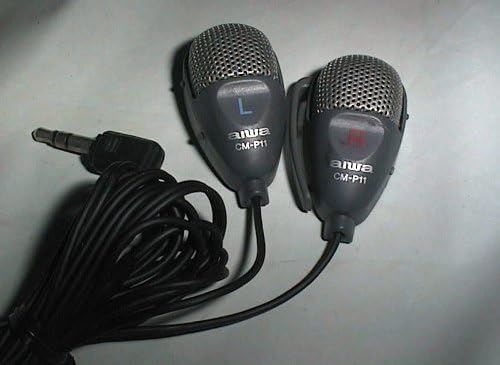
Característiques principals:
- Disseny separable: Allows for flexible placement of left and right channels.
- Tipus de condensador: Provides clear and detailed audio capture.
- Patró polar unidireccional: Focuses on sound from the front, reducing side and rear noise.
- 3.5mm Stereo Mini-Plug: Compatible with a wide range of recording devices.
Configuració
- Desempaquetar el micròfon: Carefully remove the CM-P11 microphone from its packaging.
- Connecta al dispositiu de gravació: Insert the 3.5mm stereo mini-plug into the microphone input jack of your recording device (e.g., camera, digital audio recorder, computer sound card). Ensure the connection is secure.
- Posició dels micròfons: Separate the two microphone capsules and position them according to your recording needs. For optimal stereo effect, place them at a suitable distance and angle from each other, typically facing the sound source. The 'L' and 'R' markings on the capsules indicate the left and right channels.
- Requisit d'energia: The CM-P11 is a condenser microphone and requires power. Most compatible devices provide 'plug-in power' through their microphone input jack. If your device does not provide plug-in power, an external amplifier or phantom power source may be required for proper operation. Consult your recording device's manual for microphone input specifications.
- Col·locació segura: Use the integrated clips on each microphone capsule to attach them to clothing, a stand, or other surfaces for stable positioning.
Instruccions de funcionament
- Ajusta els nivells d'entrada: Before recording, perform a test recording and adjust the input level on your recording device. Ensure the audio is not too low (noisy) or too high (distorted). Aim for levels that peak around -6dB to -3dB on your device's meter.
- Separació estèreo: Experiment with the distance between the two separable microphone capsules to achieve the desired stereo image. Placing them further apart will create a wider stereo field, while closer placement will result in a narrower, more focused stereo sound.
- Col·locació òptima: For speech, position the microphones within 6-12 inches of the speaker. For music or ambient sounds, place them at a distance that captures the overall sound field effectively. The unidirectional pattern helps to minimize unwanted background noise.
- Seguiment: If your recording device allows, monitor the audio with headphones during recording to catch any issues with sound quality or microphone placement in real-time.
- Gestió de cables: Ensure the microphone cable is not tangled or under tension, which could affect sound quality or damage the cable.
Manteniment
- Neteja: Use a soft, dry cloth to wipe the microphone capsules and cable. Do not use liquid cleaners, solvents, or abrasive materials, as these can damage the finish or internal components.
- Emmagatzematge: When not in use, store the microphone in a clean, dry place, away from extreme temperatures and humidity. Avoid coiling the cable too tightly to prevent damage.
- Cura del cable: Handle the cable gently. Avoid sharp bends, kinks, or pulling on the cable, especially near the connectors, as this can lead to internal wire damage and intermittent connections.
- Cura del connector: Keep the 3.5mm mini-plug clean and free of dust or debris. A dirty connector can lead to poor audio quality or connection issues.
Resolució de problemes
- Sense so o sortida de so baix:
- Ensure the 3.5mm mini-plug is fully inserted into the microphone input jack of your recording device.
- Check the input level settings on your recording device. Increase the gain or volume if it's too low.
- Verify that your recording device's microphone input provides 'plug-in power' if required. If not, an external power source may be necessary.
- Test the microphone with another compatible device if possible to rule out a device-specific issue.
- So distorsionat o poc clar:
- Reduce the input level on your recording device if the sound is clipping or distorting.
- Ensure the microphones are not placed too close to the sound source, which can cause overload.
- Check for any physical obstructions or debris on the microphone grilles.
- Intermittent Connection or Popping Noises:
- Inspect the 3.5mm mini-plug and the cable for any visible damage or loose connections.
- Gently wiggle the plug in the input jack to see if the connection stabilizes. If it does, the plug or jack may be faulty.
- Ensure the cable is not under strain or bent sharply.
- Excessive Background Noise or Hum:
- Move the microphone away from electronic devices that might cause interference (e.g., computers, power supplies, fluorescent lights).
- Assegureu-vos que tots els cables estiguin ben apantallats i connectats.
- Check if the recording environment itself is noisy. The unidirectional pattern helps, but cannot eliminate all ambient sound.
Especificacions
| Número de model | CM-P11 |
| Marca | No |
| Tipus de micròfon | Condensador |
| Patró polar | Unidireccional |
| Sensibilitat d'àudio | 48 decibels |
| Tecnologia de connectivitat | Auxiliary (3.5mm Stereo Mini-Plug) |
| Font d'alimentació | Corded Electric (typically plug-in power from device) |
| Factor de forma del micròfon | Microphone only (separable capsules) |
| Pes de l'article | 2.4 unces |
| Dimensions del paquet | 5.7 x 3.6 x 1.2 polzades |
| Components inclosos | Separable Stereo Condenser Microphone with integrated cable and 3.5mm mini-plug |
Garantia i Suport
For information regarding warranty coverage, service, or technical support for your Aiwa CM-P11 Separable Stereo Condenser Microphone, please refer to the warranty card included with your purchase or visit the official Aiwa weblloc web. Les dades de contacte de l'atenció al client normalment es proporcionen al lloc web del fabricant. weblloc o a l'embalatge del producte.
Always ensure you have your product model number (CM-P11) and proof of purchase available when contacting support.


