Introducció
This manual provides comprehensive instructions for the operation, maintenance, and troubleshooting of your RCA RP5025 Digital Voice Recorder. Please read this manual thoroughly before using the device to ensure proper functionality and to maximize its features. Keep this manual for future reference.
Producte acabatview
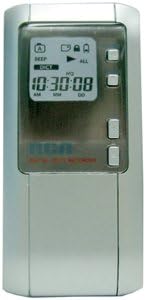
Figura 1: Davant view of the RCA RP5025 Digital Voice Recorder. The device features a prominent LCD display showing time and recording status, along with several control buttons on the right side for navigation and operation.
The RCA RP5025 is a compact digital voice recorder designed for clear audio capture and playback. It features 64 MB of built-in memory, allowing for approximately 30 hours of recording time. Key features include an LCD display, built-in flash record and speaker, Auto Voice Record (VOR), variable speed playback, intro scan, date and time stamp, and the ability to organize messages into two folders with up to 198 messages each. It also includes a low-battery indicator and a headphone jack for private listening.
Configuració
1. Instal·lació de la bateria
The RCA RP5025 requires batteries for operation. Locate the battery compartment on the back of the device. Insert the specified batteries, ensuring correct polarity (+/-) as indicated inside the compartment. Close the battery cover securely.
2. Engegada inicial
After installing batteries, press and hold the Power button (usually located on the side or front) until the LCD display illuminates. The device may prompt you to set the date and time during the first power-on. Follow the on-screen instructions to set these parameters using the navigation buttons.
3. Configuració de la data i l'hora
Accurate date and time settings are crucial for the date & time stamp feature. Navigate to the 'Settings' or 'Menu' option on the device. Select 'Date/Time' and use the control buttons to adjust the year, month, day, hour, and minute. Confirm your selections to save the settings.
Instruccions de funcionament
1. Recording Messages
- Comença a gravar: Premeu el botó REGISTRAR button. The recording indicator will appear on the LCD.
- Pausa de gravació: Premeu el botó REGISTRAR button again during recording. Press it once more to resume.
- Atura la gravació: Premeu el botó STOP button. The recorded message will be saved automatically.
- Auto Voice Record (VOR): To enable VOR, navigate to the settings menu and activate the VOR function. The recorder will automatically start recording when sound is detected and pause when silence occurs.
2. Playing Back Messages
- Select Message: Utilitza el AVANT or INVERSA buttons to navigate through saved messages.
- Inicia la reproducció: Premeu el botó JUGAR botó.
- Ajustar el volum: Utilitza el PUJAR/BAIXAR VOLUM buttons during playback.
- Reproducció de velocitat variable: Access this feature through the menu to adjust playback speed without altering pitch.
- Intro Scan: Activate Intro Scan from the menu to play the first few seconds of each message, allowing for quick message identification.
- Atura la reproducció: Premeu el botó STOP botó.
3. Managing Messages (Editing Functions)
- Delete Message: Select the message you wish to delete, then access the 'Delete' option from the menu. Confirm your selection.
- Move Message: Messages can be moved between the two available folders (Folder 1 and Folder 2). Select a message, then choose the 'Move' option and select the destination folder.
- Organizing Folders: The device supports two folders, each capable of holding up to 198 messages. Use the folder navigation buttons to switch between folders.
Manteniment
1. Neteja del dispositiu
Wipe the exterior of the recorder with a soft, dry cloth. Do not use liquid cleaners, aerosols, or solvents, as these can damage the device. Ensure no moisture enters the device openings.
2. Cura de la bateria
If the device will not be used for an extended period, remove the batteries to prevent leakage and potential damage. Replace batteries when the low-battery indicator appears on the LCD display to ensure continuous operation and prevent data loss.
3. Emmagatzematge
Store the voice recorder in a cool, dry place, away from direct sunlight, extreme temperatures, and high humidity. Avoid dropping or subjecting the device to strong impacts.
Resolució de problemes
| Problema | Causa possible | Solució |
|---|---|---|
| El dispositiu no s'encén. | Piles gastades o instal·lades incorrectament. | Comproveu la polaritat de la bateria. Substituïu-la per bateries noves. |
| No es pot gravar. | Memory full; device in playback mode. | Delete old messages to free up space. Ensure device is in record mode. |
| Poor audio quality during playback. | Microphone obstructed; recording environment too noisy; low battery. | Ensure microphone is clear. Record in a quieter environment. Replace batteries. |
| La pantalla LCD està en blanc o tènue. | Low battery; device is off. | Replace batteries. Press the Power button to turn on the device. |
Especificacions
- Model: RCA RP5025
- Capacitat de memòria: 64 MB
- Temps d'enregistrament: Aproximadament 30 hores
- Visualització: LCD
- Característiques: Built-in flash record & speaker, Auto Voice Record (VOR), Variable speed playback, Intro scan, Date & time stamp, 2 folders (198 messages each), Low-battery indicator, Headphone jack, Editing functions.
- Font d'alimentació: Batteries (type not specified in input, assuming common AAA/AA)
- Dimensions: 9.49 x 5.98 x 1.42 polzades (dimensions del paquet)
- Pes: 4.8 unces
- Presa per a auriculars: Àudio de 3.5 mm
- Micròfon: Integrat, Mono
Informació de la garantia
RCA products typically come with a limited warranty covering defects in materials and workmanship. For specific warranty terms and conditions, please refer to the warranty card included with your product packaging or visit the official RCA weblloc web. Conserveu el rebut de compra com a comprovant de compra per a reclamacions de garantia.
Atenció al client
For technical assistance, troubleshooting beyond this manual, or service inquiries, please contact RCA customer support. You can often find contact information (phone numbers, email, or support portals) on the official RCA website or within the product packaging. When contacting support, please have your product model number (RP5025) and serial number (if applicable) ready.
Oficial de la RCA Weblloc: www.rca.com (Please note: This is a general placeholder link, actual support link may vary.)


