1. Introducció
This manual provides detailed instructions for the proper use and maintenance of your Vivitar VIVICAM-X30 10.0 MegaPixel Slim Camera. Please read this manual thoroughly before operating the camera to ensure optimal performance and longevity.
The Vivitar VIVICAM-X30 features a 10.0 megapixel sensor, 3x optical zoom, and an 8x digital zoom, allowing for high-resolution images and versatile shooting. It includes a 2.5-inch color LTPS screen for convenient viewing and playback. Key features include electronic image stabilization, AVI movie recording at 640x480 at 30fps, and a compact design.
2. Producte acabatview
Familiarize yourself with the various components of your Vivitar VIVICAM-X30 camera.
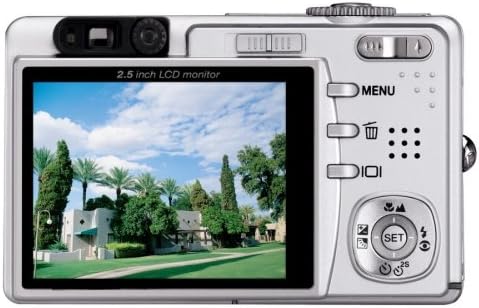
Figura 2.1: Frontal view of the Vivitar VIVICAM-X30, showing the lens, flash, and Vivitar branding.
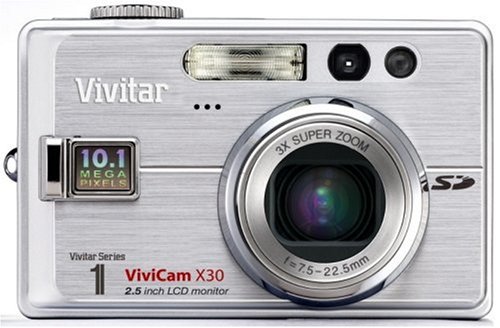
Figura 2.2: posterior view of the Vivitar VIVICAM-X30, showing the 2.5-inch LCD monitor, control buttons (MENU, delete, playback), and a directional pad with SET button. The zoom rocker is visible at the top right.
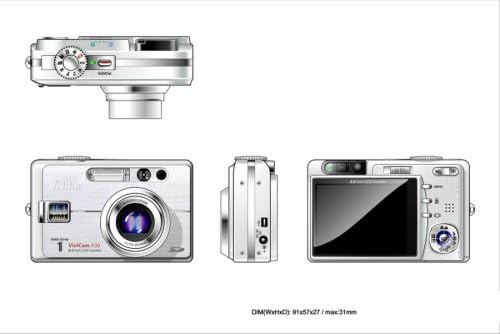
Figura 2.3: Multi-view diagram of the Vivitar VIVICAM-X30. This includes a top view with the mode dial, a front view showing the lens and flash, a side view with the USB port, and a rear view with the LCD and controls. Dimensions are indicated as 91x57x27 / max 31mm.
2.4 Components de la càmera
- Lent: Objectiu amb zoom òptic de 3x.
- Flash: Flaix integrat per a condicions de poca llum.
- Monitor LCD: 2.5-inch color LTPS screen for viewing i reproducció.
- Botons de control: MENU, Delete, Playback, and directional pad with SET button.
- Palanca de zoom: Controla el zoom òptic i digital.
- Marcador de mode: Selects shooting modes (e.g., Auto, Movie, Scene).
- Botó de l'obturador: Captures photos.
- Botó d'encesa: Encén/apaga la càmera.
- Port USB: Per connectar-se a un ordinador.
- Compartiment de la bateria: Houses the Li-Ion battery.
- Ranura per a targeta SD: Per a la inserció de targetes de memòria.
3. Configuració
3.1 Càrrega de la bateria
- Insert the supplied Li-Ion battery into the battery charger.
- Connecteu el carregador a una presa de corrent.
- El llum indicador de càrrega mostrarà l'estat de càrrega. Carregueu la bateria completament abans del primer ús.
Nota: A fully charged battery is essential for optimal camera performance.
3.2 Instal·lació de la bateria
- Obriu la tapa del compartiment de la bateria que es troba a la part inferior de la càmera.
- Insert the charged Li-Ion battery according to the polarity indicators inside the compartment.
- Tanqueu la tapa del compartiment de la bateria de manera segura fins que encaixi al seu lloc.
3.3 Inserció d'una targeta de memòria
The Vivitar VIVICAM-X30 uses SD (Secure Digital) memory cards (not included). A memory card is required to store photos and videos.
- Locate the SD card slot, typically on the side or bottom of the camera.
- Inseriu la targeta SD amb els contactes metàl·lics mirant en la direcció correcta (vegeu el diagrama a prop de la ranura).
- Push the card gently until it clicks into place. To remove, push the card again until it springs out.
Nota: Ensure the camera is powered off before inserting or removing the memory card.
4. Funcionament de la càmera
4.1 Engegada/apagada
Press the Power button to turn the camera on or off. The LCD screen will illuminate upon power-on.
4.2 Fotografia bàsica
- Seleccioneu un mode: Rotate the mode dial to select your desired shooting mode (e.g., Auto for general use, SCN for scene modes).
- Enquadra la teva presa: Use the 2.5-inch LCD monitor to compose your image.
- Zoom: Use the zoom lever to adjust the optical (3x) and digital (8x) zoom.
- Focus: The camera will automatically focus when the shutter button is half-pressed.
- Captura: Fully press the shutter button to take a picture.
The camera features an Image Stabilizer to help prevent blur, especially in challenging conditions.
4.3 Scene Modes (SCN)
The VIVICAM-X30 offers various scene modes to optimize settings for specific shooting conditions. These may include Sport, Portrait, Night, and Candelight. Access these modes via the mode dial or the camera's menu system.
4.4 Enregistrament de vídeo
The camera can record AVI format movie clips up to 640 x 480 resolution at 30 frames per second.
- Rotate the mode dial to the Movie mode icon.
- Premeu el botó de l'obturador per començar a gravar.
- Torneu a prémer el botó de l'obturador per aturar la gravació.
4.5 Reproducció
A view les teves fotos i vídeos capturats:
- Press the Playback button (often indicated by a triangle icon).
- Feu servir el botó direccional per navegar per les imatges i els vídeos.
- Press the SET button to play videos.
4.6 Connexió a un ordinador
To transfer photos and videos to your computer:
- Assegureu-vos que la càmera estigui apagada.
- Connecteu la càmera a l'ordinador mitjançant el cable USB subministrat.
- Power on the camera. It should be recognized as a removable disk or mass storage device.
- Access the camera's memory card contents through your computer's file explorador.
5. Manteniment
5.1 Neteja de la càmera
- Lent: Feu servir un drap suau i sense borrissol dissenyat específicament per a objectius de càmera. No utilitzeu materials abrasius ni productes químics agressius.
- Pantalla LCD: Gently wipe with a soft, dry cloth. For stubborn smudges, use a screen cleaner designed for electronics.
- Cos de la càmera: Wipe with a soft, dry cloth. Avoid moisture near ports and buttons.
5.2 Cura de la bateria
- Guardeu la bateria en un lloc fresc i sec quan no la feu servir.
- Eviteu descarregar completament la bateria amb freqüència per allargar-ne la vida útil.
- Si no heu d'utilitzar la càmera durant un període prolongat, traieu-ne la bateria.
5.3 Emmagatzematge
When storing the camera, especially for long periods, ensure it is clean, dry, and the battery is removed. Store it in the supplied storage case or a protective bag to prevent dust and scratches.
6. Solució De Problemes
If you encounter issues with your Vivitar VIVICAM-X30, refer to the following common problems and solutions:
| Problema | Possible causa/solució |
|---|---|
| La càmera no s'encén. |
|
| Camera shuts off automatically too quickly. |
|
| Photos are too bright or washed out (especially with flash). |
|
| No es poden desar fotos/vídeos. |
|
| Càmera no reconeguda per l'ordinador. |
|
7. Especificacions
Below are the technical specifications for the Vivitar VIVICAM-X30 digital camera:
| Característica | Detall |
|---|---|
| Nom del model | VIVICAM X30 |
| Resolució de fixes efectius | 10 MP |
| Zoom òptic | 3x |
| Zoom digital | 8x |
| Mida de la pantalla | 2.5 Inches (LTPS TFT LCD) |
| Estabilització d'imatge | Electrònica |
| Resolució de vídeo | 480p (640 x 480 at 30fps) |
| Format de captura de vídeo | AVI |
| Admet File Format | AVI (Video), JPEG (Still Image) |
| Tecnologia de connectivitat | USB |
| Tipus de bateria | Ió de liti |
| Distància focal mínima | 7.5 mm |
| Distància focal màxima | 22.5 mm |
| Tecnologia d'enfocament automàtic | Detecció de contrast |
| Configuració del balanç de blancs | Automàtic |
| ISO Màxim ampliat | 3200 |
| Pes de l'article | 2.22 lliures |
| Dimensions (A x A x P) | 91 x 57 x 27 mm (max 31mm) |
8. Garantia i Suport
8.1 Informació de la garantia
The Vivitar VIVICAM-X30 comes with a Garantia limitada de 1 anys des de la data de compra. Aquesta garantia cobreix els defectes de fabricació i la mà d'obra en condicions d'ús normal. Si us plau, conserveu el comprovant de compra per a reclamacions de garantia.
For specific terms and conditions of the warranty, please refer to the warranty card included with your product or visit the official Vivitar weblloc.
8.2 Atenció al client
If you require further assistance, have questions not covered in this manual, or need technical support, please contact Vivitar customer service. Contact information can typically be found on the Vivitar official weblloc web o a l'embalatge del producte.
When contacting support, please have your camera model (VIVICAM-X30) and serial number (if applicable) ready.


