1. Introducció
This manual provides instructions for the safe and efficient use of your Targus TG-LCS Universal Sony Rapid Li-ion Battery Charger. This device is designed to rapidly charge most Sony Li-ion batteries, offering convenience with its universal voltage compatibility and included car charging adapter.
Les característiques clau inclouen:
- Rapidly charges most Sony batteries in a standard wall outlet or in a car within 1-2 hours.
- Universal 100-240V input for worldwide usage.
- Advanced technology prevents overcharging, protecting your batteries.
- Indicator light clearly shows charging status (red for charging, green for complete).
- Includes a 12-24V DC car charging plug for on-the-go power.
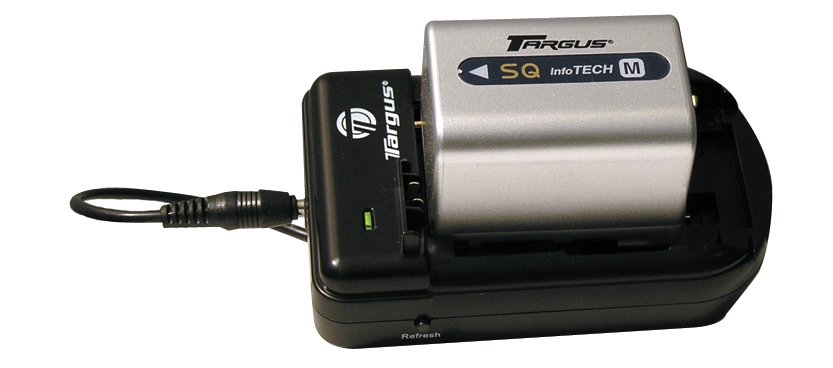
Figure 1: Targus TG-LCS Universal Sony Rapid Li-ion Battery Charger. This image shows the compact design of the charger, suitable for both home and travel use.
2. Informació important de seguretat
Si us plau, llegiu totes les instruccions de seguretat abans d'utilitzar aquest producte. Si no seguiu aquestes instruccions, podeu patir descàrregues elèctriques, incendis o lesions greus.
- No ho facis expose the charger to rain or moisture.
- No ho facis operate the charger if it has received a sharp blow, been dropped, or otherwise damaged.
- No ho facis disassemble the charger. Incorrect reassembly may result in electric shock or fire.
- No ho facis use an extension cord or attachment not recommended by the manufacturer, as this may result in a risk of fire or electric shock.
- No ho facis carregar bateries no recarregables.
- Ensure the battery type is compatible with the charger before inserting.
- Desendolleu el carregador de la presa de corrent quan no l'utilitzeu.
- Mantenir fora de l'abast dels nens.
3. Contingut del paquet
Verifiqueu que tots els elements siguin presents al vostre paquet:
- Targus TG-LCS Universal Sony Rapid Li-ion Battery Charger
- AC Power Cord (for wall outlet charging)
- 12-24V DC Car Charging Plug
- Manual d'usuari (aquest document)
4. Configuració
4.1 Connexió a l'alimentació
The charger can be powered via a standard wall outlet or a vehicle's DC power socket.
- For Wall Outlet Use: Connect the AC power cord to the charger and then plug the other end into a standard 100-240V AC wall outlet.
- Per a ús en cotxe: Connect the 12-24V DC car charging plug to the charger and then plug the other end into your vehicle's DC power socket (cigarette lighter socket).
4.2 Inserció de la bateria
Carefully insert your compatible Sony Li-ion battery into the designated slot on the charger. Ensure the battery is seated correctly and makes proper contact with the charging terminals.
Nota: The charger is designed to accommodate various Sony Li-ion battery sizes. Ensure a secure fit for optimal charging. If the fit is loose, ensure the battery is still making proper contact with the charging pins.
5. Funcionament
5.1 Procés de càrrega
Once the battery is correctly inserted and the charger is connected to a power source, the charging process will begin automatically.
5.2 Llum indicador
The charger features an indicator light to communicate the charging status:
- Llum vermella: Indica que la bateria s'està carregant actualment.
- Llum verda: Indicates that the battery is fully charged and ready for use. The charger's advanced technology prevents overcharging, so you can leave the battery connected even after the light turns green.
Typical charging time for most Sony batteries is 1-2 hours, depending on the battery's capacity and discharge level.
6. Manteniment
To ensure the longevity and optimal performance of your charger:
- Keep the charger clean and dry. Wipe with a soft, dry cloth.
- Eviteu exposar el carregador a temperatures extremes o a la llum solar directa.
- Guardeu el carregador en un lloc fresc i sec quan no l'utilitzeu.
- Regularly check the power cords for any signs of damage. If damaged, discontinue use and replace.
7. Solució De Problemes
If you encounter issues with your Targus TG-LCS charger, refer to the following common problems and solutions:
| Problema | Causa possible | Solució |
|---|---|---|
| El llum indicador del carregador no s'encén. | Sense energia al carregador. |
|
| Battery is not charging (light remains off or flashes erratically). | Battery not properly seated or incompatible battery. |
|
| Charging takes longer than expected. | Battery capacity is very high or deeply discharged. | This is normal for high-capacity or deeply discharged batteries. Allow more time. Ensure the charger is in a well-ventilated area. |
8. Especificacions
| Número de model | TG-LCS |
| Marca | Targus |
| Entrada Voltage | 100-240V AC (Wall Outlet), 12-24V DC (Car) |
| Tipus de bateria compatible | Sony Li-ion batteries |
| Temps de càrrega | Approximately 1-2 hours (depending on battery capacity) |
| Dimensions del producte | 2 x 2 x 5 polzades |
| Pes de l'article | 5.6 unces |
| Fabricant | Targus |
| UPC | 871436005453 |
9. Atenció al client i garantia
For technical assistance, warranty information, or to inquire about replacement parts, please contact Targus customer support.
Please visit the official Targus website for the most up-to-date contact information and warranty details: www.targus.com/us/support
Conserveu el rebut de compra com a comprovant de compra per a reclamacions de garantia.


