1. Introducció
This manual provides detailed instructions for the installation, operation, and maintenance of your IOGEAR GUH275W6 High-Speed USB 2.0 Hub. Please read this manual thoroughly before using the device to ensure proper functionality and to prevent damage.
The IOGEAR GUH275W6 is a 4-port USB 2.0 hub designed to expand the USB connectivity of your computer. It offers high-speed data transfer rates and is backward compatible with USB 1.1 devices.
2. Característiques del producte
- Provides 4 Hi-Speed USB 2.0 ports.
- Supports data transfer rates up to 480 Mbps.
- Backward compatible with USB 1.1 specifications and devices.
- Plug-n-Play functionality for easy setup.
- Hot-swappable, allowing devices to be connected and disconnected without restarting the computer.
- Disseny compacte i portàtil.
- Compatible with Windows 98SE, 2000, ME, XP, and Mac OS X or later.
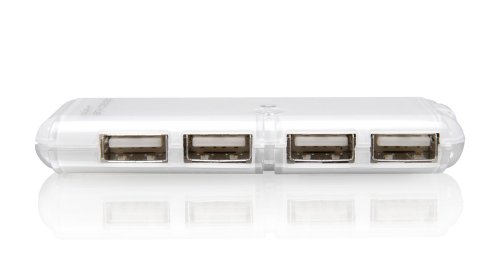
Figura 1: The IOGEAR GUH275W6 4-Port USB 2.0 Hub, showing its four USB ports on the front face.
3. Instruccions de configuració
- Connect the Hub to Your Computer: Locate an available USB port on your computer. Plug the USB connector cable from the IOGEAR GUH275W6 hub into this port.
- Detecció del sistema operatiu: Your operating system (Windows or Mac OS) should automatically detect and install the necessary drivers for the hub. This process is typically quick and requires no user intervention.
- Connectar dispositius USB: Once the hub is recognized, you can connect your USB devices (e.g., flash drives, keyboards, mice, printers) to the available ports on the IOGEAR GUH275W6 hub.
- Verifica el reconeixement del dispositiu: Ensure that your connected USB devices are recognized by your computer. You may check your computer's Device Manager (Windows) or System Information (Mac OS) to confirm.
Nota: The IOGEAR GUH275W6 is a Plug-n-Play device and typically does not require external power for most standard USB devices. For high-power consumption devices, an optional external power adapter (not included) may be required, if the hub supports it. The product description does not explicitly mention an external power port, so we assume it's bus-powered for typical use.
4. Instruccions de funcionament
The IOGEAR GUH275W6 hub operates automatically once connected. Here are general guidelines for its use:
- Dispositius de connexió: Simply plug your USB 2.0 or USB 1.1 compatible devices into any of the four available ports on the hub.
- Desconnexió de dispositius: The hub supports hot-swapping. You can disconnect devices at any time. For storage devices, it is recommended to safely eject them from your operating system before physical disconnection to prevent data corruption.
- Transferència de dades: The hub facilitates data transfer between your connected USB devices and your computer at speeds up to 480 Mbps, depending on the connected device and your computer's USB port capabilities.
5. Manteniment
To ensure the longevity and optimal performance of your IOGEAR GUH275W6 USB hub, follow these simple maintenance guidelines:
- Neteja: Use a soft, dry cloth to clean the exterior of the hub. Avoid using liquid cleaners or solvents, as they may damage the device.
- Emmagatzematge: Quan no l'utilitzeu, guardeu el concentrador en un lloc fresc i sec, allunyat de la llum solar directa i de temperatures extremes.
- Manipulació: Manipuleu el concentrador amb cura. Eviteu deixar-lo caure o sotmetre'l a impactes forts.
- Gestió de cables: Ensure that the USB cable connected to the hub is not excessively bent or strained, which could lead to internal damage.
6. Solució De Problemes
If you encounter issues with your IOGEAR GUH275W6 hub, refer to the following troubleshooting steps:
- Dispositiu no reconegut:
- Ensure the hub is securely plugged into a working USB port on your computer.
- Proveu de connectar el concentrador a un altre port USB de l'ordinador.
- Reinicieu l'ordinador.
- If connecting a high-power device, ensure your computer's USB port can supply sufficient power. Some older or lower-power USB ports may not provide enough power for multiple high-drain devices through a hub.
- Transferència lenta de dades:
- Verify that both the hub and the connected device are USB 2.0 compatible. If either is USB 1.1, data transfer will be limited to USB 1.1 speeds.
- Ensure your computer's USB port is a USB 2.0 port.
- Disconnect other high-bandwidth devices from the hub or other USB ports on your computer to free up bandwidth.
- Connexions intermitents:
- Comproveu si totes les connexions dels cables estan soltes.
- Test the hub with different USB devices to isolate if the issue is with the hub or a specific device.
- Avoid placing the hub near sources of strong electromagnetic interference.
7. Especificacions
| Model | GUH275W6 |
| Marca | IOGEAR |
| Tipus de producte | Hub USB 2.0 |
| Nombre de Ports | 4 |
| Interfície del maquinari | USB, USB 2.0 |
| Velocitat de transferència de dades | Fins a 480 megabits per segon (Mbps) |
| Compatibilitat | Windows 98SE, 2000, ME, XP, and Mac OS X or later |
| Característiques especials | Plug-n-Play, Hot Swappable |
| Dimensions (aprox.) | 2.54 x 2.54 x 2.54 cm (1 x 1 x 1 polzades) |
| Pes (aprox.) | 453.59 g (1 lliures) |
| UPC | 881317004406 |
8. Garantia i Suport
The IOGEAR GUH275W6 High-Speed USB 2.0 Hub is backed by a Garantia limitada de 3 anys from IOGEAR. For warranty claims or technical support, please refer to the official IOGEAR weblloc o poseu-vos en contacte amb el seu departament d'atenció al client.
For the most current support information, drivers, and FAQs, please visit the official IOGEAR support page:


