
Introducció
Thank you for choosing the Casio EDIFICE EFA-113D-2AVEF watch. This manual provides detailed instructions on how to set up, operate, and maintain your timepiece. Please read this manual carefully to ensure proper use and to fully utilize all the features of your watch. Keep this manual for future reference.
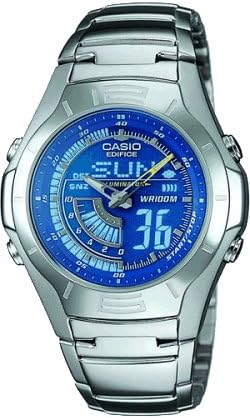
The image above shows the Casio EDIFICE EFA-113D-2AVEF men's watch, featuring a silver-tone stainless steel case and bracelet with a blue dial and digital display elements.
Configuració
Before using your watch, it is important to perform the initial setup steps to ensure accurate timekeeping and functionality.
1. Configuració inicial de la data i l'hora
Your watch features both analog hands and a digital display. Both need to be synchronized for correct time display.
- Entra al mode de configuració de l'hora: Manteniu premut el botó MODE button (usually bottom-left) until the digital display starts flashing, indicating it is in setting mode.
- Select Time Zone/City: Utilitza el AJUSTAR button (usually top-left) to cycle through settings. When the city code or time zone is flashing, use the AVANT (a dalt a la dreta) i INVERSA (bottom-right) buttons to select your desired home city.
- Set Digital Time: Continueu prement AJUSTAR to move to the hour, minute, second, 12/24-hour format, year, month, and day settings. Use AVANT i INVERSA per canviar els valors.
- Synchronize Analog Hands: After setting the digital time, the analog hands may need adjustment. In the setting mode, navigate to the hand setting option (often indicated by 'H-SET' or similar). Use the AVANT i INVERSA buttons to align the analog hands with the digital time.
- Sortir del mode de configuració: Premeu el botó MODE button once to exit the setting mode. The digital display will stop flashing.
Funcionament del rellotge
Your Casio EDIFICE EFA-113D-2AVEF watch offers various modes and functions. Use the buttons on the side of the watch to navigate and operate these features.
1. Navegació de modes
Premeu el botó MODE button (typically bottom-left) to cycle through the different operational modes:
- Mode d'indicació de l'hora: Displays the current time and date. This is the default mode.
- Mode de cronòmetre: Used for measuring elapsed time.
- Mode d'alarma: Allows you to set daily alarms.
- Mode de doble hora: Displays the time in a second time zone.
2. Funció de cronòmetre
Per utilitzar el cronòmetre:
- Enter Stopwatch Mode by pressing the MODE botó.
- Premeu el botó INICI/PARA button (typically top-right) to start timing.
- Premeu INICI/PARA de nou per aturar el cronometratge.
- Premeu el botó RESET button (typically bottom-right) to clear the stopwatch to zero.
3. Funció d'alarma
Per configurar una alarma:
- Enter Alarm Mode by pressing the MODE botó.
- Utilitza el AJUSTAR button to select the alarm number (if multiple alarms are available).
- Manteniu premut el botó AJUSTAR fins que l'hora de l'alarma comenci a parpellejar.
- Utilitza el AVANT i INVERSA botons per ajustar l'hora i els minuts de l'alarma desitjats.
- Premeu AJUSTAR per confirmar i sortir de la configuració.
- Per activar/desactivar l'alarma, premeu el botó AVANT button while in Alarm Mode. An alarm indicator will appear/disappear.
4. Il·luminació
Premeu el botó LLUM button (typically top-left) to illuminate the digital display for easy viewing in low-light conditions. The illumination duration is preset.
Manteniment
Proper care and maintenance will help ensure the longevity and optimal performance of your Casio watch.
1. Resistència a l'aigua
Your watch is marked with WR100M, indicating it is water resistant to 100 meters. This means it is suitable for everyday use, swimming, and snorkeling. However, it is no suitable for scuba diving. Avoid operating buttons while the watch is wet or submerged.
2. Neteja
- Watch Case and Bracelet: Wipe with a soft, dry cloth. For stubborn dirt, use a soft brush with mild soap and water, then rinse thoroughly and dry.
- Banda de resina: Wash with water and dry with a soft cloth. Avoid solvents or harsh cleaners.
3. Substitució de la bateria
The watch is powered by a battery. When the display becomes dim or functions become erratic, it is an indication that the battery needs replacement. Battery replacement should be performed by an authorized Casio service center or a qualified watch technician to ensure water resistance is maintained.
4. Precaucions generals
- Avoid exposing the watch to extreme temperatures (hot or cold) for extended periods.
- Protegiu el rellotge de forts impactes o cops.
- Mantingueu el rellotge allunyat de camps magnètics forts.
- Avoid contact with gasoline, cleaning solvents, aerosol sprays, adhesives, paints, etc., as these can damage the watch's seals, case, and band.
Resolució de problemes
Si teniu problemes amb el rellotge, consulteu els problemes i solucions més comuns següents:
- La pantalla digital està en blanc o té poca llum: The battery may be low or depleted. Arrange for battery replacement.
- Analog Hands Do Not Match Digital Time: The analog hands may have become misaligned due to impact or magnetic exposure. Refer to the "Synchronize Analog Hands" step in the Setup section to re-align them.
- Els botons no responen: Ensure the watch is not in a mode that locks buttons. If the issue persists, a full reset (if available for your module, consult a service center) or battery replacement might be necessary.
- El temps és inexacte: Check your home city setting and ensure the time is correctly set. Strong magnetic fields can also affect accuracy.
For issues not covered here, please contact Casio customer support.
Especificacions
- Model: EFA-113D-2AVEF
- Marca: Casio EDIFICE
- Resistència a l'aigua: 100 meters (WR100M)
- Cronometratge: Analog and Digital Display
- Funcions: Stopwatch, Daily Alarm, Dual Time, Full Auto-Calendar, LED Light (Illuminator)
- Precisió: ±30 segons per mes (sense calibratge del senyal)
- Durada de la bateria: Approximately 2 years (on CR2016, typical usage)
Garantia i Suport
Your Casio EDIFICE EFA-113D-2AVEF watch is covered by a manufacturer's warranty against defects in materials and workmanship. The specific terms and duration of the warranty may vary by region. Please refer to the warranty card included with your purchase for detailed information.
For technical support, service, or warranty claims, please contact your local authorized Casio service center or visit the official Casio weblloc per obtenir informació de contacte.
Important: Unauthorized repair or modification of the watch may void the warranty.


