Introducció
This manual provides detailed instructions for the setup, operation, maintenance, and troubleshooting of your Adesso WKB-3000UB Wireless Mini Keyboard. Please read this manual thoroughly before using the product to ensure proper functionality and to maximize your user experience.
Contingut del paquet
Verifiqueu que tots els elements siguin presents al vostre paquet:
- Adesso WKB-3000UB Wireless Mini Keyboard with integrated trackball
- Receptor sense fil USB
- Manual d'usuari (aquest document)
Requisits del sistema
Before proceeding with the setup, ensure your system meets the following requirements:
- Port USB 2.0 disponible
- Operating System: Windows 7/8/10/11, macOS, or Linux (basic functionality)
Configuració
1. Instal·lació de la bateria
- Localitzeu la tapa del compartiment de la bateria a la part inferior del teclat.
- Feu lliscar o aixequeu la tapa per obrir el compartiment.
- Insert the required batteries (typically 2x AAA, not included) according to the polarity indicators (+/-) inside the compartment.
- Col·loqueu la coberta del compartiment de la bateria amb seguretat.
2. Connecteu el receptor USB
- Connecteu el receptor sense fil USB a un port USB disponible de l'ordinador.
- El vostre sistema operatiu hauria de detectar i instal·lar automàticament els controladors necessaris. Això pot trigar uns instants.
3. Establir connexió
The keyboard and receiver are typically pre-paired. Once the batteries are installed and the receiver is plugged in, the keyboard should be ready for use. If the connection is not established automatically, ensure the keyboard is powered on (if it has a power switch) and try moving the keyboard closer to the receiver.
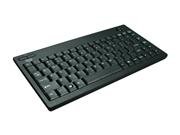
Image: The Adesso WKB-3000UB Wireless Mini Keyboard, featuring a compact design with an integrated trackball on the right side and media hotkeys above the function row.
Instruccions de funcionament
Funcions del teclat
- Mecanografia: Use the QWERTY layout for standard text input. The compact design may require a brief adjustment period.
- Tecles d'accés directe: The keyboard features dedicated hotkeys for quick access to common functions such as email, web browser, volume control, and media playback. Refer to the key legends for specific functions.
Trackball Operation
- Moviment del cursor: Roll the trackball with your thumb or finger to move the cursor on the screen.
- Clic esquerre: Press the left mouse button, typically located to the left of the trackball or duplicated on both sides of the keyboard.
- Clic dret: Press the right mouse button, typically located to the right of the trackball.
- Roda de desplaçament: Use the scroll wheel (if present, often on the left side) to scroll through documents and web pàgines.
Wireless Range and Power Saving
- The keyboard operates on a 2.4 GHz radio frequency, providing an effective working range of up to 100 feet (approximately 30 meters) from the USB receiver.
- To conserve battery life, the keyboard will enter a sleep mode after a period of inactivity. To wake it up, simply press any key or move the trackball.
Manteniment
Cleaning the Keyboard and Trackball
- Desconnecteu el receptor USB de l'ordinador abans de netejar-lo.
- Utilitzeu un drap suau i sense pelusa lleugerament dampened with water or a mild cleaning solution to wipe the surface of the keyboard. Avoid excessive moisture.
- For the trackball, periodically clean around its housing to remove dust and debris that may affect its smooth operation. If possible, gently remove the trackball (refer to product diagrams if available) and clean the internal rollers with a cotton swab.
- No utilitzeu netejadors abrasius, dissolvents ni aerosols.
Canvi de bateria
When the keyboard's performance degrades or it stops responding, it is likely time to replace the batteries. Follow the battery installation steps outlined in the Setup section.
Resolució de problemes
- El teclat no respon:
- Assegureu-vos que les piles estiguin correctament instal·lades i que no estiguin esgotades. Substituïu-les si cal.
- Verifiqueu que el receptor USB estigui ben connectat a un port USB que funcioni. Proveu-ho amb un altre port USB.
- Move the keyboard closer to the USB receiver to rule out range issues.
- Reinicieu l'ordinador.
- Trackball Movement is Jerky or Inaccurate:
- Clean the trackball and its housing as described in the Maintenance section. Dust and debris can interfere with smooth operation.
- Adjust the pointer speed settings in your operating system's mouse/trackball settings.
- Poor Wireless Range or Intermittent Connection:
- Ensure there are no large metal objects or other electronic devices (like Wi-Fi routers, cordless phones) operating on the 2.4 GHz frequency between the keyboard and the receiver, as these can cause interference.
- If the receiver is plugged into the back of a computer, consider using a USB extension cable to position the receiver in a more open area.
Especificacions
| Número de model | WKB-3000UB |
| Tecnologia de connectivitat | RF (2.4 GHz) |
| Effective Working Range | Fins a 100 peus (30 metres) |
| Descripció del teclat | QWERTY |
| Característiques especials | Optical Trackball, Hotkeys |
| Trackball Resolution | 800 ppp |
| Dimensions del producte | 15.1 x 7 x 1.9 polzades (38.4 x 17.8 x 4.8 cm) |
| Pes de l'article | 2.55 lliures (1.16 kg) |
| Material | Plàstic |
| Color | Negre |
Garantia i Suport
Adesso products are designed for reliability and performance. For information regarding warranty coverage, technical support, or to register your product, please visit the official Adesso weblloc web o poseu-vos en contacte amb el seu departament d'atenció al client. Conserveu el rebut de compra per a reclamacions de garantia.
Adesso Oficial Weblloc: www.adesso.com


