Introducció
This manual provides detailed instructions for the setup, operation, and maintenance of your Logitech X-540 5.1 Surround Sound Speaker System. This system is designed to deliver an immersive audio experience for games, movies, and music, utilizing Frequency Directed Dual Driver (FDD2) technology and a powerful down-firing subwoofer.
Contingut del paquet
Verifiqueu que tots els elements que s'enumeren a continuació s'inclouen al vostre paquet:
- 4 altaveus satèl·lit
- 1 Center Channel Speaker
- 1 subwoofer
- 1 Control Pod
- Color-coded Audio Cables
- Game Console Adapter
- Manual d'usuari (aquest document)
Configuració
Col·locació dels altaveus
Optimal speaker placement is crucial for achieving the best surround sound experience. Consider the following guidelines:
- Front Left and Right Satellites: Place these speakers equidistant from your listening position, typically on either side of your monitor or TV.
- Altaveu del canal central: Position this speaker directly in front of your listening position, usually above or below your monitor. It includes an integrated clip for easy attachment to flat-panel displays.
- Rear Left and Right Satellites: Place these speakers behind your listening position, ideally at ear level or slightly above. The stands can be rotated for wall mounting.
- subwoofer: The down-firing subwoofer can be placed on the floor, preferably in a corner or against a wall to enhance bass response. Ensure it has adequate ventilation.
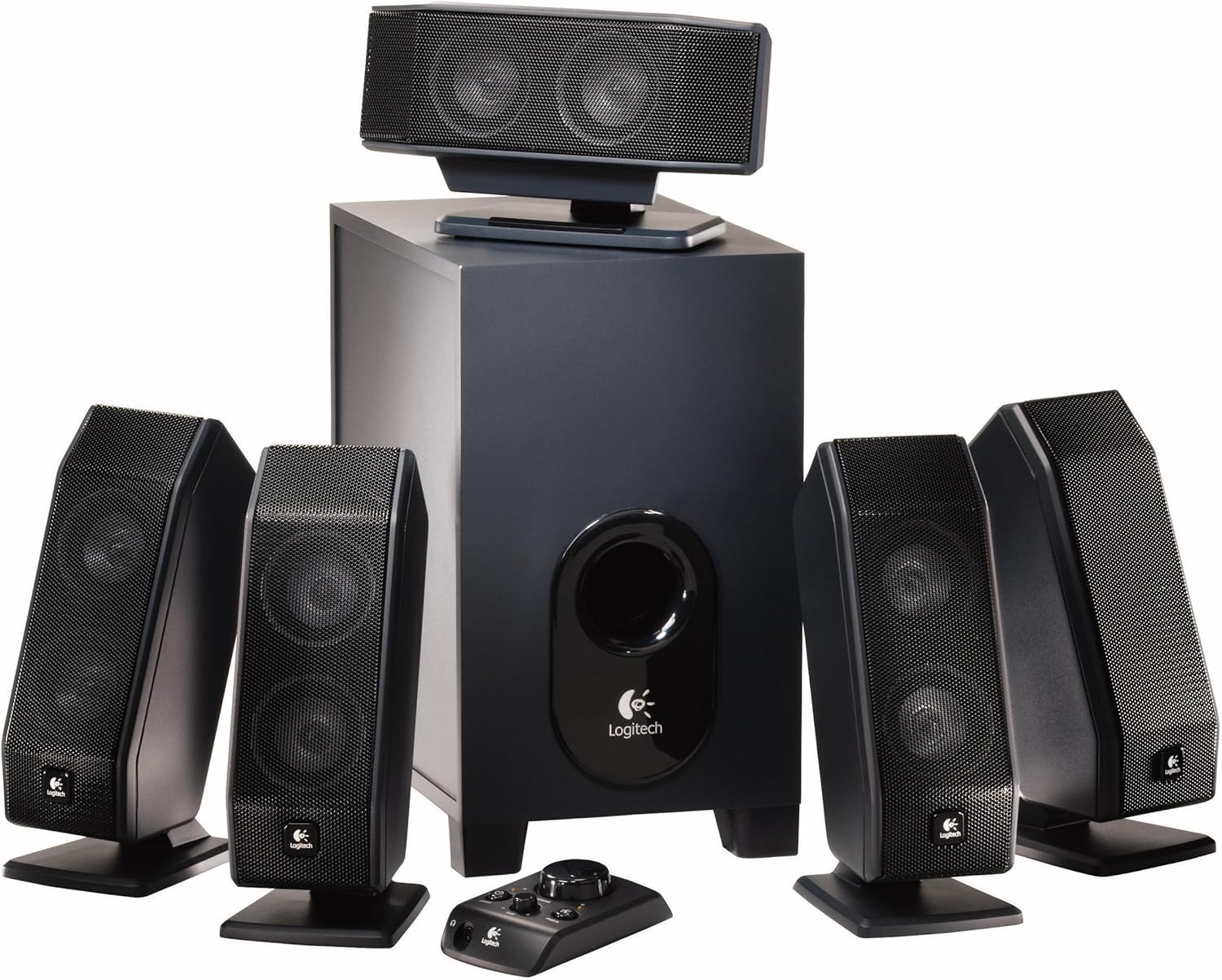
Figure 1: Complete Logitech X-540 5.1 Speaker System layout.

Figure 2: Center channel speaker mounted on a flat-panel display.

Figure 3: Satellite speaker with stand adjusted for wall mounting.
Connexió del sistema
- Connecteu els altaveus satèl·lit: Plug the color-coded cables from the satellite speakers (front left, front right, rear left, rear right) and the center channel speaker into their corresponding color-coded ports on the back of the subwoofer.
- Connect Control Pod: Plug the control pod cable into the dedicated port on the subwoofer.
- Connecteu-vos a la font d'àudio:
- For 5.1 surround sound, connect the color-coded audio cables from the subwoofer to the corresponding 5.1 audio output jacks on your computer's sound card or other audio device.
- For stereo sources, you can use the green audio cable to connect to a standard stereo headphone jack. The system's Matrix Mode can then convert this to simulated 5.1 surround sound.
- Use the included game console adapter if connecting to a gaming console with RCA audio outputs.
- Connectar l'alimentació: Connecteu el cable d'alimentació del subwoofer a una presa de corrent estàndard.
Instruccions de funcionament
Control Pod Functions
The wired control pod provides convenient access to all essential functions:

Figure 4: Logitech X-540 Control Pod.
- Botó d'encesa: Press to turn the speaker system on or off.
- Selector de volum principal: Rotate to adjust the overall volume of the system.
- Bass Level Dial: Adjusts the intensity of the subwoofer's bass output.
- Matrix Mode Button: Activates or deactivates Matrix Mode. When active, this mode converts 2-channel stereo audio into simulated 5.1 surround sound. This is useful for older games, movies, or music that are not natively 5.1.
- Auriculars Jack: Plug in headphones for private listening. When headphones are connected, the speakers will automatically mute.
Tecnologies d'àudio
- Frequency Directed Dual Driver (FDD2) Technology: This technology is integrated into the satellite speakers to produce a uniform sound field throughout your room. It helps eliminate "hot spots" and "dead zones" by ensuring a smooth and even frequency response, providing consistent surround sound regardless of your listening position.
- Ported Down-Firing Subwoofer: The subwoofer is designed to direct bass downwards, distributing it evenly across the room. This design, combined with real-time bass equalization, delivers deep, rich bass without distortion, even at high volumes.
Manteniment
Per garantir la longevitat i el rendiment òptim del vostre sistema d'altaveus Logitech X-540, seguiu aquestes pautes de manteniment:
- Neteja: Use a soft, dry cloth to wipe down the speakers and subwoofer. Avoid using liquid cleaners or abrasive materials, as they may damage the finish or internal components.
- Ventilació: Ensure the subwoofer and satellite speakers have adequate airflow. Do not block ventilation ports.
- Medi ambient: Keep the system away from excessive heat, direct sunlight, moisture, and dust.
- Gestió de cables: Avoid kinking or sharply bending audio cables. Secure them to prevent accidental disconnections or damage.
Resolució de problemes
Si teniu problemes amb el vostre sistema d'altaveus, consulteu els següents problemes i solucions habituals:
- Sense so:
- Ensure the system is powered on (power indicator light on the control pod should be lit).
- Check all cable connections to the subwoofer and audio source. Ensure they are securely plugged into the correct ports.
- Verify that the master volume on the control pod is turned up and not muted on your audio source (computer, console, etc.).
- If headphones are plugged into the control pod, unplug them to enable speaker output.
- Test with a different audio source to rule out issues with your primary device.
- So distorsionat:
- Reduce the master volume and bass level on the control pod.
- Check the audio output settings on your computer or audio device to ensure they are not set too high or causing clipping.
- Assegureu-vos que els cables no estiguin danyats ni connectats de manera fluixa.
- Subwoofer Not Producing Bass:
- Increase the bass level using the dial on the control pod.
- Ensure the subwoofer is properly connected to the audio source.
- Check your audio source's settings for subwoofer or bass management options.
- Only Some Speakers Working (e.g., no surround sound):
- Verify that your audio source is outputting 5.1 surround sound and that all color-coded audio cables are correctly connected to the corresponding 5.1 output jacks.
- Ensure Matrix Mode is enabled if you are trying to simulate 5.1 from a stereo source.
- Check individual speaker connections to the subwoofer.
Especificacions
| Característica | Detall |
|---|---|
| Nom del model | X-540 |
| Tipus d'altaveu | 5.1 Surround Sound System with Subwoofer |
| Potència màxima total | 140 watts |
| Resposta de freqüència | 40 Hz - 20 kHz |
| Diàmetre del subwoofer | 12.5 polzades |
| Tipus de controlador | Corded Electric Control Pod |
| Tecnologia de connectivitat | Amb cable |
| Dimensions del producte | 12.5"D x 12.5"W x 12.5"H (Subwoofer) |
| Pes de l'article | 18 lliures |
| Tipus de muntatge | Muntatge de paret, muntatge de taula |
| Característiques especials | Bass Boost, FDD2 Technology, Matrix Mode |
| Dispositius compatibles | Desktop, Laptop, Smartphone, Tablet (with appropriate adapters) |
| Número de model | 970223-0403 |
| UPC | 840356579115, 097855050359, 097855040084 |
Garantia i Suport
Your Logitech X-540 5.1 Surround Sound Speaker System comes with a Garantia limitada de maquinari de 2 anys des de la data de compra. Aquesta garantia cobreix els defectes de materials i de mà d'obra en ús normal.
For warranty claims, technical support, or further assistance, please visit the official Logitech support weblloc web o poseu-vos en contacte amb el servei d'atenció al client. Conserveu el comprovant de compra per validar la garantia.
Note: This product is sold as is. Please refer to the full warranty terms and conditions provided by Logitech.


