1. Introducció
The Plantronics Vista M22 Audio Processor is designed to enhance sound quality and provide acoustic protection for telephone users, especially with telephones that do not allow direct headset connection. It incorporates advanced technologies to ensure clear, consistent, and comfortable communication.
Les característiques clau inclouen:
- Acoustic Protection: SoundGuard Plus technology reduces loud tones to comfortable levels while maintaining natural voice clarity.
- Claritat de la trucada: Electronic signal processing minimizes phone noise and maintains consistent volume levels.
- Compatibilitat amb auriculars: Enables headset use with telephones not designed for direct headset connection.
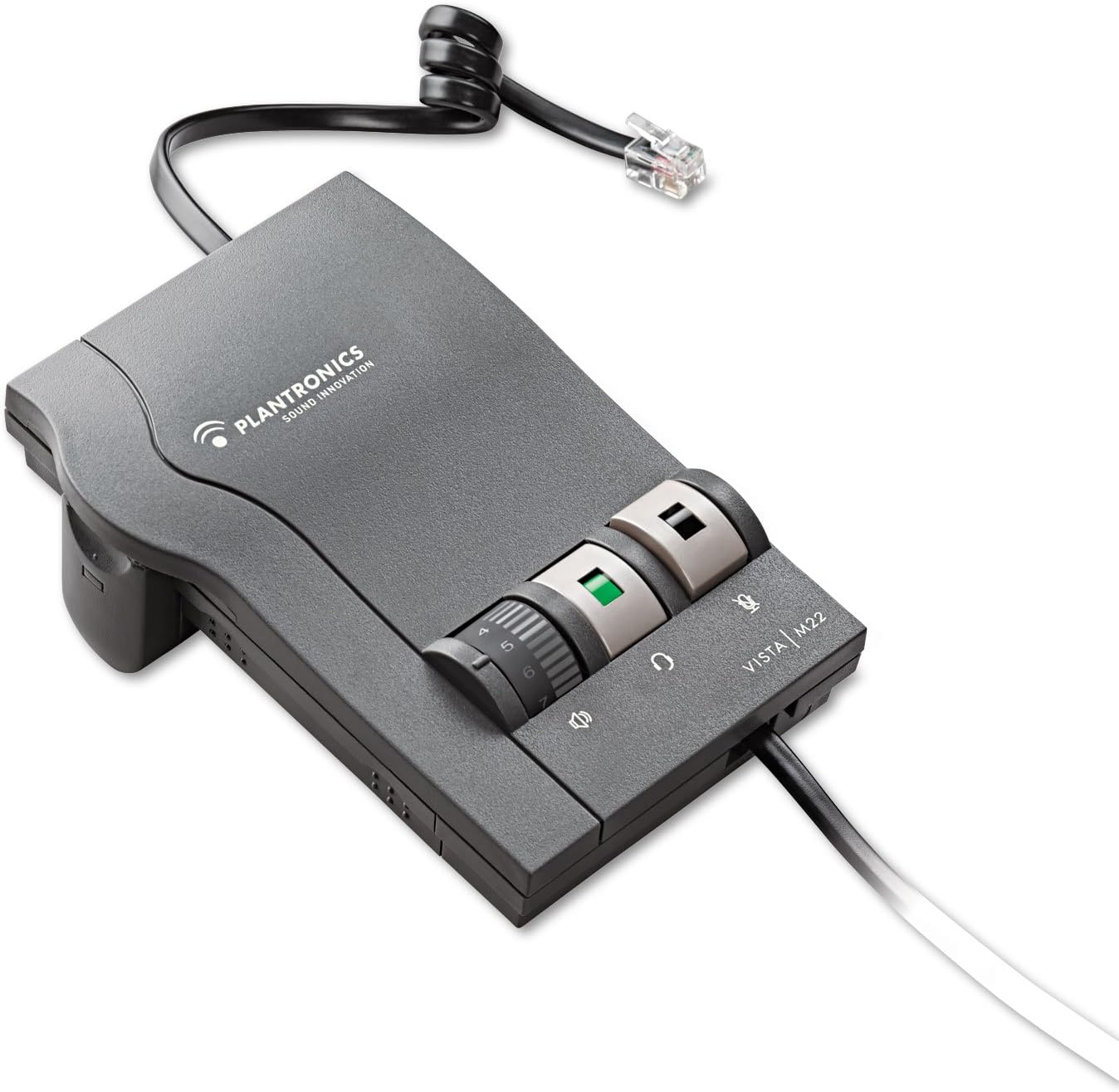
Figure 1: Plantronics Vista M22 Audio Processor. This image shows the compact, gray audio processor with its coiled cord and control dials.
2. Informació de seguretat
- Llegiu atentament totes les instruccions abans d'utilitzar.
- Mantingueu el dispositiu allunyat de l'aigua i la humitat.
- No intenteu obrir ni reparar el dispositiu vosaltres mateixos. Demaneu ajuda a personal de servei qualificat.
- Use only specified power sources (2 AA batteries or compatible AC adapter, sold separately).
- Eviteu exposar el dispositiu a temperatures extremes.
- Assegureu-vos una ventilació adequada per evitar el sobreescalfament.
3. Contingut del paquet
The Plantronics Vista M22 Audio Processor package includes:
- 1 x Plantronics Vista M22 Headset Ampmés viu
- 2 piles AA (incloses)
- Necessary connection cables (headset connection cable, telephone connection cable)
4. Instruccions de configuració
Follow these steps to set up your Plantronics Vista M22 Audio Processor:
- Instal·leu les bateries: Open the battery compartment on the side of the M22 unit and insert the two AA batteries. Close the compartment securely. Alternatively, connect an optional AC power adapter (not included) to the power port on the back.
- Connecta els auriculars: Plug your Plantronics headset's Quick Disconnect (QD) cable into the corresponding port on the front of the M22 ampmés viu.
- Connect to Telephone:
- Disconnect the coiled handset cord from the base of your telephone.
- Plug the telephone connection cable (typically a short, coiled cord with RJ9 connectors) from the M22 amplifier into the handset port on your telephone base.
- Plug your telephone's handset into the handset port on the M22 ampmés viu.
- Adjust Compatibility Switch: On the side of the M22 unit, there is a compatibility switch (labeled 1-6 or 1-7). Adjust this switch until you hear a clear dial tone in your headset. Setting 5 is a common starting point.
- Ajustar el volum del micròfon: On the bottom of the M22 unit, there is a small dial for microphone volume. Use the provided tool (or a small screwdriver) to adjust this dial if your voice is too quiet or too loud for the listener. Rotate clockwise to increase volume, counter-clockwise to decrease.

Figure 2: The Plantronics Vista M22 features Clearline audio technology for superior voice clarity and reduces background noise for clear communication.
5. Instruccions de funcionament
Once set up, operating the M22 is straightforward:
- Headset/Handset Switch: Press the button with the headset icon to switch audio to your headset. Press the button with the handset icon to switch audio back to your telephone's handset.
- Control de volum: Use the large rotary dial on the front of the M22 to adjust the listening volume in your headset.
- Botó de silenci: Press the button with the microphone icon to mute your headset microphone. Press it again to unmute.
- Fer/respondre trucades:
- To make a call: Press the headset button on the M22, lift your telephone's handset, dial the number, and then place the handset back on the cradle once the call connects.
- To answer a call: Press the headset button on the M22, then lift your telephone's handset.
- To end a call: Place your telephone's handset back on the cradle, then press the headset button on the M22 to switch back to handset mode (or simply leave it in headset mode if preferred).
6. Manteniment
- Neteja: Netegeu la unitat amb un drap suau i sec. No utilitzeu netejadors líquids ni aerosols.
- Substitució de la bateria: Replace AA batteries when the power indicator light dims or the unit stops functioning.
- Emmagatzematge: Store the M22 in a cool, dry place when not in use for extended periods.
7. Solució De Problemes
| Problema | Solució |
|---|---|
| No dial tone or poor audio quality. |
|
| Caller cannot hear me or my voice is too quiet/loud. |
|
| Brunzit o soroll estàtic. |
|
| Headset volume is too low/high. |
|
8. Especificacions
| Característica | Detall |
|---|---|
| Número de model | 43596-64 |
| Dimensions del producte | 0.03 x 0.03 x 0.03 polzades |
| Pes de l'article | 0.48 unces (0.03 lliures) |
| Font d'alimentació | Battery Powered (2 AA batteries included) / Optional AC Adapter (not included) |
| Material | Plàstic |
| Color | Negre |
| Compatibilitat | Telephones that do not allow direct connection of headsets |
| Característiques especials | SoundGuard Plus, Call Clarity Technology |
9. Garantia i Suport
Avís legal: La garantia no cobreix el mal ús del producte.
For further assistance, please refer to the official Plantronics weblloc web o poseu-vos en contacte amb el seu servei d'atenció al client. Conserveu el rebut de compra per a reclamacions de garantia.


