Introducció
Benvingut al manual d'usuari del vostre sistema d'altaveus Logitech X-240 2.1. Aquest sistema està dissenyat per transformar el vostre ordinador, iPod, reproductor MP3 o altres dispositius compatibles en un potent centre de música digital. Compta amb un centre de control amb una base integrada per a dispositius portàtils, un subwoofer de baixada per a greus profunds i altaveus satèl·lit d'alta excursió per a un so ric. Llegiu atentament aquest manual per garantir una configuració correcta i un rendiment òptim del vostre sistema d'altaveus.
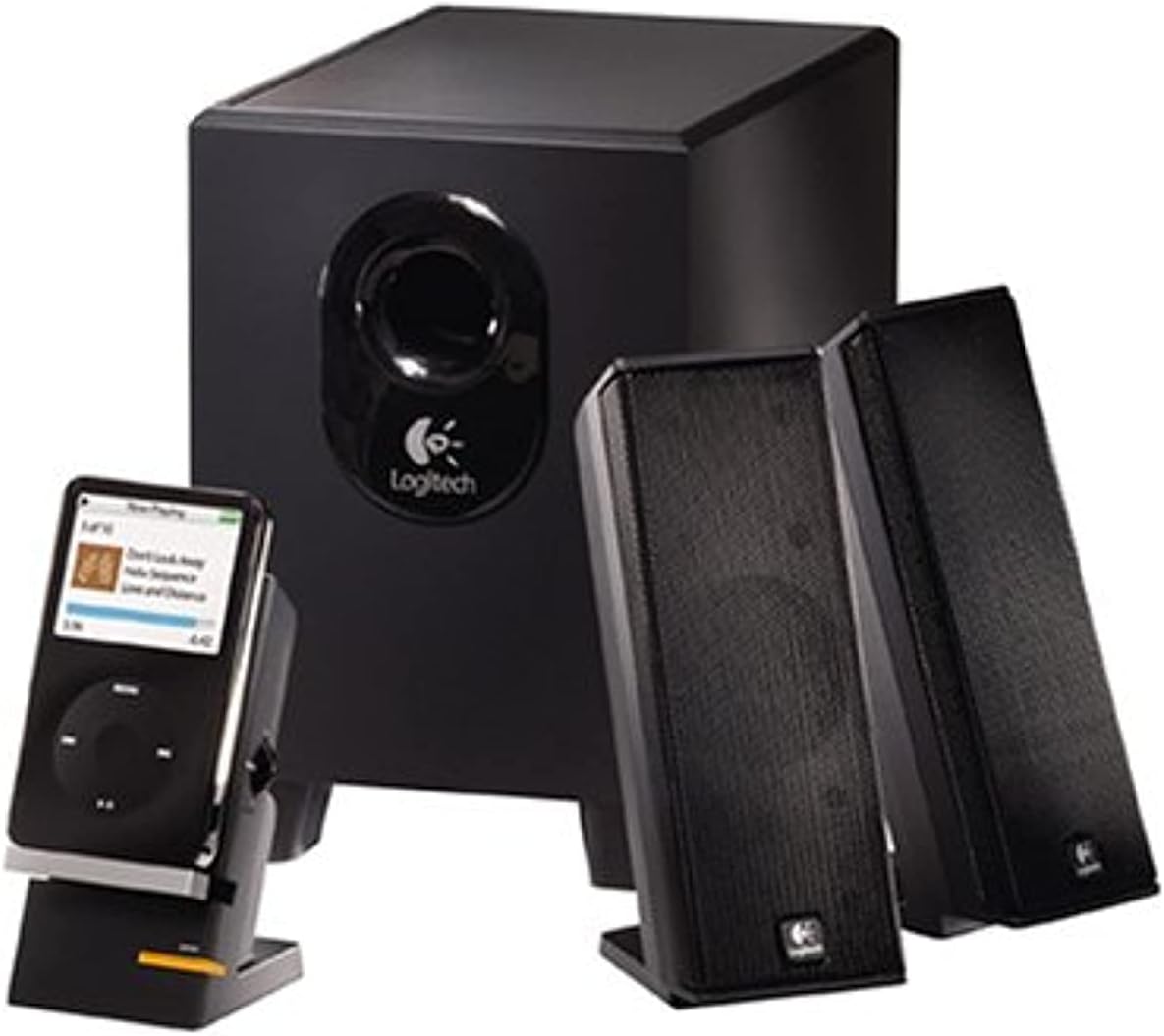
Figura 1: El sistema d'altaveus Logitech X-240 2.1, exposicióasinel subwoofer, dos altaveus satèl·lit i el centre de control amb un reproductor multimèdia portàtil connectat a la base.
Contingut del paquet
Abans de començar, assegureu-vos que tots els elements que s'enumeren a continuació estiguin al paquet:
- 1 subwoofer
- 2 altaveus satèl·lit
- 1 Centre de control amb suport per a reproductor MP3 integrat
- 1 Cable d'àudio codificat per colors
- 1 cable de reproductor MP3 (cable d'entrada auxiliar)
- Adaptadors per a iPod, iPod vídeo i iPod nano
- Adaptador de Microsoft Zune
- Manual d'usuari (aquest document)
Instruccions de configuració
Segueix aquests passos per configurar el teu sistema d'altaveus Logitech X-240:
- Col·loqueu el subwoofer: Col·loqueu el subwoofer a terra, preferiblement sota l'escriptori o en un racó, per maximitzar la resposta dels greus. Assegureu-vos que hi hagi una ventilació adequada al voltant de la unitat.
- Col·locació dels altaveus satèl·lit: Col·loca els dos altaveus satèl·lit a cada costat del monitor o de la zona d'escolta. Per obtenir una imatge estèreo òptima, assegura't que estiguin equidistants de la teva posició d'escolta.
- Connecteu els altaveus satèl·lit al subwoofer: Connecteu els cables dels altaveus satèl·lit als ports corresponents de la part posterior del subwoofer. Els cables solen estar codificats per colors per facilitar-ne la identificació.
- Centre de control de connexió: Connecteu el cable del centre de control a la presa d'altaveu designada del subwoofer.
- Connecteu-vos a la font d'àudio:
- Per a ordinador: Connecteu el cable d'àudio codificat per colors del subwoofer a la sortida d'àudio (normalment verda) de la targeta de so de l'ordinador.
- Per a reproductor MP3/iPod/Zune: Feu servir el cable del reproductor MP3 inclòs (cable d'entrada auxiliar) per connectar el dispositiu a l'entrada auxiliar del centre de control. També podeu fer servir el cable USB/d'alimentació del dispositiu amb la base integrada i l'adaptador adequat per sincronitzar-lo i carregar-lo mentre reproduïu.
- Connectar l'alimentació: Connecteu el cable d'alimentació del subwoofer a una presa de corrent estàndard.
- Encès: Engegueu el sistema d'altaveus amb el botó d'engegada del centre de control.
Funcionament del vostre sistema d'altaveus
El sistema Logitech X-240 està dissenyat per a un funcionament fàcil d'utilitzar.
- Encès/apagat: Feu servir el botó d'engegada dedicat del centre de control per encendre o apagar el sistema.
- Control de volum: Ajusteu el volum principal amb el botó giratori del centre de control.
- Auriculars Jack: Per escoltar en privat, connecteu els auriculars al connector de 3.5 mm que es troba al centre de control. Això silenciarà automàticament els altaveus.
- Base del dispositiu: El suport integrat al centre de control us permet col·locar còmodament el vostre iPod, reproductor MP3, PDA o telèfon mòbil. Feu servir el cable USB/d'alimentació del dispositiu amb l'adaptador adequat (iPod, Zune) per sincronitzar, carregar o reproduir música directament a través de l'entrada auxiliar del sistema.
- Ajust dels baixos: El sistema inclou una equalització de greus dinàmica i en temps real. Tot i que no hi ha un botó de greus separat, el sistema optimitza automàticament la resposta dels greus.
Manteniment i cura
Per garantir la longevitat i el rendiment òptim del vostre sistema d'altaveus Logitech X-240, seguiu aquestes pautes de manteniment:
- Neteja: Feu servir un drap suau i sec per netejar les superfícies dels altaveus i del subwoofer. Eviteu utilitzar netejadors líquids o materials abrasius, ja que poden danyar l'acabat o els components interns.
- Ventilació: Assegureu-vos que el subwoofer i els altaveus satèl·lit tinguin un flux d'aire adequat. No bloquegeu el port del subwoofer ni col·loqueu els altaveus en espais tancats que puguin provocar un sobreescalfament.
- Col·locació: Eviteu col·locar els altaveus a la llum solar directa, a prop de fonts de calor o en zones amb molta humitat.
- Gestió de cables: Mantingueu els cables ordenats i desenredats per evitar danys i garantir una instal·lació neta.
Resolució de problemes
Si teniu algun problema amb el vostre sistema d'altaveus, consulteu els passos habituals següents per a la resolució de problemes:
| Problema | Causa possible | Solució |
|---|---|---|
| Sense so |
|
|
| So distorsionat |
|
|
| El subwoofer no produeix greus |
|
|
Especificacions tècniques
- Poder total de la FTC: RMS de 25 Watts
- subwoofer: 15 watts RMS (a 8 ohms, a 100 Hz, a 10% de THD)
- Satèl·lits: 5 watts RMS x 2 (a 8 ohms, a 1 kHz, a 10% de THD)
- Potència màxima total: 50 watts
- Resposta de freqüència: 40 Hz - 20 kHz
- Ràtio senyal / soroll: > 96 dB
- Conductors:
- Satèl·lits: controlador d'alta excursió de 2 polzades
- Subwoofer: controlador amb port de 4 polzades
- Dimensions de l'altaveu (Alt x A x P):
- Satèl·lits: 6.9" x 2.6" x 3.8"
- Subwoofer: 8.7" x 5.9" x 8.7"
- Connectivitat: Cablejat (entrada auxiliar de 3.5 mm)
- Dispositius compatibles: Reproductor MP3, iPod, Zune, PC
- Número de model: 970285-0403
- UPC: 097855039866, 097855044693
Informació de la garantia
El sistema d'altaveus Logitech X-240 2.1 inclou un Garantia limitada d'2 anyAquesta garantia cobreix els defectes de materials i fabricació en condicions d'ús normal. Per conèixer els termes i condicions específics, consulteu la documentació de la garantia inclosa amb el producte o visiteu el servei d'assistència oficial de Logitech. weblloc.
Atenció al client
Per obtenir més ajuda, assistència tècnica o consultes sobre reclamacions de garantia, visiteu el lloc web d'assistència oficial de Logitech. weblloc o poseu-vos en contacte amb el seu servei d'atenció al client.
Suport Logitech Weblloc: www.logitech.com/support