Introducció
The Celestron AstroMaster 70AZ is a user-friendly refractor telescope designed for both astronomical and terrestrial viewing. Its robust construction and intuitive controls make it an excellent choice for beginners and experienced users alike. This manual provides comprehensive instructions for setting up, operating, and maintaining your telescope to ensure optimal performance and longevity.

Figure 1: Celestron AstroMaster 70AZ Telescope with included accessories.
Configuració
Setting up your AstroMaster 70AZ telescope is quick and requires no tools. Follow these steps to get started:
- Desempaquetar components: Carefully remove all components from the packaging. Verify that all parts listed in the 'What's in the Box' section are present.
- Configura el trípode: Extend the tripod legs to your desired height. The adjustable full-height tripod ensures a stable base and can be customized for comfortable viewing for adults or children, whether standing or seated. Secure the legs using the locking clamps.
- Attach the Optical Tube: Mount the telescope's optical tube onto the alt-azimuth mount. Ensure it is securely fastened.
- Install the StarPointer Red Dot Finderscope: Slide the finderscope into its bracket on the optical tube and tighten the retaining screw.
- Insert the Erect Image Diagonal: Place the 90° erect image diagonal into the focuser. This accessory provides a right-side-up image, making the telescope suitable for both astronomical and terrestrial observations.
- Insert an Eyepiece: Choose either the 20mm (45x magnification) or 10mm (90x magnification) eyepiece and insert it into the diagonal. Secure it with the thumbscrew.
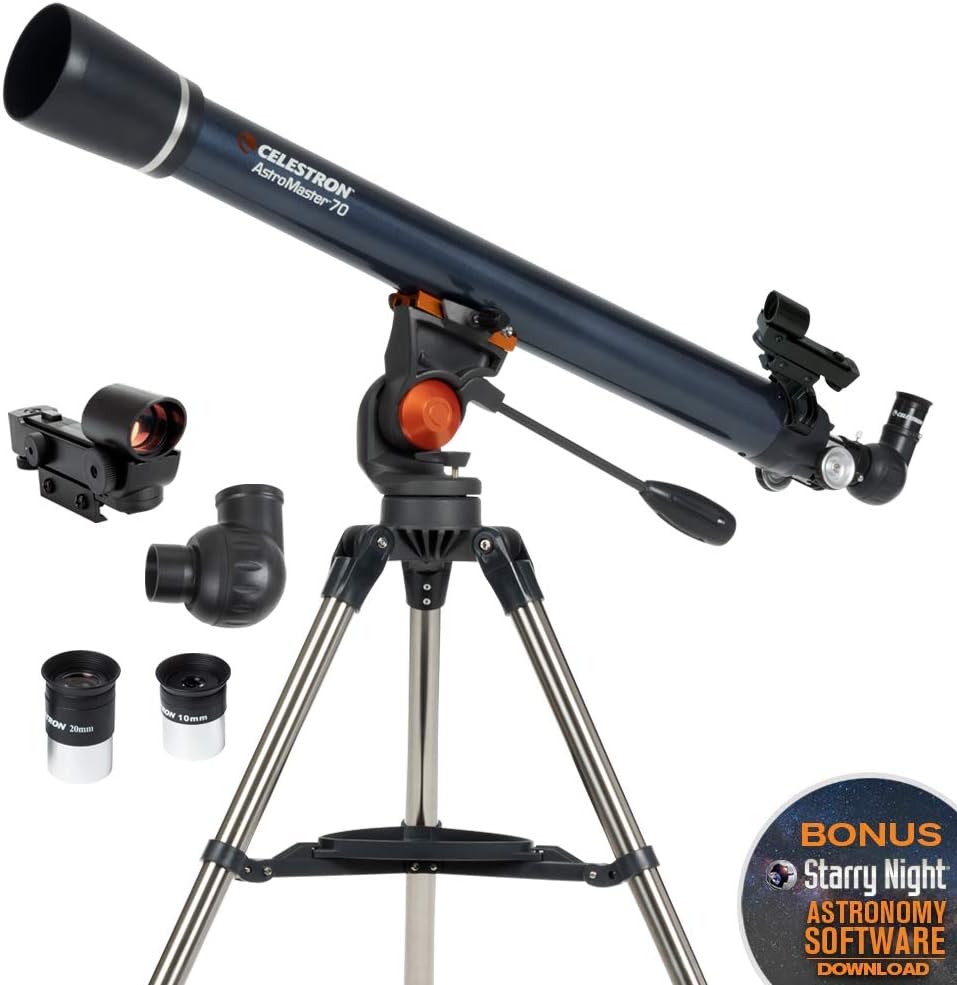
Figure 2: All components of the AstroMaster 70AZ telescope.
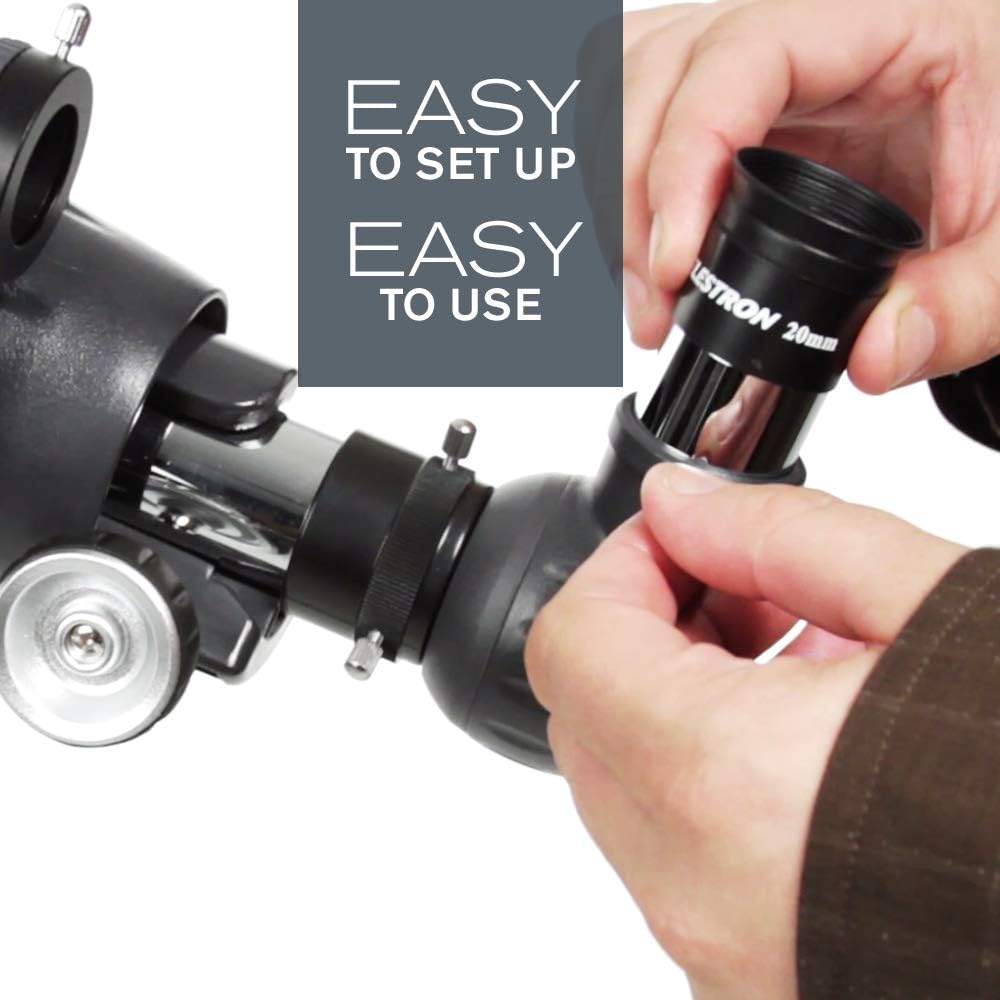
Figure 3: Proper insertion of an eyepiece into the diagonal.

Figure 4: The adjustable tripod allows for comfortable viewing at various heights.
Funcionament del telescopi
The AstroMaster 70AZ features an intuitive alt-azimuth mount with a smooth panhandle, allowing effortless pointing and tracking.
Alineació del cercador StarPointer
Before observing, align the StarPointer finderscope with the main telescope. This makes locating objects much easier.
- Point the main telescope at a distant, easily identifiable object (e.g., a street light or tree top) during the day.
- Look through the main telescope's eyepiece and center the object in the field of view.
- Turn on the StarPointer finderscope. Look through the finderscope and use its adjustment knobs to move the red dot until it is centered on the same object you see in the main eyepiece.
Viewing Objects
Once aligned, use the finderscope to quickly point your telescope at desired objects. Then, look through the main eyepiece and use the focuser knob to bring the image into sharp focus.
- Durant el dia Viewing: The erect image diagonal provides a correct orientation, making it ideal for observing land-based objects like wildlife, landscapes, or distant scenery.
- De nit Viewing: Explore celestial objects such as the Moon, planets (Jupiter, Saturn, Venus), and bright star clusters. The 70mm objective lens delivers bright, sharp views.

Figure 5: The AstroMaster 70AZ is suitable for both daytime terrestrial viewing and nighttime astronomical observation.

Figure 6: The telescope is designed for easy use by both adults and children.

Figure 7: The included 20mm and 10mm eyepieces provide 45x and 90x magnification respectively.
Bonus Astronomy Software
Your telescope includes a free download of top-rated astronomy software, Starry Night. This software can help you plan your observing sessions and learn more about celestial objects.

Figure 8: Starry Night educational software for enhanced learning and planning.
Manteniment
Proper care and maintenance will ensure your telescope provides years of enjoyment.
- Òptiques de neteja: Use a soft, lint-free cloth or a specialized optical cleaning solution to gently clean the objective lens and eyepieces. Avoid touching optical surfaces with bare hands.
- Protecció contra la pols: Always replace the lens caps when the telescope is not in use to prevent dust accumulation.
- Emmagatzematge: Store the telescope in a dry, dust-free environment. If storing for extended periods, consider disassembling it and returning components to their original packaging.
- Cura del trípode: Keep the tripod legs and adjustment mechanisms clean and free of debris to ensure smooth operation.
Resolució de problemes
If you encounter issues with your telescope, refer to the table below for common problems and their solutions.
| Problema | Causa possible | Solució |
|---|---|---|
| La imatge està borrosa o desenfocada | Focuser not adjusted; Eyepiece not fully inserted | Adjust the focuser knob; Ensure eyepiece is fully seated and secured |
| Cannot find objects easily | Finderscope is not aligned | Align the StarPointer finderscope with the main telescope (refer to 'Aligning the StarPointer Finderscope' section) |
| Image is upside down or reversed | No erect image diagonal used (for terrestrial viewing) | Ensure the erect image diagonal is installed for correct image orientation during terrestrial viewing. For astronomical viewing, inverted images are normal. |
| Telescope shakes or is unstable | Tripod legs not fully extended or secured; Uneven surface | Ensure tripod legs are fully extended and locking clamps are tight; Place telescope on a stable, level surface. |
Especificacions
| Característica | Detall |
|---|---|
| Nom del model | AstroMaster 70AZ Telescope |
| Longitud del tub òptic | 685 mil·límetres |
| Diàmetre de la lent objectiu | 70 mil·límetres |
| Lents oculars | 20 mm i 10 mm |
| Muntatge del telescopi | Muntanya Altazimut |
| Cercador | StarPointer™ red dot finderscope |
| Tipus d'enfocament | Enfocament manual |
| Font d'alimentació | Manual |
| Pes de l'article | 10.8 lliures (4.9 kg) |
| Dimensions del producte | 27 x 32 x 51 polzades (68.58 x 81.28 x 129.54 cm) |
| Fabricant | Celestron Acquisition LLC |
| País d'origen | Xina |
Garantia i Suport
Your Celestron AstroMaster 70AZ Telescope is backed by Celestron’s Garantia d'2 any als EUA. This warranty covers defects in materials and workmanship under normal use. For any technical assistance or warranty claims, please contact Celestron's US-based technical support team. They are available to provide unlimited support and guidance.
For more information, you may also refer to the official Celestron weblloc web o el PDF de la guia d'usuari disponible en línia.


