Introducció
This manual provides comprehensive instructions for the operation and maintenance of your OM SYSTEM OLYMPUS Evolt E510 Digital SLR Camera. Designed for photographers seeking advanced control and image quality, the E-510 features a 10-megapixel Live MOS sensor, CCD Shift Image Stabilization, and a 2.5-inch Live View HyperCrystal LCD. Its lightweight and ergonomic design ensures comfortable use. Understanding its functions will enable you to capture high-quality images in various conditions.

Figura 1: Frontal view of the Olympus Evolt E510 Digital SLR Camera with the included 14-42mm f/3.5-5.6 Zuiko lens. The camera body is black, featuring the Olympus branding and E-510 model designation.
Configuració
1. Instal·lació de la bateria
The E-510 is powered by a lithium-ion battery. To install:
- Localitzeu la tapa del compartiment de la bateria a la part inferior de la càmera.
- Feu lliscar el pestell per obrir la coberta.
- Insert the battery with the correct orientation, aligning the contacts.
- Tanqueu la tapa del compartiment de la bateria fins que encaixi correctament al seu lloc.
2. Inserció de la targeta de memòria
The camera supports CompactFlash Type I & II, Microdrives, and xD-Picture Cards.
- Open the memory card slot cover, typically located on the side of the camera.
- Insert the memory card firmly into the slot until it locks. Ensure correct orientation to avoid damage.
- Tanqueu la tapa de la ranura de la targeta de memòria.
3. Fixació de la lent
The camera comes with a 14-42mm f/3.5-5.6 Zuiko lens.
- Traieu la tapa del cos de la càmera i la tapa posterior de l'objectiu.
- Align the mounting marks on the lens and the camera body.
- Fixeu la lent girant-la en sentit horari fins que encaixi al seu lloc.
4. Engegada inicial
After installing the battery and memory card, turn the camera on using the power switch. The Live View LCD will activate.
Funcionament de la càmera
1. Controls i pantalla
Familiarize yourself with the camera's controls and the 2.5-inch HyperCrystal LCD display.
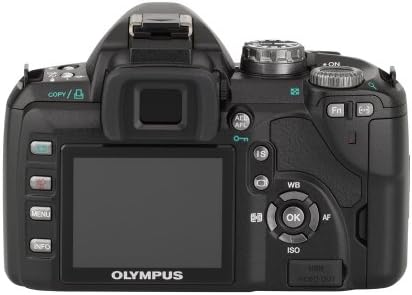
Figura 2: posterior view of the Olympus Evolt E510, highlighting the 2.5-inch Live View LCD, navigation buttons, and various function controls for easy operation.
2. Modes de tir
The E-510 offers 28 shooting modes to optimize settings for various scenarios. These include:
- Modes automàtics: Landscape-portrait, Landscape, Macro, Document, Portrait, Fireworks, Beach/Snow, Panorama, High Key, Children, Sunset, Candle, Night Portrait, Low Key, Nature Macro, Sports.
- Manual Control Options: The camera also provides a full range of manual control options for advanced users.
3. Estabilització d'imatge
The E-510 features Mechanical Image Stabilization (Sensor-shift) to compensate for camera movement, ensuring sharp images even in challenging conditions. This works in conjunction with Digital Image Stabilization for moving subjects.
4. Enfocament
The camera supports both autofocus and manual focus. Autofocus technology includes Phase Detection, Selective single-point, Multi-area, Single, and Continuous modes. For manual focus, the camera offers a focus confirmation light in the viewcercador.
5. Image Capture and File Formats
The 10-megapixel Live MOS sensor captures high-resolution still images. Supported file formats include RAW (ORF) and JPEG. You can select the JPEG quality level (Normal).
6. Reviewing Imatges
Images can be reviewed on the 2.5-inch HyperCrystal LCD display. The display offers a wide viewing angle for easy sharing and composition.
Manteniment
1. Dust Reduction System
The Olympus E-510 incorporates a Supersonic Wave Filter, which vibrates to remove dust and other particles from the image sensor. This system activates automatically each time the camera is turned on, helping to ensure spot-free photos.
2. Neteja de la càmera i l'objectiu
- Feu servir un drap suau i sense borrissol per netejar el cos de la càmera.
- For the lens, use a lens brush or blower to remove dust, followed by a lens cleaning solution and cloth if necessary. Avoid touching the lens surface directly with your fingers.
- No utilitzeu dissolvents orgànics ni productes químics forts per a la neteja.
3. Cura de la bateria
- Carregueu la bateria completament abans d'utilitzar-la.
- Guardeu la bateria en un lloc fresc i sec quan no la feu servir.
- Traieu la bateria de la càmera si no la fareu servir durant un període prolongat.
Resolució de problemes
1. Image Noise at Higher ISO Settings
The E-510 may exhibit increased image noise when shooting at ISO settings greater than 400. To minimize noise, try to shoot in well-lit conditions or use a lower ISO setting when possible. The TruePic III Image Processor helps reduce noise, but optimal results are achieved at lower ISOs.
2. Autofocus Performance in Low Light
Autofocus may struggle in very low light conditions. In such situations, consider switching to manual focus. The camera provides a focus confirmation light in the viewfinder to assist with accurate manual focusing.
3. Actualitzacions de firmware
Periodically check the Olympus support website for firmware updates. To update the camera's firmware, ensure the USB Mode setting in the camera's menu is set to "Storage" (not "Auto") before connecting to a computer. Follow the instructions provided with the firmware update utility.
4. RAW File Conversió
The E-510 produces proprietary Olympus RAW Files (ORF). These files may not be directly readable by all third-party photo editing software. Olympus Viewer 3 software can be used for conversion. Alternatively, third-party converters like XnView can convert ORF files to more common formats like TIFF for editing.
Especificacions
| Característica | Detall |
|---|---|
| Nom del model | Olympus Evolt E510 |
| Sensor d'imatge | 10 MP Live MOS |
| Estabilització d'imatge | Sensor-shift (Mechanical) |
| Pantalla LCD | 2.5 Inches HyperCrystal LCD (230,000 dots) |
| Muntatge de la lent | Quatre Terços |
| Lent inclosa | 14-42mm f/3.5-5.6 Zuiko Lens |
| Admet File Formats | RAW, JPEG |
| Mitjans d'emmagatzematge | Compact Flash (Type I or II), xD Picture Card |
| Connectivitat | USB, HDMI |
| Pes (només cos) | 1.1 lliures (aprox. 460 grams) |
| Dimensions (Excluding Protrusions) | 5.35 x 3.61 x 2.2 polzades (136 x 91.7 x 56 mm) |
| Velocitat de tir continu | 3 fotogrames per segon |
| Velocitat d'obturació mínima | 60 segons |
| Velocitat màxima d'obturació | 1/4000 segons |
Garantia i Suport
For warranty information, technical support, or service inquiries regarding your Olympus Evolt E510 camera, please refer to the official Olympus website or contact Olympus customer service directly. Keep your purchase receipt as proof of purchase for any warranty claims.
Podeu trobar més informació i recursos de suport visitant el lloc web oficial Olympus Store.


