1. Introducció
The Iwata-Medea Studio Series Smart Jet Pro is a single-piston, oil-less air compressor designed for airbrush applications. This unit features an auto shut-off function, an adjustable air-pressure gauge, and a moisture filter. It is engineered for quiet operation and reliability, making it suitable for both occasional and professional artists.
This manual provides essential information for the safe and efficient operation, setup, and maintenance of your Smart Jet Pro compressor.
2. Informació de seguretat
Please read and understand all safety instructions before operating the compressor. Failure to follow these instructions may result in electric shock, fire, or serious injury.
- Feu servir sempre el compressor en una zona ben ventilada.
- No utilitzeu prop de líquids o gasos inflamables.
- Ensure the power cord is undamaged and properly grounded.
- Desconnecteu l'alimentació abans de realitzar qualsevol manteniment o neteja.
- Mantingueu els nens i les mascotes allunyats del compressor durant el funcionament.
- Aquest producte conté productes químics coneguts per l'estat de Califòrnia per causar càncer i defectes de naixement o altres danys reproductius.
3. Contingut del paquet
Verifiqueu que tots els elements siguin presents al paquet:
- Iwata-Medea Studio Series Smart Jet Pro Air Compressor (Model IS 875)
- High-strength polyurethane air hose
- Moisture filter (pre-installed)
- Manual d'instruccions (aquest document)
4. Producte acabatview
The Smart Jet Pro compressor features a compact design with an all-metal protective case and a convenient carrying handle. Key components include the air pressure gauge, pressure regulator knob, and moisture filter.

Figura 1: Frontal view of the Iwata-Medea Smart Jet Pro Air Compressor, showing the pressure gauge, regulator, and included air hose.
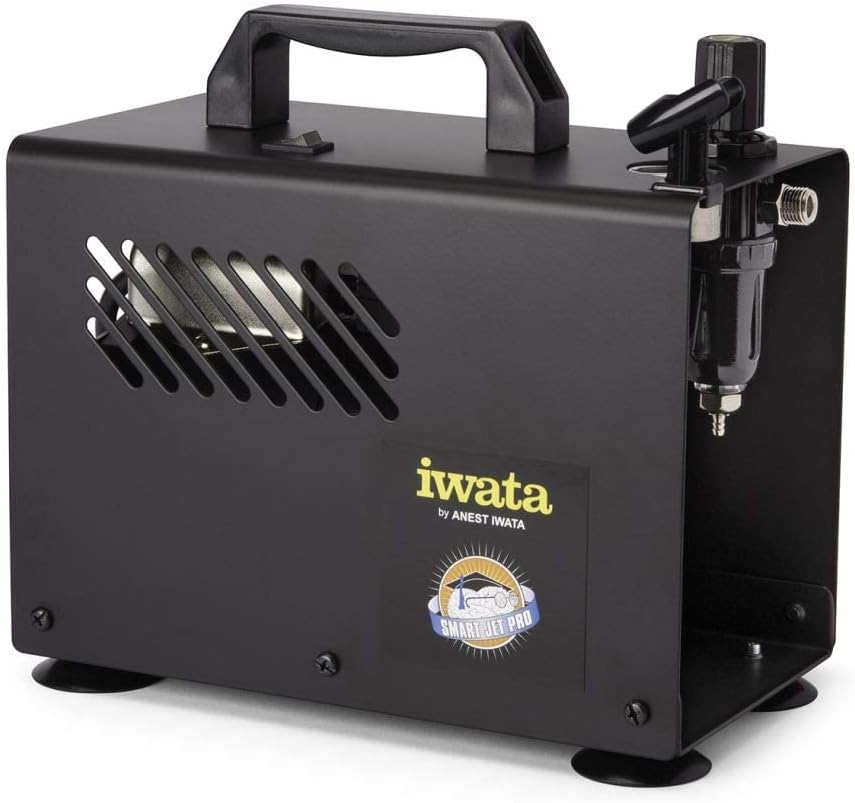
Figura 2: lateral view of the compressor, highlighting the integrated moisture filter and pressure adjustment knob.
5. Configuració
- Col·locació: Place the compressor on a stable, level surface in a clean, well-ventilated area. Ensure adequate space around the unit for air circulation.
- Connectar la mànega d'aire: Connect one end of the provided air hose to the air outlet on the compressor. Connect the other end to your airbrush. Ensure connections are secure to prevent air leaks.
- Connexió d'alimentació: Plug the compressor's power cord into a standard 120V AC electrical outlet.
6. Instruccions de funcionament
- Encès: Flip the power switch located on the top of the compressor to the "ON" position. The compressor will start running.
- Ajustar la pressió de l'aire: Use the pressure regulator knob (typically located near the air outlet and gauge) to adjust the desired air pressure. Turn clockwise to increase pressure and counter-clockwise to decrease. Monitor the air pressure gauge for accurate readings. The maximum operating pressure is 35 PSI.
- Funció d'apagat automàtic: The Smart Jet Pro features an automatic shut-off function. When the airbrush trigger is released and air flow stops, the compressor will automatically turn off to conserve energy and reduce wear. It will restart automatically when the airbrush trigger is pressed again.
- Begin Airbrushing: Once the desired pressure is set, you can begin your airbrushing work.
- Apagar: After use, flip the power switch to the "OFF" position and unplug the compressor from the power outlet.
7. Manteniment
Regular maintenance ensures optimal performance and longevity of your compressor.
- Moisture Filter Drainage: The integrated moisture filter collects condensation. Periodically check the filter bowl for accumulated water. To drain, ensure the compressor is off and depress the small valve at the bottom of the filter bowl to release the water.
- Neteja: Netegeu l'exterior del compressor amb un drap netamp cloth. Do not use harsh chemicals or abrasive cleaners. Ensure no liquids enter the internal components.
- Filtre d'aire: The compressor is designed with an internal air filter. No user-serviceable air filter replacement is typically required for this model.
8. Solució De Problemes
Consulteu aquesta secció per conèixer els problemes comuns i les seves solucions.
| Problema | Causa possible | Solució |
|---|---|---|
| El compressor no s'engega. | Sense alimentació, connexió fluixa, interruptor apagat. | Check power cord connection, ensure outlet is functional, verify power switch is ON. |
| Pressió d'aire baixa o nul·la. | Regulator set too low, air leaks, clogged airbrush. | Adjust pressure regulator, check hose connections for leaks, clean airbrush. |
| El compressor funciona contínuament. | Air leak in system, airbrush trigger stuck open. | Check all connections for leaks, ensure airbrush trigger is fully released. |
| Excessive moisture in air line. | Moisture filter needs draining. | Drain the moisture filter as described in the Maintenance section. |
9. Especificacions
Technical specifications for the Iwata-Medea Studio Series Smart Jet Pro Air Compressor (Model IS 875).

Figure 3: Product dimensions of the Iwata-Medea Smart Jet Pro Air Compressor.
| Característica | Especificació |
|---|---|
| Nom del model | IS 875 |
| Marca | Iwata |
| Voltage | 120 Volts |
| Font d'alimentació | Elèctric amb cable |
| Nivell de soroll | 50 decibels |
| Pressió màxima de funcionament | 35 PSI (lliura per polzada quadrada) |
| Potència del motor | 0.13 HP (1/8 hp) |
| Pes de l'article | 12.67 lliures (5.76 quilograms) |
| Dimensions del producte (L x A x A) | 6.18" x 8.65" x 2.25" |
| Característica especial | Moisture Filter, Auto Shut-Off |
| Components inclosos | Filter, Air Hose |
10. Garantia i Suport
For warranty information or technical support, please refer to the documentation included with your purchase or contact Iwata customer service. Keep your purchase receipt as proof of purchase for warranty claims.
For further assistance, visit the official Iwata weblloc web o poseu-vos en contacte amb els seus centres de servei autoritzats.


