1. Introducció
Gràcies per la compraasing the COWON iAUDIO 7 Portable MP3 Player. This device is designed to provide high-quality audio playback, along with additional features such as an FM radio, voice recorder, line-in recorder, and picture viewer. This manual provides essential information for the safe and efficient use of your device. Please read it thoroughly before operation.
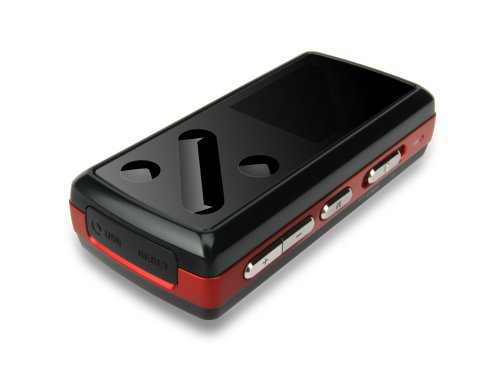
Imatge: Frontal view of the COWON iAUDIO 7 Portable MP3 Player, showcasing its compact design and color LCD screen.
2. Producte acabatview
2.1 Característiques clau
- Color LCD display for clear navigation.
- Supports multiple audio formats including MP3.
- Sintonitzador de ràdio FM integrat.
- Voice and Line-In recording capabilities.
- Imatge viewer funcionalitat.
- 8 GB internal memory for extensive storage.
- USB connectivity for data transfer.
2.2 Components
The iAUDIO 7 features a compact design with a 1.3-inch screen. It includes physical buttons for navigation and control, a USB port for connectivity, and a headphone jack. Specific button functions are detailed in the 'Operating Instructions' section.
3. Configuració
3.1 Càrrega inicial
Before first use, fully charge the iAUDIO 7. Connect the device to a computer's USB port or a compatible USB wall adapter using the provided USB cable. The charging indicator on the device will show its status. A full charge typically takes several hours.
3.2 Engegada/apagada
- Per encendre: Press and hold the Power button until the COWON logo appears on the screen.
- Per apagar: Premeu i manteniu premut el botó d'engegada fins que el dispositiu s'apagui.
- Bloqueig de pantalla: Use the Hold switch to prevent accidental button presses during transport.
4. Instruccions de funcionament
4.1 Navegació bàsica
The iAUDIO 7 features a combination of physical buttons for menu navigation and selection. Use the directional buttons to scroll through menus and the 'Play/Pause' button to select items or confirm actions. The 'Menu' button typically returns to the previous screen or main menu.
4.2 Reproducció de música
- From the main menu, navigate to 'Music'.
- Browse your music by artist, album, genre, or all tracks.
- Select a track and press the 'Play/Pause' button to begin playback.
- Use the volume buttons to adjust audio levels.
- Supported audio formats include MP3, OGG, and FLAC.
4.3 Ràdio FM
- Connect headphones, as they act as the FM antenna.
- Navigate to 'FM Radio' from the main menu.
- Feu servir els botons de navegació per cercar emissores o sintonitzar manualment una freqüència.
- The device supports recording from the FM radio. Refer to the on-screen prompts for recording options.
4.4 Voice and Line-In Recording
- Select 'Recorder' from the main menu.
- Choose 'Voice Recording' to use the built-in microphone or 'Line-In Recording' to record from an external audio source connected via the line-in port.
- Press the 'Play/Pause' button to start and stop recording.
- Gravat files are saved in a designated folder on the device.
4.5 Imatge i vídeo Viewing
- Navigate to 'Pictures' or 'Videos' from the main menu.
- Navega i selecciona files per viewing.
- Note: Videos may require conversion to a compatible format using COWON's software before transfer to the device.
5. Connexió a un ordinador
The iAUDIO 7 connects to a computer via a standard USB cable for data transfer. When connected, the device will appear as a removable disk drive.
- Usuaris de Windows: The device is compatible with Windows operating systems. You can drag and drop files directly to and from the device. COWON may provide optional software (e.g., JetAudio) for enhanced management and video conversion.
- Usuaris de Mac: The iAUDIO 7 supports data transfer with Mac OS. You can transfer files by dragging and dropping. However, the supplied software for device management and video conversion is primarily designed for Windows.
- Expulseu sempre el dispositiu de l'ordinador de manera segura abans de desconnectar el cable USB per evitar que les dades es corrompin.
6. Manteniment
- Neteja: Feu servir un drap suau i sec per netejar el dispositiu. Eviteu netejadors líquids o materials abrasius.
- Emmagatzematge: Guardeu el dispositiu en un lloc fresc i sec, allunyat de la llum solar directa i de temperatures extremes.
- Cura de la bateria: Per allargar la durada de la bateria, eviteu descarregar-la completament amb freqüència. Carregueu el dispositiu regularment, fins i tot si no l'utilitzeu durant períodes prolongats.
- Actualitzacions de firmware: Periodically check the official COWON website for any available firmware updates to improve performance and add features.
7. Solució De Problemes
- El dispositiu no s'encén: Ensure the battery is charged. Connect to a power source and try again. If unresponsive, perform a soft reset (refer to the device's specific reset procedure, often a small reset button or holding the power button for an extended period).
- Sense so: Check headphone connection and volume level. Ensure the audio file is not corrupted and is in a supported format.
- L'ordinador no reconeix el dispositiu: Ensure the USB cable is securely connected. Try a different USB port or cable. Restart both the device and the computer.
- Controls are unresponsive or erratic: Ensure the Hold switch is not engaged. If the device is exposed to extreme heat, allow it to cool down. A soft reset may resolve temporary software glitches.
- Cannot play certain files: Comproveu que el file format is supported by the iAUDIO 7 (e.g., MP3, OGG, FLAC for audio). Video files often require specific conversion.
8. Especificacions
| Nom del model | COWON iAUDIO 7 |
| Número de model de l'article | I7-08RD |
| Capacitat d'emmagatzematge de memòria | 8 GB |
| Mida de la pantalla | 1.3 polzades |
| Tecnologia de connectivitat | USB |
| Estàndards suportats | MP3 (and other formats like OGG, FLAC) |
| Característica especial | FM Radio, Voice Recorder, Line-In Recorder, Picture Viewer |
| Dimensions del producte | 3 x 1 x 1 polzades |
| Pes de l'article | 4.2 unces (0.26 lliures) |
| Fabricant | Cowon |
9. Informació de seguretat
- No exposeu el dispositiu a l'aigua ni a una humitat excessiva.
- Eviteu deixar caure o sotmetre el dispositiu a forts impactes.
- No intenteu desmuntar ni modificar el dispositiu. Això anul·larà la garantia.
- Utilitzeu només accessoris i carregadors homologats.
- Escoltar música durant un període prolongat a volums alts pot causar danys auditius.
- Desfeu-vos del dispositiu i de la bateria de manera responsable d'acord amb la normativa local.
10. Garantia i Suport
COWON products are manufactured under strict quality control. For information regarding warranty coverage, terms, and conditions, please refer to the warranty card included with your purchase or visit the official COWON website. For technical support or service inquiries, please contact COWON customer service through their official channels.
Per obtenir més ajuda, visiteu el COWON Store on Amazon.


