1. Introducció
The Viking Electronics K-202-DVA is a two-input, multi-number auto dialer and voice announcer designed for emergency and non-emergency message notification. This device can be integrated into various systems to provide automated voice alerts and dial out to pre-programmed numbers upon activation of its inputs.
2. Característiques
- Two independent input triggers for distinct notifications.
- Multi-number auto dialing capability.
- Voice announcement for emergency and non-emergency messages.
- Designed for reliable message notification.
3. Informació de seguretat
Please read and understand all safety instructions before installing or operating the K-202-DVA. Failure to do so may result in injury or damage to the device.
- Ensure power is disconnected before making any wiring connections.
- Install the device in a dry, protected environment, away from direct sunlight, moisture, and extreme temperatures.
- Use only the specified 12 VDC power supply.
- No intenteu obrir ni reparar el dispositiu. Encarregueu totes les tasques de manteniment a personal qualificat.
- Mantenir fora de l'abast dels nens.
4. Configuració i instal·lació
This section details the physical connections and initial setup of the K-202-DVA unit.
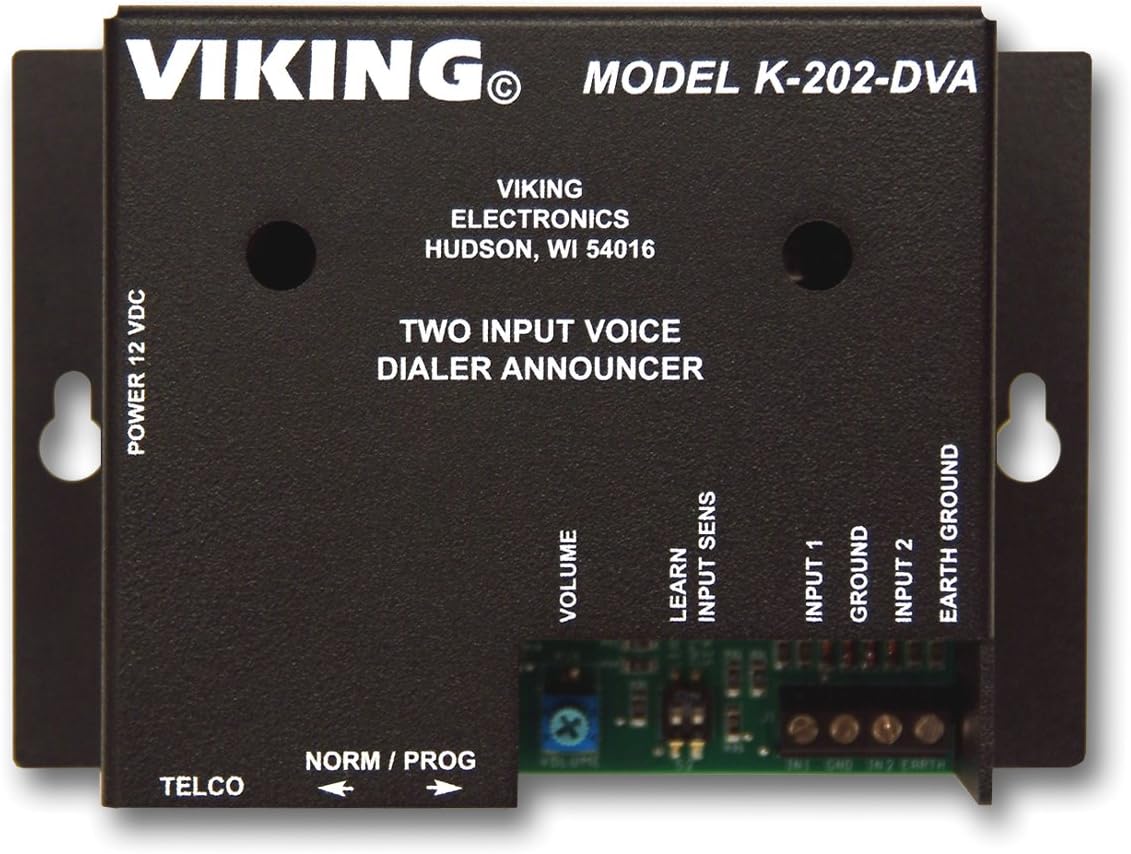
Figura 1: Davant view of the Viking K-202-DVA showing power, TELCO, volume, input, and ground connections.
4.1. Connection Points Overview
Refer to Figure 1 for the location of the following connection points:
- POWER 12 VDC: Connect the specified 12 Volt DC power adapter here.
- TELCO: Connect to the telephone line for dialing capabilities.
- NORM / PROG Switch: This switch is used to toggle between Normal operation mode and Programming mode. Ensure it is in the PROG position for initial setup and programming, and then switch to NORM per al funcionament normal.
- VOLUM: A potentiometer for adjusting the output volume of the voice announcements.
- LEARN INPUT SENS: Used during the learning or programming phase, likely for input sensitivity adjustment or calibration.
- ENTRADA 1: First trigger input. Connect a device or sensor that provides a signal to activate the dialer.
- TERRA: Common ground connection for inputs and other system components.
- ENTRADA 2: Second trigger input. Connect another device or sensor for a separate activation signal.
- EARTH GROUND: Connection point for grounding the unit to earth for safety and performance.
4.2. Initial Wiring Steps
- Assegureu-vos que la unitat estigui apagada.
- Connect the telephone line to the TELCO port.
- Connect your trigger devices or sensors to ENTRADA 1 i ENTRADA 2, ensuring a common connection to TERRA.
- Connect the 12 VDC power supply to the POTÈNCIA 12 VDC terminal. Do not apply power yet.
- If required by your installation, connect the TERRA TERRA terminal to a suitable earth ground point.
5. Funcionament
Once the K-202-DVA is properly installed and programmed, it operates automatically. Ensure the NORM / PROG l'interruptor està configurat a NORM per al funcionament normal.
5.1. Triggering Announcements
When an input (INPUT 1 or INPUT 2) is activated by a connected device or sensor, the K-202-DVA will initiate its pre-programmed sequence. This typically involves:
- Dialing the pre-programmed telephone numbers.
- Playing the associated voice message for the activated input.
- Repeating the message or dialing sequence as configured during programming.
5.2. Ajust de volum
Use a small screwdriver to carefully adjust the VOLUM potentiometer on the unit to achieve the desired announcement volume.
6. Programació
The K-202-DVA requires programming to define the telephone numbers to dial and the voice messages to announce for each input. Refer to the detailed programming guide (often provided separately by Viking Electronics or available on their website) for specific steps. Generally, programming involves:
- Canviant el NORM / PROG canviar a PROG.
- Connecting a telephone or programming device to the unit.
- Following a sequence of button presses or voice prompts to record messages and enter phone numbers.
- Adjusting settings like dial attempts, message repetition, and input sensitivity (possibly using LEARN INPUT SENS).
- Canviant el NORM / PROG tornar a NORM after programming is complete.
For detailed programming instructions, please visit the official Viking Electronics support page or consult the full product manual.
7. Manteniment
The K-202-DVA is designed for minimal maintenance. Follow these guidelines to ensure longevity:
- Mantingueu la unitat neta i lliure de pols. Feu servir un drap suau i sec per netejar-la.
- Do not use liquid cleaners or aerosols directly on the unit.
- Assegureu-vos que totes les connexions romanguin segures.
- Periodically test the system to confirm proper operation, especially for emergency notification applications.
8. Solució De Problemes
If you encounter issues with your K-202-DVA, try the following troubleshooting steps:
| Problema | Causa possible | Solució |
|---|---|---|
| La unitat no s'encén. | No power, incorrect power supply, faulty connection. | Verify 12 VDC power supply is connected and functional. Check power outlet. |
| No dialing or announcement when input is triggered. | Unit in PROG mode, incorrect wiring, no phone line, programming error. | Ensure NORM / PROG switch is in NORM. Check input wiring. Verify phone line connection. Re-program the unit. |
| Voice announcement is too quiet or distorted. | Volume setting too low, poor recording quality. | Adjust the VOLUME potentiometer. Re-record the voice message if necessary. |
| Unit dials but no message is heard. | Message not recorded or corrupted. | Re-record the voice message for the corresponding input. |
If the problem persists after attempting these solutions, contact Viking Electronics technical support.
9. Especificacions
| Atribut | Detall |
|---|---|
| Dimensions del producte | 7.5 x 7.5 x 4.5 polzades |
| Pes de l'article | 1.4 lliures |
| Número de model | VK-K-202-DVA |
| ASIN | B000UC894C |
| Fabricant | Components Viking |
| Data de primera disponibilitat | 14 de setembre de 2004 |
10. Garantia i Suport
Specific warranty details for the Viking K-202-DVA are not provided in this manual. For comprehensive warranty information, technical support, and additional resources, please visit the official Viking Electronics weblloc o poseu-vos en contacte amb el seu departament d'atenció al client.
Viking Electronics Official Weblloc: www.vikingelectronics.com


