1. Introducció
Gràcies per la compraasing the OLYMPUS CAMEDIA FE-220D Digital Camera. This compact digital camera is designed for ease of use, allowing you to capture high-quality images and videos effortlessly. This manual will guide you through the camera's features and operations to help you get the most out of your device.
2. Producte acabatview
The OLYMPUS CAMEDIA FE-220D features a 7.1-megapixel sensor and a 3x optical zoom lens, housed in a slim 20mm stainless steel body. Its intuitive design ensures straightforward operation for all users.
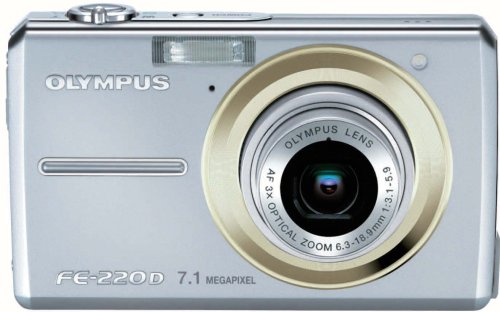
Figura 1: Davant view of the OLYMPUS CAMEDIA FE-220D Digital Camera, showing the lens and flash.
3. Configuració
3.1. Instal·lació de la bateria
- Obriu la tapa del compartiment de la bateria que es troba a la part inferior de la càmera.
- Insert the Lithium-ion battery with the correct orientation, matching the polarity indicators (+/-).
- Tanqueu la tapa del compartiment de la bateria de manera segura fins que encaixi al seu lloc.
3.2. Inserció d'una targeta de memòria
- Obriu la tapa de la ranura de la targeta de memòria, que normalment es troba al costat del compartiment de la bateria.
- Insert a compatible memory card (e.g., xD-Picture Card) into the slot until it locks. Ensure the card is facing the correct direction.
- Tanqueu bé la tapa de la ranura de la targeta de memòria.
4. Funcionament de la càmera
4.1. Encès / apagat
- Per encendre, premeu el botó PODER botó.
- Per apagar, premeu el botó PODER botó de nou.
4.2. Fer fotos
- Enceneu la càmera.
- Enquadra la foto amb el monitor LCD.
- Press the shutter button halfway down to focus. The focus indicator will light up when focus is achieved.
- Premeu el botó de l'obturador completament per fer la foto.
4.3. Ús del zoom
The camera features a 3x optical zoom. Use the zoom lever (typically located around the shutter button) to adjust the focal length:
- Moure la palanca cap a W (Amplia) per allunyar la imatge.
- Moure la palanca cap a T (Teleobjectiu) per ampliar la imatge.
4.4. Gravació de pel·lícules
The OLYMPUS CAMEDIA FE-220D supports movie recording.
- Set the camera to Movie mode (refer to your camera's mode dial or menu for this setting).
- Premeu el botó de l'obturador per començar a gravar.
- Torneu a prémer el botó de l'obturador per aturar la gravació.
5. Manteniment
5.1. Neteja de la càmera
- Feu servir un drap suau i sec per netejar el cos de la càmera.
- For the lens and LCD screen, use a specialized lens cleaning cloth and solution. Avoid harsh chemicals.
- Gently remove dust from the lens using a blower brush.
5.2. Emmagatzematge
- Guardeu la càmera en un lloc fresc i sec, allunyat de la llum solar directa i de temperatures extremes.
- Traieu la bateria si la càmera no s'utilitzarà durant un període prolongat.
6. Solució De Problemes
Si teniu problemes amb la càmera, consulteu els problemes i solucions més comuns següents:
- La càmera no s'encén: Assegureu-vos que la bateria estigui completament carregada i inserida correctament.
- No es poden fer fotos: Comproveu si hi ha una targeta de memòria inserida i si hi ha prou espai lliure. Assegureu-vos que s'ha tret la tapa de l'objectiu.
- Les imatges són borroses: Ensure the lens is clean. Check lighting conditions and camera shake.
- El flaix no es dispara: Check flash settings to ensure it is not set to 'Off' or 'Red-eye Reduction' in bright conditions.
For more complex issues, please consult the Olympus support weblloc o contacteu amb el servei d'atenció al client.
7. Especificacions
| Característica | Especificació |
|---|---|
| Marca | OM SYSTEM/Olympus |
| Número de model de producte | FE-220D |
| Resolució màxima d'imatge | 7.1 MP |
| Zoom òptic | 3x |
| ISO Sensitivity (Expanded) | 100-3200 |
| Finder Type | Electrònica |
| Tipus de lent | 3x zoom, wide-angle starting from 20mm |
| Funció de tir | Pel·lícula |
| Tipus de bateria | Ió de liti |
| Dimensions del paquet | 18.9 x 8 x 1.6 cm |
| Pes de l'article | 421.84 g |
| Relació d'aspecte | 4:3 |
| Tecnologia del sensor fotogràfic | CMOS |
| Admet File Format | JPEG |
| Tipus de control d'exposició | Automàtic |
| Factor de forma | Compacte |
8. Garantia i Suport
For information regarding warranty coverage, service, and technical support for your OLYMPUS CAMEDIA FE-220D, please refer to the documentation included with your product or visit the official Olympus weblloc web. Conserveu el comprovant de compra per a reclamacions de garantia.


