1. Introducció i finalview
The Cat Mate Electronic I.D. Disc is an essential accessory designed to work seamlessly with compatible Cat Mate and Closer Pets electronic cat flaps. This disc provides a unique electronic identity for your pet, allowing the cat flap to recognize and grant access only to authorized animals.
It is particularly useful for pets that are not microchipped or as an additional identification disc for existing systems. When used with a compatible cat flap, such as the Cat Mate Elite I.D. Disc Cat Flap with Timer Control, it ensures secure and selective entry to your home, keeping unwanted animals out.

Image 1: The Cat Mate Collar Worn Pet ID Disc. This disc is designed to be attached to your pet's collar and interacts with compatible electronic cat flaps.

Image 2: A cat utilizing a compatible Cat Mate electronic cat flap. The ID disc, worn on the collar, allows the flap to recognize the pet and grant access.
2. Configuració i instal·lació
The Cat Mate Electronic I.D. Disc is designed for simple attachment to your pet's collar. For the disc to function, it must be registered with your compatible Cat Mate or Closer Pets electronic cat flap.
2.1 Attaching the ID Disc to Your Pet's Collar
- Ensure your pet's collar is appropriately sized and comfortable.
- Attach the Cat Mate Electronic I.D. Disc securely to your pet's collar using the integrated metal ring. Ensure it hangs freely and is not obstructed by other tags or accessories, which could interfere with the cat flap's sensor.
- Verify that the disc is positioned on the collar such that it will pass within range of the cat flap's sensor when your pet approaches.
2.2 Registering the ID Disc with Your Cat Flap
The process for registering the ID Disc with your electronic cat flap varies by model. Please refer to the specific instruction manual provided with your Cat Mate or Closer Pets electronic cat flap for detailed pairing and programming instructions. Generally, this involves placing the disc near the cat flap's sensor during a programming mode.
Note: Some users have reported that the recognition and registration process can be sensitive. Follow your cat flap's manual carefully.

Image 3: The Cat Mate electronic cat flap. The ID disc interacts with the sensor located within the flap's frame.
3. Instruccions de funcionament
Once the Cat Mate Electronic I.D. Disc is securely attached to your pet's collar and successfully registered with your compatible electronic cat flap, the system will operate automatically.
3.1 Automatic Access Control
- When your pet approaches the cat flap, the integrated sensor will detect the unique signal from the ID Disc.
- Upon successful recognition, the cat flap will unlock, allowing your pet to pass through.
- The flap will then re-lock, preventing entry or exit by unauthorized animals.
3.2 Cat Flap Features (Enabled by ID Disc System)
The ID Disc enables the advanced features of your compatible cat flap:
- Four-Way Lock Control: Most compatible cat flaps offer flexible control modes:
- Dins i fora: Allows free movement in both directions.
- Només en: Allows entry but prevents exit.
- Només sortida: Allows exit but prevents entry.
- Bloquejat: Prevents movement in both directions.
- Funció de temporitzador: For models with a timer, you can set specific times for your pet to be allowed outdoors or to be kept indoors, such as overnight.
- Pantalla LCD: Compatible cat flaps feature an LCD display that provides real-time information, including:
- Selected entry and exit lock status.
- Current location of your registered pets (in or out).
- Time since last use for up to three selected cats.

Image 4: The digital display of a compatible Cat Mate cat flap, providing control and status information.
4. Manteniment
The Cat Mate Electronic I.D. Disc requires minimal maintenance to ensure optimal performance and longevity.
- Neteja regular: Periodically wipe the ID Disc with a soft, damp cloth to remove dirt, dust, or debris. Avoid harsh chemicals or abrasive materials.
- Inspeccionar per danys: Regularly check the disc for any signs of wear, cracks, or damage. A damaged disc may not function correctly.
- Collar Security: Ensure the disc remains securely attached to your pet's collar. If your pet frequently loses its collar, consider a more secure collar type or alternative attachment method to prevent loss of the ID Disc.
- Cat Flap Battery Check: The ID Disc itself does not require batteries. However, the compatible electronic cat flap is typically powered by four AA batteries, providing approximately 12 months of operation. Regularly check and replace the cat flap's batteries as indicated by its low battery indicator to ensure continuous functionality.
5. Solució De Problemes
If you encounter issues with your Cat Mate Electronic I.D. Disc or the associated cat flap system, consider the following troubleshooting steps:
- Disc Not Recognized by Cat Flap:
- Ensure the ID Disc is securely attached to your pet's collar and is positioned correctly to pass near the cat flap's sensor.
- Check the batteries in your electronic cat flap and replace them if necessary. Low batteries can affect sensor performance.
- Refer to your cat flap's instruction manual for specific troubleshooting steps related to disc recognition and re-registration procedures.
- Confirm that the ID Disc is indeed registered with your cat flap. If unsure, attempt to re-register the disc following your cat flap's manual.
- Cat Flap Not Unlocking:
- Verify the cat flap's lock settings (e.g., 4-way lock control) are not set to "locked" or "in only" if your pet is trying to exit.
- Check the timer settings on your cat flap, if applicable, to ensure your pet is allowed access at the current time.
- Ensure no physical obstructions are preventing the flap from opening or closing freely.
- Pet Hesitation at Flap:
- Some pets may need time to adjust to the electronic cat flap, especially if they are used to a simpler, non-electronic door.
- The locking mechanism can produce a sound. Pets typically adapt to this noise within a few days.
- For some cat flap models, pets may need to learn to push the door in once to unlock it, then push again to go through. Refer to your cat flap's manual for any training modes or tips.
- Frequent Loss of ID Disc:
- If your pet frequently loses its collar and thus the ID Disc, consider a more secure collar or a different attachment method for the disc.
For further assistance, consult the comprehensive manual for your specific Cat Mate or Closer Pets electronic cat flap model or contact customer support.
6. Especificacions
| Nom del producte | Cat Mate Collar Worn Pet ID Disc |
| Número de model (ASIN) | B000XPSH34 |
| Marca | Gat company |
| Material | Plàstic |
| Approximate Dimensions (Disc) | 8.9 cm (3.5 inches) width |
| Compatibilitat | Designed for use with all Cat Mate, Dog Mate, and Closer Pets electronic cat flaps. |
| Power Source (for compatible cat flap) | 4 piles AA (no incloses) |
| Battery Life (for compatible cat flap) | Aproximadament 12 mesos |
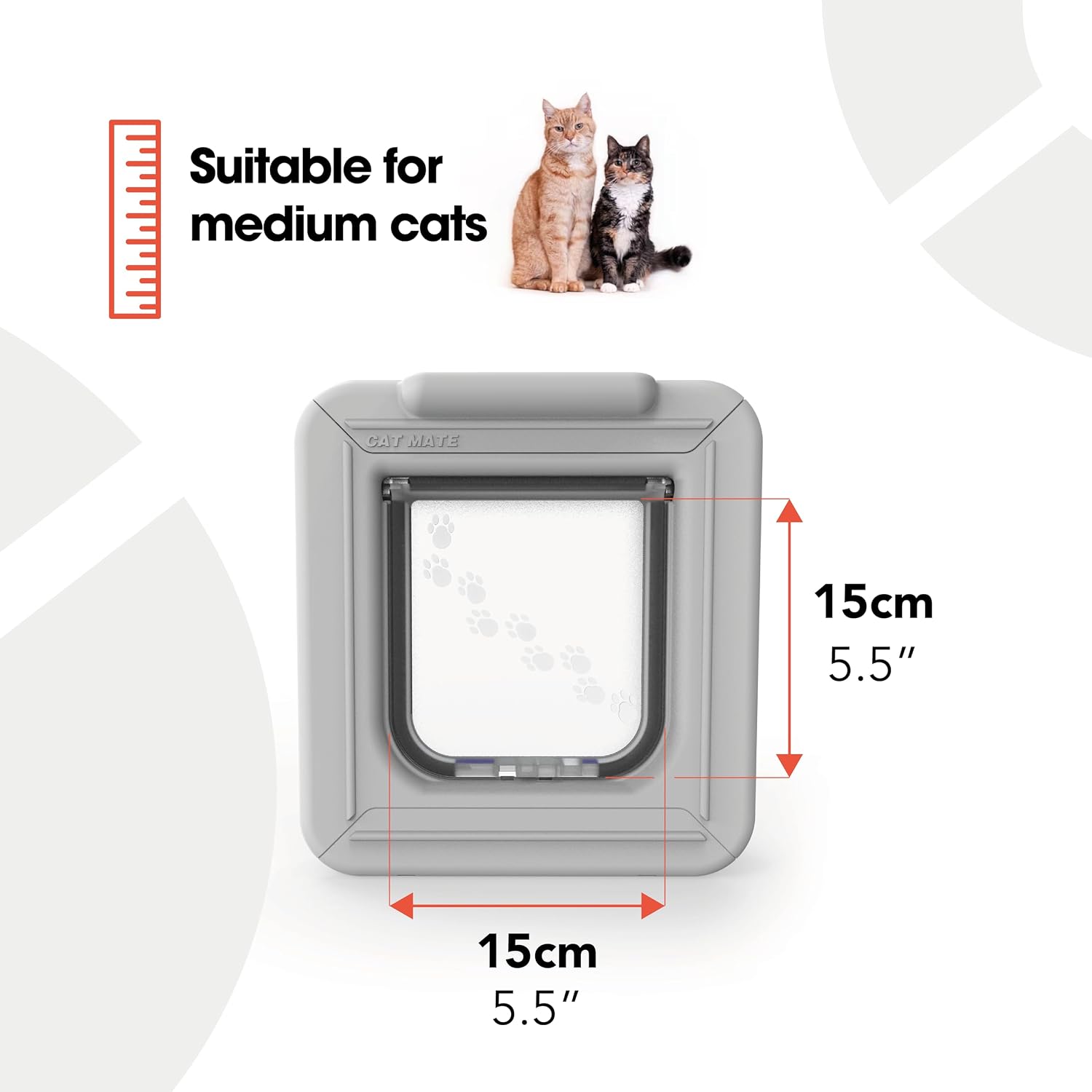
Image 5: Dimensions of a compatible Cat Mate electronic cat flap. The ID disc facilitates access through this opening.
7. Garantia i Suport
For information regarding product warranty, please refer to the documentation provided with your purchase or visit the official Cat Mate or Closer Pets weblloc. Els termes de garantia específics poden variar.
7.1 Atenció al client
If you require further assistance, have questions about your Cat Mate Electronic I.D. Disc, or need support for your compatible cat flap, please contact the manufacturer or authorized seller.
- Fabricant: Pet Mate
- Seller (on Amazon): Closer Pets - U.S.
- Botiga oficial de la marca: Visita el Cat Mate Store on Amazon per a més productes i informació.


