Introducció
The Creative Inspire T10 2.0 Multimedia Speaker System is designed to deliver high-quality audio for your PC, notebook, or MP3 player. Featuring a sleek, compact design and BasXPort Technology, these speakers provide enhanced audio performance without the need for a separate subwoofer. This manual provides essential information for setting up, operating, maintaining, and troubleshooting your Inspire T10 speakers.

Image: The Creative Inspire T10 2.0 Multimedia Speaker System, showcasing both left and right speakers with their sleek black finish and speaker grilles.
Característiques clau
- Disseny compacte i elegant: High-glossy black finish, ideal for matching with PCs, notebooks, or MP3 players.
- Premium 2.0 Speaker System: Dedicated tweeter in each satellite for improved highs and mid-tones.
- BasXPort Technology: Provides strong bass without requiring a separate subwoofer.
- Extended Listening Options: Built-in headphone jack for private listening and an AUX In connector for external audio devices.
Configuració
1. Desembalatge
Traieu amb cura tots els components de l'embalatge. Assegureu-vos que hi hagi els elements següents:
- Creative Inspire T10 Left Speaker
- Creative Inspire T10 Right Speaker (with controls)
- Adaptador d'alimentació
- Cable d'àudio estèreo de 3.5 mm
2. Col·locació d'altaveus
For optimal sound quality, place the speakers on a flat, stable surface, equidistant from your listening position. Position them to form an equilateral triangle with your ears. Ensure there are no obstructions in front of the speakers.
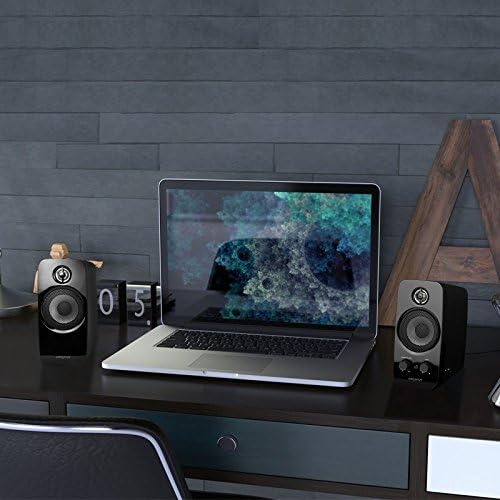
Image: Creative Inspire T10 speakers positioned on a desk alongside a laptop, demonstrating typical setup.
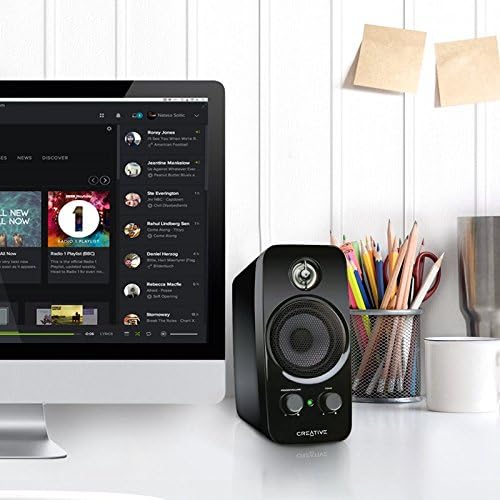
Image: A single Creative Inspire T10 speaker placed next to a desktop computer monitor, illustrating a common desktop setup.
3. Connexió dels altaveus
- Connect the audio cable from the left speaker to the corresponding port on the right speaker.
- Connect the 3.5mm stereo audio cable from the "AUX IN" port on the right speaker to the audio output jack (headphone jack) of your computer, MP3 player, or other audio source.
- Connect the power adapter to the power input port on the right speaker, then plug the adapter into a wall outlet.
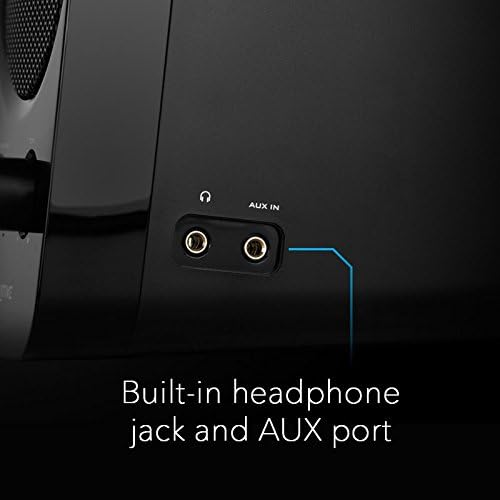
Imatge: Una imatge detallada view of the side panel of the Creative Inspire T10 speaker, highlighting the built-in headphone jack and AUX In port for external audio connections.
Instruccions de funcionament
Encès / apagat i control de volum
The main control knob on the right speaker functions as both the power switch and volume control.
- To power on, rotate the POTÈNCIA/VOLUM knob clockwise until you hear a click and the power indicator light illuminates.
- Continueu girant en sentit horari per augmentar el volum.
- Rotate counter-clockwise to decrease the volume.
- To power off, rotate the POTÈNCIA/VOLUM knob counter-clockwise until you hear a click and the power indicator light turns off.
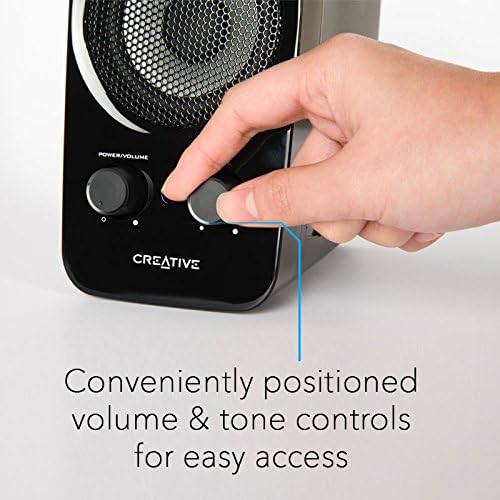
Image: A hand adjusting the conveniently positioned Power/Volume and Tone controls on the front of the Creative Inspire T10 speaker.
Control de to
El TO knob allows you to adjust the audio characteristics, balancing between bass and treble to suit your preference.
- Gira el TO knob clockwise to enhance higher frequencies (treble).
- Rotate counter-clockwise to emphasize lower frequencies (bass).
Ús de la presa per a auriculars
For private listening, plug your headphones into the headphone jack located on the side of the right speaker. When headphones are connected, audio output from the speakers will automatically mute.
Imatge: Una imatge detallada view of the side panel of the Creative Inspire T10 speaker, highlighting the built-in headphone jack and AUX In port for external audio connections.
Manteniment
Neteja
- Before cleaning, ensure the speakers are powered off and unplugged from the wall outlet.
- Wipe the speaker surfaces with a soft, dry, lint-free cloth.
- Do not use liquid cleaners, aerosols, or abrasive cleaning agents, as these may damage the finish or internal components.
Emmagatzematge
Quan no els utilitzeu durant períodes prolongats, guardeu els altaveus en un lloc fresc i sec, allunyats de la llum solar directa i de temperatures extremes.
Precaucions de seguretat
- No exposeu els altaveus a l'aigua ni a una humitat excessiva.
- Eviteu col·locar els altaveus a prop de fonts de calor o sota la llum solar directa.
- No intenteu obrir ni reparar els altaveus vosaltres mateixos. Encarregueu totes les tasques de manteniment a personal qualificat.
- Assegureu-vos que hi hagi una ventilació adequada al voltant dels altaveus.
Resolució de problemes
If you encounter issues with your Creative Inspire T10 speakers, refer to the following common problems and solutions:
| Problema | Causa possible | Solució |
|---|---|---|
| No hi ha so dels altaveus. |
|
|
| So distorsionat o poc clar. |
|
|
| Soroll de brunzit o brunzit. |
|
|
Especificacions
| Nom del model | Inspire T10 |
| Número de model | IN-T10-R3 |
| Tipus d'altaveu | Computer, Satellite |
| Configuració del canal de so envoltant | 2.0 |
| Potència de sortida màxima dels altaveus | 10 watts |
| Dimensions del producte (P x A x A) | 6.9 "P x 9.4" W x 8.1" H |
| Pes de l'article | 0.01 Ounces (Note: This weight seems unusually low and might be a data entry error. Actual product weight is likely higher.) |
| Tecnologia de connectivitat | Amb cable |
| Mode de sortida d'àudio | estèreo |
| Dispositius compatibles | Ordinador de sobretaula, portàtil, reproductor MP3, projector, telèfon intel·ligent, tauleta, televisió |
| Mètode de control | Manual Knobs (Power/Volume, Tone) |
| Característiques especials | BasXPort Technology, Built-in Headphone Jack, AUX In |
Nota: les especificacions estan subjectes a canvis sense previ avís.
Garantia i Suport
Informació de la garantia
Creative products are covered by a limited hardware warranty. For specific warranty terms and conditions applicable to your region, please refer to the warranty card included with your product or visit the official Creative weblloc.
Atenció al client
For technical assistance, product inquiries, or warranty claims, please contact Creative customer support through their official weblloc:
Visit Creative Support Weblloc
Please have your product model number (IN-T10-R3) and purchase details ready when contacting support.