1. Introducció
The Olympus LS-10 Linear PCM Recorder is a portable device designed for high-fidelity audio recording. It captures sound with exceptional clarity, making it suitable for various applications, including live music, nature sounds, and interviews. This manual provides detailed instructions for the proper use and maintenance of your LS-10 recorder.
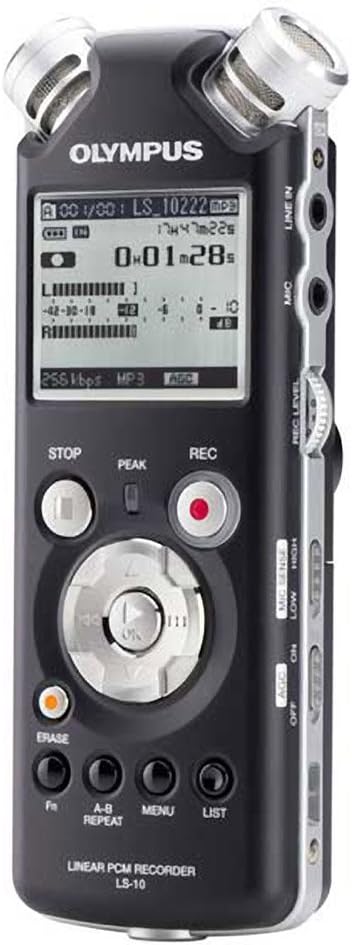
Figura 1: Frontal view of the Olympus LS-10 Linear PCM Recorder, showing the display, control buttons, and built-in microphones.
2. Configuració
2.1 Instal·lació de la bateria
The LS-10 operates on two AA batteries. For optimal performance, use alkaline, lithium, or NiMH rechargeable batteries.
- Localitzeu la tapa del compartiment de la bateria a la part posterior de la unitat.
- Feu lliscar la tapa en la direcció indicada per la fletxa per obrir-la.
- Insert two AA batteries, ensuring correct polarity (+/-) as marked inside the compartment.
- Tanqueu bé la tapa del compartiment de la bateria.

Figura 2: Esquena view of the LS-10, illustrating the location of the battery compartment and built-in speakers.
2.2 Engegada/apagada
Per encendre el dispositiu, premeu i manteniu premut el botó PODER button until the display illuminates. To power off, press and hold the PODER de nou el botó fins que la pantalla s'apagui.
2.3 Inserting an SD/SDHC Card
The LS-10 features an SD/SDHC card slot for expanded storage capacity.
- Locate the SD card slot on the side of the recorder.
- Insert an SD or SDHC card into the slot until it clicks into place. Ensure the card is inserted in the correct orientation.
- To remove the card, gently push it inward until it clicks, then release to eject.
3. Funcionament
3.1 Enregistrament d'àudio
The LS-10 supports uncompressed 24-bit/96kHz Linear PCM recording, as well as WAV, MP3, and WMA formats.
- Seleccioneu el mode d'enregistrament: Utilitza el MENÚ button to navigate to the recording settings and select your desired format (WAV, MP3, or WMA) and quality.
- Ajusta la sensibilitat del micròfon: Utilitza el SENTIT MIC switch (LOW/HIGH) on the side of the device to match the recording environment. Use LOW for loud sounds and HIGH for quiet sounds.
- Set Recording Level: Utilitza el NIVELL REC dial to adjust the input level. Monitor the level meter on the display to prevent clipping (distortion).
- Comença a gravar: Premeu el botó REC button (red circle) to begin recording. The REC indicator will illuminate.
- Atura la gravació: Premeu el botó STOP botó per finalitzar la gravació.

Figure 3: Front panel of the LS-10, highlighting the REC, STOP, and navigation buttons essential for recording and playback.

Figura 4: superior view of the LS-10, displaying the two high-quality built-in stereo microphones.
3.2 Reproducció
Recordings can be played back through the built-in stereo speakers or via headphones.
- Seleccioneu File: Use the navigation buttons to browse through your recorded files i seleccioneu la pista desitjada.
- Inicia la reproducció: Premeu el botó PLAY/OK botó per començar la reproducció.
- Ajustar el volum: Utilitza el VOLUM dial on the side of the unit to increase or decrease playback volume.
- Atura la reproducció: Premeu el botó STOP botó.
- AB Repetició: Utilitza el AB REPETIR button to loop a specific section of a recording.

Figura 5: lateral view of the LS-10, showing the LINE IN, MIC, and EAR (headphone) jacks, along with the REC LEVEL and VOLUME controls.
3.3 Navegació i configuració del menú
The LS-10 features a menu system for configuring various settings.
- Premeu el botó MENÚ botó per accedir al menú principal.
- Use the navigation buttons (up/down) to scroll through menu options.
- Premeu PLAY/OK to select an option or enter a sub-menu.
- La configuració comuna inclou:
- Rec Mode: Adjust recording quality and format.
- Informació del sistema: View informació del dispositiu.
- Hora i data: Estableix l'hora i la data actuals.
- Apagat automàtic: Configure automatic power-off duration.
- Premeu el botó LLISTA botó per sortir del menú.

Figure 6: The LS-10 display screen, illustrating the menu interface with various system settings.
3.4 File Gestió
The recorder organizes files into folders and allows for easy transfer to a computer.
- Carpetes: The LS-10 supports 5 folders, each capable of holding up to 200 messages, plus a dedicated MUSIC folder.
- Erasing Files: Seleccioneu el file voleu suprimir i premeu la tecla ESBORRA button. Confirm the deletion when prompted.
- Connexió a un ordinador: Connect the LS-10 to your computer using a USB cable. The device will appear as a removable drive, allowing you to transfer files. Compatible with Windows 2000/XP/VISTA and Mac OS 10.2 or later.
4. Manteniment
4.1 Neteja
To maintain the recorder's performance and appearance:
- Netegeu la unitat amb un drap suau i sec.
- Per a la brutícia tossuda, lleugerament dampNetegeu el drap amb aigua i després eixugueu-lo.
- Do not use abrasive cleaners, solvents, or alcohol, as these can damage the surface.
4.2 Cura de la bateria
- Traieu les piles si no heu d'utilitzar la unitat durant un període prolongat per evitar fuites.
- Eliminar les bateries usades d'acord amb la normativa local.
4.3 Emmagatzematge
Store the LS-10 in a cool, dry place away from direct sunlight, extreme temperatures, and high humidity.
5. Solució De Problemes
If you encounter issues with your LS-10, refer to the following common problems and solutions:
- Sense energia:
- Comproveu si les piles estan inserides correctament amb la polaritat correcta.
- Substituïu-les per piles noves.
- Assegureu-vos que el botó d'engegada estigui premut i mantingut prou premut.
- No es pot gravar:
- Check available memory on internal storage or SD card. Delete unnecessary files if storage is full.
- Ensure the device is not in playback mode.
- Verify microphone sensitivity and recording level settings.
- Qualitat de so baixa:
- Adjust microphone sensitivity (MIC SENSE) to match the environment.
- Ensure the recording level is not too high (causing distortion) or too low (causing noise).
- Record in a quiet environment if possible.
- Check if external microphones or line-in sources are properly connected.
- Computer Does Not Recognize Device:
- Assegureu-vos que el cable USB estigui connectat correctament tant a la gravadora com a l'ordinador.
- Proveu un port USB diferent a l'ordinador.
- Restart your computer and the LS-10.
6. Especificacions
| Característica | Detall |
|---|---|
| Formats de gravació | WAV (Linear PCM), MP3, WMA |
| Memòria interna | 2 GB |
| Memòria externa | Ranura per a targetes SD/SDHC |
| Durada de la bateria | Approximately 14 hours (recording) |
| Bateries | 2 x AA (Alkaline, Lithium, or NiMH) |
| Connector de micròfon | 3.5mm stereo mini-jack, impedance 2 kohms |
| Jack d'entrada de línia | 3.5mm stereo mini-jack, impedance 2 kohms |
| Conector d'auriculars | 3.5mm stereo mini-jack, impedance 8 ohms |
| Altaveu incorporat | 2 x 16mm round dynamic speakers, 8 ohms, 200 mW output |
| Dispositius compatibles | Ordinador personal |
| Interfície del maquinari | USB |
| Dimensions (A x A x P) | 3.4 x 6.3 x 6.5 polzades (aproximadament) |
| Pes | 1 lliura (aproximadament) |
7. Informació de suport
For further assistance, technical support, or information regarding warranty, please refer to the official Olympus weblloc web o poseu-vos en contacte amb el seu departament d'atenció al client. Mantingueu a mà el rebut de compra i el número de sèrie del producte quan busqueu assistència.


