1. Introducció
This manual provides comprehensive instructions for the installation, operation, and maintenance of your AT&T 993 2-Line Corded Phone. Designed for efficiency, this phone supports two distinct telephone lines, features a speakerphone, and includes Caller ID capabilities, making it suitable for home offices or small business environments.
Please read this manual thoroughly before using your new phone to ensure proper setup and to take full advantage de les seves característiques.
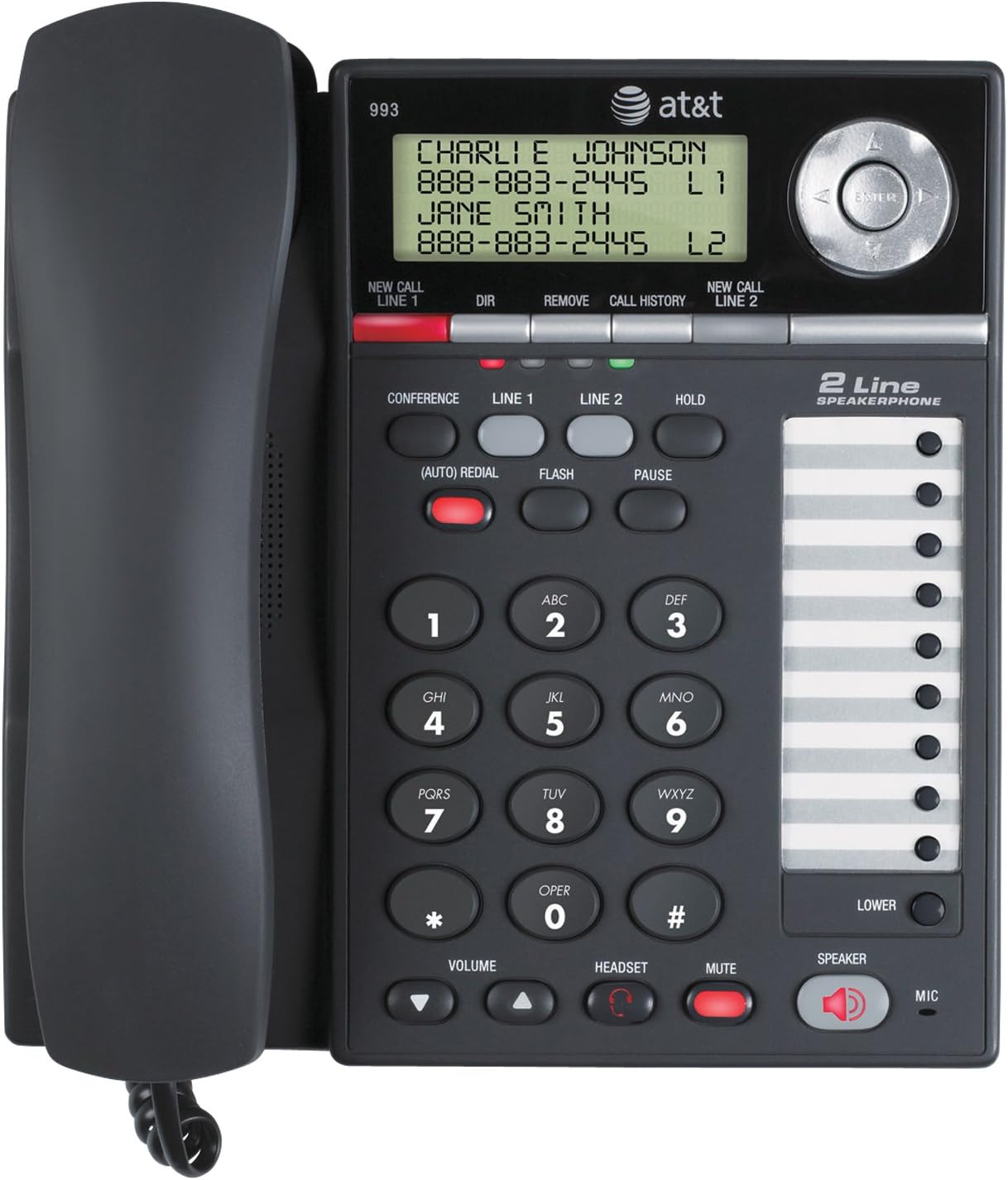
Figura 1: Frontal view of the AT&T 993 2-Line Corded Phone, displaying the handset, keypad, display screen, and speakerphone.
2. Informació de seguretat
Per reduir el risc d'incendi, descàrrega elèctrica o lesions, seguiu sempre les precaucions de seguretat bàsiques quan utilitzeu aquest producte.
- Llegeix i entén totes les instruccions.
- Seguiu totes les advertències i instruccions marcades al producte.
- Desconnecteu aquest producte de la presa de corrent abans de netejar-lo. No utilitzeu netejadors líquids o aerosols. Utilitza l'anunciamp drap per netejar.
- Do not use this product near water, such as a bathtub, wash bowl, kitchen sink, or laundry tub, in a wet basement, or near a swimming pool.
- No col·loqueu aquest producte sobre un carro, un suport o una taula inestables.
- Avoid placing the phone in areas with extreme temperatures, direct sunlight, or other heat sources.
- This product should be operated only from the type of power source indicated on the marking label. If you are not sure of the type of power supply to your home or office, consult your dealer or local power company.
- Do not allow anything to rest on the power cord. Do not locate this product where the cord will be walked on.
- Never push objects of any kind into this product through slots in the base or handset as they may touch dangerous voltage punts o crear un curtcircuit.
- Do not disassemble this product. Refer servicing to qualified service personnel.
3. Configuració
3.1 Contingut del paquet
Assegureu-vos que tots els elements estiguin presents al vostre paquet:
- AT&T 993 Phone Base
- Telèfon
- Handset Curly Cordó
- 2 Telephone Line Cords
- Adaptador de corrent alterna
- Replacement Directory Card
- Manual d'usuari (aquest document)
- Guia d'inici ràpid
3.2 Connexió del telèfon
Follow these steps to connect your AT&T 993 phone:
- Connecteu el telèfon: Connecteu un extrem del curly handset cord into the handset and the other end into the jack labeled TELECOMPLE on the side of the phone base.
- Connect Telephone Line 1: Plug one end of a telephone line cord into the jack labeled LÍNIA 1 on the back of the phone base. Plug the other end into your telephone wall jack for Line 1.
- Connect Telephone Line 2: Plug one end of the second telephone line cord into the jack labeled LÍNIA 2 on the back of the phone base. Plug the other end into your telephone wall jack for Line 2.
- Connectar l'alimentació: Plug the small end of the AC power adapter into the CC EN 9V jack on the back of the phone base. Plug the large end into a standard electrical wall outlet.
- Battery Installation (Optional/Required for some features): The phone requires 12V batteries for certain features (e.g., display backlight, memory retention during power outages). Refer to the battery compartment for specific instructions on installation.

Figura 2: posterior view of the AT&T 993 2-Line Corded Phone, illustrating the connection points for power, handset, and telephone lines.
3.3 Muntatge a la paret (opcional)
The phone base is designed for wall mounting. Use the integrated wall mount holes on the back of the unit and appropriate screws (not included) to secure it to a wall. Ensure the phone is securely fastened before use.
4. Instruccions de funcionament
4.1 Fer i rebre trucades
- Per fer una trucada:
- Aixequeu el telèfon o premeu PONENT botó.
- Select the desired line by pressing LÍNIA 1 or LÍNIA 2.
- Marqueu el número de telèfon.
- Per rebre una trucada:
- Quan soni el telèfon, aixequeu l'auricular o premeu la tecla PONENT button. The phone will automatically connect to the ringing line.
- Per finalitzar una trucada: Pengeu el telèfon o premeu PONENT tornar a prémer el botó si feu servir l'altaveu.
4.2 2-Line Operation
The AT&T 993 supports two independent telephone lines. You can switch between lines, place a call on hold, or use three-party conferencing.
- Línies de commutació: During a call on one line, press the button for the other line (LÍNIA 1 or LÍNIA 2). The current call will automatically be placed on hold.
- Posar una trucada en espera: Premeu el botó MANTENIM button. The line indicator will flash. To retrieve the call, press the corresponding line button.
- Distinct Ringtones: Each line can be assigned a distinct ringtone to easily identify which line is ringing. Refer to the phone's menu settings for customization.
4.3 Altaveu
To use the speakerphone function:
- Premeu el botó PONENT botó per activar o desactivar l'altaveu.
- Ajusteu el volum de l'altaveu amb el VOLUM botons.
4.4 Identificador de trucada
The phone stores up to 99 names and numbers in its Caller ID history. This feature requires a subscription to Caller ID service from your telephone service provider.
- Viewing Caller ID History: Use the navigation buttons (up/down arrows) to scroll through the Caller ID log.
- Dialing from Caller ID: Select an entry from the Caller ID history and press the MARCA button (or lift handset/press speaker) to call the number.
- Call Waiting Caller ID: If you subscribe to Call Waiting service, the display will show the incoming caller's information even if you are already on a call.
4.5 Directory and Speed Dial
The phone features a 100-entry directory and supports speed dialing for frequently called numbers.
- Storing Directory Entries: Access the directory menu to add, edit, or delete contact entries. Each entry can store a name and number.
- De marcatge ràpid: The phone allows for programming up to 18 speed dial numbers. Refer to the specific instructions in the phone's menu for programming these slots. To use, press the designated speed dial button.
4.6 Three-Party Conferencing
This feature allows three parties to converse simultaneously on three different lines (two external calls and your phone).
- Establir una trucada a la línia 1.
- Premeu LÍNIA 2 to place Line 1 on hold and get a dial tone on Line 2.
- Dial the second party's number on Line 2.
- Once connected to the second party, press the CONFERÈNCIA button to join all three parties.
4.7 Voicemail Indicator
If you subscribe to a voicemail service from your telephone service provider, a red light on the phone will blink when you have new voicemail messages waiting.
4.8 Headset Operation
For hands-free operation, you can connect a 2.5mm headset (not included) to the headset jack on the side of the phone base.
- Plug your 2.5mm headset into the dedicated headset jack.
- Premeu el botó AURICULAR button to activate or deactivate headset mode.
5. Manteniment
5.1 Neteja del telèfon
To keep your phone in good condition:
- Unplug the phone from the wall outlet and power source before cleaning.
- Utilitzeu un suau, damp cloth to clean the exterior surfaces of the phone.
- Do not use liquid or aerosol cleaners, or harsh chemicals.
- Eviteu que entri humitat a cap obertura.
5.2 Atenció general
- Protect the phone from extreme temperatures, direct sunlight, and moisture.
- Eviteu deixar caure el telèfon o sotmetre'l a impactes forts.
- Ensure cords are not tangled or pinched.
6. Solució De Problemes
If you experience issues with your AT&T 993 phone, try the following solutions:
- Sense to de marcatge:
- Ensure all phone line cords are securely plugged into the phone and the wall jacks.
- Verify the AC power adapter is properly connected to the phone and a working electrical outlet.
- Test the phone line with another known working phone.
- L'identificador de trucada no es mostra:
- Confirm you have subscribed to Caller ID service from your telephone service provider.
- Ensure the phone is connected to a compatible telephone line.
- Speakerphone Volume Low/Distorted:
- Ajusteu el volum amb el botó VOLUM buttons during a call.
- Assegureu-vos que el micròfon no estigui obstruït.
- Phone Not Ringing:
- Check the ringer volume settings in the phone's menu.
- Ensure the phone is not in "Do Not Disturb" or similar silent mode if such a feature exists.
- Buttons Sticky or Unresponsive:
- Clean the keypad area with a soft, slightly damp tela.
- Si el problema persisteix, poseu-vos en contacte amb el servei d'atenció al client.
Per obtenir més ajuda, consulteu la secció de suport.
7. Especificacions
| Marca | AT&T |
| Número de model | 993 |
| Tipus de telèfon | Cordat |
| Nombre de línies | 2 |
| Color | Carbó vegetal |
| Material | Plàstic |
| Font d'alimentació | Elèctric amb cable |
| Piles necessàries | 12V batteries (for certain features) |
| Pes de l'article | 3.05 lliures (aprox. 1.38 kg) |
| Dimensions del producte (L x A x A) | 3.98 x 7.87 x 8.27 polzades (aprox. 10.1 x 20 x 21 cm) |
| Mostra | LCD, 2-3/4 by 1 inches |
| Historial d'identificació de trucades | 99 noms i números |
| Directory Memory | 100 entrades |
| Jack per a auriculars | 2.5 mm |
| Compatible amb audiòfons | Sí |
8. Garantia i Suport
8.1 Informació de la garantia
This product is covered by a limited warranty. Please refer to the warranty card included in your original packaging for details regarding the warranty period and terms. Keep your purchase receipt as proof of purchase.
8.2 Atenció al client
For technical support, troubleshooting assistance, or warranty claims, please contact AT&T customer service. Contact information can typically be found on the AT&T official weblloc web o a l'embalatge del producte.
Recursos en línia: For the most up-to-date support information, FAQs, and additional resources, visit the official AT&T support weblloc.


