1. Introducció
This manual provides essential instructions for the installation, operation, and maintenance of your Channel Vision DVR-HD080 additional hard drive. This hard drive is designed to expand the storage capacity of compatible Channel Vision Digital Video Recorders (DVRs). Please read this manual thoroughly before installation to ensure proper functionality and to prevent damage.
2. Producte acabatview
The DVR-HD080 is an internal hard drive designed to seamlessly integrate with specific Channel Vision DVR models, providing additional storage for video recordings. Its primary function is to increase the recording capacity of your existing DVR system.
Característiques principals:
- Expands storage capacity for Channel Vision digital video recorders.
- Compatible with DVR-4JN, DVR-4N, DVR-8N, and DVR-16N DVR models.
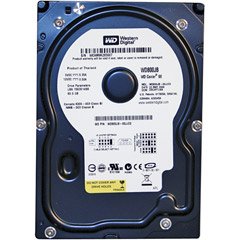
Figura 1: Channel Vision DVR-HD080 Additional Hard Drive. This image displays the external appearance of the hard drive unit.
3. Configuració i instal·lació
Important: Before beginning installation, ensure your DVR is powered off and unplugged from the electrical outlet. Refer to your DVR's specific manual for detailed instructions on opening the casing and accessing the internal hard drive bay.
- Prepare the DVR: Power off and unplug your Channel Vision DVR. Disconnect all cables.
- Open DVR Casing: Carefully open the DVR's outer casing. This usually involves removing screws on the back or sides.
- Localitza la badia de la unitat: Identify an available internal hard drive bay within the DVR.
- Muntar el disc dur: Securely mount the DVR-HD080 into the designated bay using appropriate screws. Ensure it is firmly in place to prevent vibration.
- Connectar els cables: Connect the SATA data cable from the DVR's motherboard to the hard drive. Then, connect the SATA power cable from the DVR's power supply to the hard drive. Ensure both connections are secure.
- Tanca Casing: Carefully close the DVR casing and secure it with the removed screws.
- Encès: Reconnect all cables to the DVR and power it on.
- Initialize Drive: Access your DVR's system settings or storage management menu. The DVR may prompt you to initialize or format the new hard drive. Follow the on-screen instructions to prepare the drive for use. This step is crucial for the DVR to recognize and utilize the additional storage.
4. Instruccions de funcionament
Once the DVR-HD080 additional hard drive is successfully installed and initialized, it operates as an integrated part of your Channel Vision DVR's storage system. The DVR will automatically manage recording space across all installed drives.
- Automatic Storage Management: The DVR's operating system will automatically detect and utilize the additional storage provided by the DVR-HD080.
- Capacitat de gravació: Your DVR's total recording capacity will increase, allowing for longer retention of video footage.
- Accés a les gravacions: Accés gravat footage through your DVR's standard playback interface. The location of recordings is transparent to the user, as the DVR manages the storage internally.
5. Manteniment
The DVR-HD080 hard drive requires minimal maintenance. Adhering to general best practices for electronic devices will help ensure its longevity and reliable performance.
- Apagada correcta: Always power down your DVR correctly through its menu system before unplugging or performing any maintenance. Avoid abrupt power loss.
- Condicions ambientals: Ensure the DVR operates in a well-ventilated area, free from excessive dust, moisture, and extreme temperatures.
- Manipulació física: Avoid physical shocks or impacts to the DVR, as hard drives are sensitive components.
- Actualitzacions de firmware: Periodically check the Channel Vision website for firmware updates for your specific DVR model, as these may include improvements for storage management.
6. Solució De Problemes
If you encounter issues with your DVR-HD080 hard drive, consider the following troubleshooting steps:
- Unitat no detectada:
- Ensure the DVR is powered off and unplugged. Re-open the casing and verify that both the SATA data and power cables are securely connected to the hard drive and the DVR's motherboard/power supply.
- Check your DVR's system settings to see if the drive appears in the storage management menu. If it appears but is uninitialized, follow the on-screen prompts to format it.
- Insufficient Storage Despite New Drive:
- Confirm the drive was successfully initialized and formatted by the DVR.
- Verify that your DVR model is listed as compatible with the DVR-HD080 (DVR-4JN, DVR-4N, DVR-8N, DVR-16N).
- Unusual Noises from DVR:
- Power down the DVR immediately. Unusual clicking or grinding noises may indicate a failing hard drive. Contact Channel Vision support.
- Ensure the hard drive is securely mounted and not vibrating against the DVR casing.
7. Especificacions
| Especificació | Detall |
|---|---|
| Número de model | DVR-HD080 |
| Marca | Visió del canal |
| Dimensions del producte | 8 x 3.1 x 9.3 polzades |
| Pes de l'article | 8 unces |
| Models de DVR compatibles | DVR-4JN, DVR-4N, DVR-8N, DVR-16N |
| ASIN | B00155BFW6 |
| UPC | 690240021646 |
| Data de primera disponibilitat | 19 de gener de 2008 |
8. Garantia i Suport
For information regarding the warranty of your Channel Vision DVR-HD080 additional hard drive, please refer to the warranty documentation provided with your original purchase or visit the official Channel Vision website. For technical support, troubleshooting assistance beyond this manual, or service inquiries, please contact Channel Vision customer support directly.
Fabricant: Visió del canal


