Introducció
Welcome to the user manual for your new Karlsson KA4548 Gummy Alarm Clock. This battery-powered LCD alarm clock is designed for simplicity and functionality, featuring a unique rubberized casing that seamlessly integrates all control buttons. Its clear LCD display provides time at a glance, and the blue backlight activates only when the light button is pressed, ensuring no disruptive light emission during the night. This manual will guide you through the setup, operation, maintenance, and troubleshooting of your alarm clock.
Informació de seguretat
- Seguretat de la bateria: Always use the specified battery type (3 AAA batteries). Do not mix old and new batteries, or different types of batteries. Remove batteries if the clock will not be used for an extended period to prevent leakage. Dispose of used batteries responsibly.
- Col·locació: Place the alarm clock on a stable, flat surface. Avoid placing it in direct sunlight, near heat sources, or in areas with high humidity.
- Neteja: Clean the clock with a soft, dry cloth. Do not use abrasive cleaners or immerse the clock in water.
- Nens: Mantenir fora de l'abast dels nens petits. Aquest producte no és una joguina.
Producte acabatview
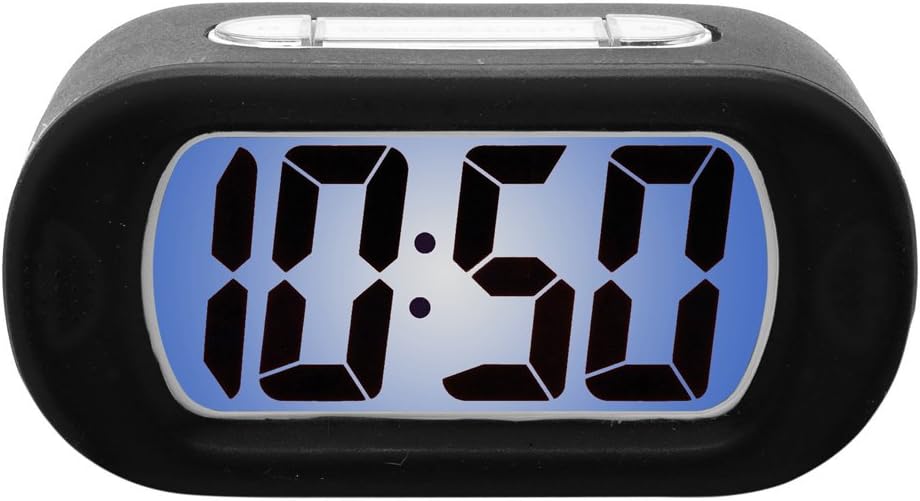
Figure 1: Karlsson KA4548 Gummy Alarm Clock. This image displays the Karlsson KA4548 Gummy Alarm Clock from a front-facing perspective. The clock features a black rubberized casing and a clear LCD screen with a blue backlight, currently displaying the time '10:50' in large, digital segments. The top of the clock shows subtle outlines of control buttons integrated into the rubber material.
Components:
- Pantalla LCD: Mostra l'hora, l'estat de l'alarma i altres indicadors.
- C de gomaasing: Durable and provides integrated button access.
- Botons de control: (Located on top/back, integrated into rubber) For setting time, alarm, snooze, and activating backlight.
- Compartiment de la bateria: Located on the back, for 3 AAA batteries.
Configuració
Instal·lació de la bateria:
- Localitza el compartiment de la bateria a la part posterior del despertador.
- Obriu la tapa del compartiment de la bateria.
- Insert 3 new AAA batteries, ensuring correct polarity (+ and -) as indicated inside the compartment.
- Close the battery compartment cover securely. The LCD display should now turn on.
Instruccions de funcionament
Configuració de l'hora:
- Press the 'SET' button (or equivalent, typically integrated into the rubber casing). The hour digits will start flashing.
- Use the '+' or '-' buttons (or up/down arrows) to adjust the hour.
- Press 'SET' again to confirm the hour and move to the minute setting. The minute digits will flash.
- Feu servir els botons '+' o '-' per ajustar els minuts.
- Press 'SET' one more time to confirm the minutes and exit time setting mode.
Configuració de l'alarma:
- Press the 'ALARM SET' button (or similar, often labeled with an alarm icon). The alarm hour digits will start flashing.
- Use the '+' or '-' buttons to adjust the alarm hour.
- Press 'ALARM SET' again to confirm the alarm hour and move to the alarm minute setting. The alarm minute digits will flash.
- Use the '+' or '-' buttons to adjust the alarm minutes.
- Press 'ALARM SET' one more time to confirm the alarm minutes and exit alarm setting mode.
- Ensure the alarm is activated. There is usually a dedicated 'ALARM ON/OFF' switch or button. A small alarm icon should appear on the display when the alarm is active.
Funció de posposar:
When the alarm sounds, press the 'SNOOZE' button (typically a large button on top). The alarm will temporarily stop and sound again after a few minutes (usually 5-9 minutes, depending on the model).
Funció de llum de fons:
To illuminate the display in the dark, press the 'LIGHT' button (often integrated with the snooze button). The blue backlight will activate for a few seconds and then turn off automatically to conserve battery life. The display does not remain continuously lit.
Manteniment
Neteja:
Wipe the clock's surface with a soft, dry, lint-free cloth. For stubborn marks on the rubber casing, a slightly damp cloth can be used, but ensure no moisture enters the electronic components. Do not use chemical cleaners, solvents, or abrasive materials.
Substitució de la bateria:
When the display dims or the alarm function becomes unreliable, it is time to replace the batteries. Follow the battery installation steps outlined in the 'Setup' section. Always replace all three AAA batteries at the same time with new ones.
Resolució de problemes
- La pantalla està en blanc o té poca llum:
Solució: Comproveu la polaritat de la bateria. Substituïu-la per piles AAA noves. - L'alarma no sona:
Solució: Ensure the alarm is set and activated (check for alarm icon on display). Verify that the time and alarm time are correctly set. Replace batteries if they are low. - Backlight does not work or is very dim:
Solució: Press the 'LIGHT' button firmly. If it still doesn't work, replace the batteries. Note that the backlight is designed to be momentary, not continuously lit. - Els botons no responen:
Solució: Ensure batteries are correctly installed and have sufficient power. Try removing and reinserting batteries to reset the device. - Visualització de l'hora incorrecta:
Solució: Reset the time following the 'Setting the Time' instructions.
Especificacions
| Característica | Detall |
|---|---|
| Número de model | KA4548 |
| Marca | Karlsson |
| Dimensions del producte | 14.73 x 5.08 x 7.62 cm |
| Pes | 220 g |
| Color | Negre |
| Tipus de visualització | LCD digital |
| Font d'alimentació | Battery (3 x AAA required) |
| Piles incloses | No |
| Característiques especials | Alarm, Momentary Backlight |
| Estil | Disseny modern |
| Muntatge obligatori | No |
Garantia i Suport
Els productes Karlsson es fabriquen amb estàndards d'alta qualitat. Per obtenir informació sobre la cobertura de la garantia, consulteu la targeta de garantia inclosa amb la vostra compra o visiteu el lloc web oficial de Karlsson. website. For technical support or further assistance, please contact Karlsson customer service through their official channels.


