1. Introducció
The Multipure Aquaperform Model MP880 is a high-performance drinking water system designed for below-sink installation. It features a durable stainless steel housing and is engineered to reduce a wide range of contaminants, including Arsenic V. This system provides filtered water through a dedicated chrome faucet, equipped with a capacity monitor to track filter life.
- Housing Dimensions: 11 inches (height) x 5.75 inches (width)
- Filter Capacity: 960 gallons
- Stainless steel housing for enhanced contaminant reduction, including Arsenic V.
- Includes a chrome faucet and below-sink installation kit.
2. Informació de seguretat
Si us plau, llegiu atentament totes les instruccions abans de la instal·lació i l'ús. Si no seguiu aquestes instruccions, podeu patir danys materials o lesions.
- Assegureu-vos que totes les connexions estiguin ben fixades per evitar fuites.
- Do not overtighten plastic fittings, as this can cause damage.
- Verify that the water supply is turned off before beginning installation.
- Utilitzeu les eines i els equips de seguretat adequats durant la instal·lació.
- The system is designed for cold water use only.
- Do not expose the unit to freezing temperatures.
3. Contingut del paquet
Verifiqueu que tots els components siguin presents abans de començar la instal·lació:
- Multipure Aquaperform MP880 Filter Unit (Stainless Steel Housing)
- Aixeta de crom
- Below Sink Installation Kit (includes tubing, fittings, mounting bracket)
- Monitor de capacitat
- Vàlvula Adapta
- Manual d'instruccions (aquest document)
4. Setup and Installation (Below Sink)
This section outlines the steps for installing the Aquaperform MP880 system below your sink. Professional installation is recommended if you are not comfortable with plumbing tasks.
4.1 Prepareu la zona d'instal·lació
- Tanca el subministrament d'aigua freda de la pica.
- Clear the area under the sink where the filter unit will be mounted.
- Identify a suitable location on your countertop or sink for the dedicated chrome faucet. A 0.5-inch hole is required for faucet installation. If no existing hole is available, one must be drilled.
4.2 Install the Faucet
- Insert the chrome faucet stem through the 0.5-inch hole in the countertop or sink.
- Secure the faucet from underneath the sink using the provided washer and nut. Ensure it is tightened firmly but do not overtighten.
- Connect the appropriate water line tubing to the faucet stem.
4.3 Mount the Filter Unit
- Using the included mounting bracket, attach the Aquaperform filter unit to a cabinet wall below the sink. Ensure the unit is level and securely fastened.
- Position the unit to allow for easy access for filter changes.
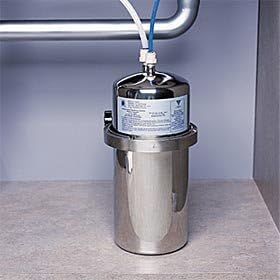
Figura 1: The Multipure Aquaperform MP880 unit installed below a sink, showing its connection to the cold water line and the outlet tubing.
4.4 Connect Water Lines
- Connect the Adapta Valve to the cold water line under your sink.
- Connect one end of the water line tubing from the Adapta Valve to the inlet port of the Aquaperform filter unit.
- Connect the other end of the water line tubing from the outlet port of the Aquaperform filter unit to the dedicated chrome faucet.
- Ensure all connections are hand-tightened, then use a wrench for a final quarter-turn to ensure a leak-free seal. Avoid overtightening, especially with plastic components.
4.5 Install Capacity Monitor
- Connect the capacity monitor to the appropriate tubing as per the monitor's specific instructions.
- Mount the monitor's indicator light in a visible location, typically near the faucet or inside the cabinet for discreet monitoring.
4.6 Flush the System
- Slowly turn on the cold water supply.
- Open the dedicated chrome faucet and allow water to run for at least 10-15 minutes to flush out any carbon fines and air from the system.
- Check all connections for leaks. Tighten any leaking connections as necessary.
5. Funcionament
Once installed, the Multipure Aquaperform MP880 system operates automatically. Simply open the dedicated chrome faucet to dispense filtered water.
5.1 Capacity Monitor
The included capacity monitor tracks the volume of water filtered. It will provide an indication (e.g., a blinking light or color change) when the filter is nearing its 960-gallon capacity and requires replacement. Refer to the monitor's specific instructions for detailed operation and indicator meanings.
6. Manteniment
6.1 Substitució del filtre
The filter cartridge inside the Aquaperform MP880 unit has a rated capacity of 960 gallons. It is recommended to replace the filter annually or when the capacity monitor indicates replacement is due, whichever comes first. Regular filter replacement ensures optimal performance and water quality.
- Tanqueu el subministrament d'aigua freda al sistema.
- Open the dedicated faucet to relieve pressure.
- Desenrosqueu amb cura la carcassa del filtre.
- Traieu el cartutx de filtre antic i llenceu-lo correctament.
- Insert a new Multipure replacement filter cartridge, ensuring it is seated correctly.
- Screw the housing back on, hand-tightening first, then a quarter-turn with a wrench.
- Slowly turn on the cold water supply and flush the new filter as described in Section 4.6.
- Reset the capacity monitor according to its instructions.
6.2 Neteja
Wipe the exterior of the stainless steel housing and the chrome faucet with a soft, damp drap segons calgui. No utilitzeu productes de neteja abrasius ni dissolvents.
7. Solució De Problemes
| Problema | Causa possible | Solució |
|---|---|---|
| Baix cabal d'aigua | Clogged filter cartridge; kinked tubing; low water pressure. | Replace filter cartridge; check tubing for kinks; verify household water pressure. |
| Fuites d'aigua | Loose connections; damaged O-rings; cracked fittings. | Check and tighten all connections; inspect O-rings for damage and replace if necessary; replace any cracked fittings. |
| Unusual Taste/Odor | Filter nearing end of life; new filter not properly flushed. | Replace filter cartridge; flush new filter for 10-15 minutes. |
| Capacity Monitor Not Working | Battery depleted; incorrect installation; sensor issue. | Check/replace battery; verify monitor connections; consult Multipure support. |
8. Especificacions
- Marca: Multipure
- Nom del model: MP880
- Número de peça: MP880-BC
- Tipus d'instal·lació: Below sink, permanent (convertible to countertop with additional parts)
- Característiques especials: NSF certified, Multi-Stage Filtration, Capacity Monitor
- Material de l'habitatge: Acer inoxidable
- Capacitat del filtre: 960 galons
- Dimensions de l'habitatge: Approximately 11 inches (height) x 5.75 inches (width)
- UPC: 815578005209
- Fabricant: Multipure
9. Garantia i Suport
For specific warranty information regarding your Multipure Aquaperform MP880 system, please refer to the warranty card included with your product or visit the official Multipure website. For technical assistance, replacement parts, or further inquiries, please contact Multipure customer support directly.
Fabricant: Multipure
Weblloc: www.multipure.com (Exampl'enllaç, l'enllaç real pot variar)


