Introducció
This manual provides detailed instructions for the safe and efficient operation of your Coby DP559 Digital Photo Frame with MP3 Player. Please read this manual thoroughly before using the device and retain it for future reference.
The Coby DP559 is a versatile digital photo frame featuring a 5.6-inch TFT LCD color display. It supports JPEG image files, plays MP3 and WMA audio files, and can play AVI, MPG, and XviD video files. It includes multiple card slots (SD, MMC, MS, xD, CF) and a full-size USB port for flash memory drives. Integrated stereo speakers and an AV output allow for use with home theater systems. The design is wall-mountable and includes a detachable stand.
Informació important de seguretat
- Font d'alimentació: Feu servir només l'adaptador de corrent especificat. Assegureu-vos que el volumtage coincideix amb els requisits del dispositiu.
- Col·locació: Place the device on a stable, flat surface. Avoid direct sunlight, heat sources, and areas with high humidity or dust.
- Ventilació: No bloquegeu les obertures de ventilació. Assegureu-vos que hi hagi un flux d'aire adequat al voltant del dispositiu.
- Neteja: Disconnect from power before cleaning. Use a soft, dry cloth. Do not use liquid cleaners or aerosols.
- Aigua i humitat: Do not expose the device to water or moisture. Do not operate with wet hands.
- Manteniment: No intenteu reparar el dispositiu vosaltres mateixos. Demaneu tot el servei a personal qualificat.
- Nens: Mantenir fora de l'abast dels nens petits.
Contingut del paquet
Verifiqueu que tots els elements siguin presents al paquet:
- Coby DP559 Digital Photo Frame
- Adaptador d'alimentació
- Suport desmuntable
- Manual d'usuari (aquest document)
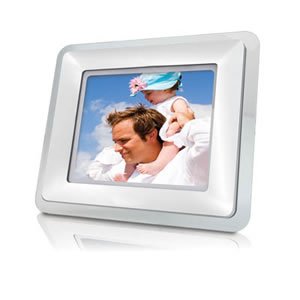
Image: The Coby DP559 Digital Photo Frame, showing its 5.6-inch screen, control buttons, and the included detachable stand. The power adapter is also visible.
Guia de configuració
- Col·loca el suport: Locate the detachable stand and securely attach it to the back of the photo frame. Ensure it clicks into place for stability.
- Connectar l'alimentació: Plug the power adapter into the DC IN port on the back of the frame. Then, plug the other end of the adapter into a standard electrical outlet.
- Insert Storage Media: Insert your SD, MMC, MS, xD, or CF memory card into the appropriate slot, or connect a USB flash drive to the full-size USB port. Ensure the media is inserted correctly.
- Encès: Press the Power button, usually located on the back or side of the frame, to turn on the device.
Instruccions de funcionament
Navegació bàsica
Use the control buttons on the back or side of the frame to navigate menus. Typically, these include directional buttons (Up, Down, Left, Right), an Enter/OK button, and a Menu/Exit button.
Viewfotos
- From the main menu, select "Photo" or "Pictures."
- Navigate to your desired memory card or USB drive.
- Select a folder or individual photo to begin a slideshow.
- Use the directional buttons to manually advance or go back through photos.
Playing Music (MP3/WMA)
- From the main menu, select "Music" or "Audio."
- Navigate to your desired memory card or USB drive.
- Seleccioneu un àudio file or folder to begin playback.
- Use the control buttons to play, pause, skip tracks, or adjust volume.
Playing Videos (AVI/MPG/XviD)
- From the main menu, select "Video."
- Navigate to your desired memory card or USB drive.
- Seleccioneu un vídeo file per començar la reproducció.
- Use the control buttons to play, pause, fast forward, or rewind.
Connecting to a Home Theater System
The DP559 features an AV output. Connect an appropriate AV cable (not included) from the frame's AV OUT port to the AV IN ports on your television or home theater receiver. Select the correct input source on your TV/receiver to view the frame's output.
Cura i Manteniment
- Neteja de la pantalla: Netegeu suaument la pantalla amb un drap suau i sense borrissol. Per a marques difícils, netegeu lleugerament.ampen the cloth with water or a screen cleaner designed for electronics. Do not spray liquids directly onto the screen.
- Neteja de la Casing: Feu servir un drap suau i sec per netejar l'exterior de la casing. Eviteu netejadors o dissolvents abrasius.
- Emmagatzematge: Si guardeu el dispositiu durant un període prolongat, desconnecteu-lo de l'alimentació i guardeu-lo en un lloc fresc i sec, allunyat de la llum solar directa.
- Gestió de mitjans: Always handle memory cards and USB drives carefully. Insert and remove them gently to prevent damage to the device's ports.
Guia de resolució de problemes
| Problema | Causa possible | Solució |
|---|---|---|
| El marc no s'encén. | Sense alimentació, adaptador defectuós o connexió fluixa. | Ensure the power adapter is securely connected to both the frame and the electrical outlet. Test the outlet with another device. |
| No es mostren imatges. | No memory card/USB drive, unsupported file format, or corrupted files. | Insert a memory card or USB drive with JPEG images. Ensure images are in JPEG format. Try different media or files. |
| No hi ha so dels altaveus. | Volume too low, muted, or audio file tema. | Increase the volume using the control buttons. Check if the device is muted. Ensure audio files are MP3 or WMA format. |
| Vídeo fileno juguen. | Unsupported video format or corrupted file. | Assegura't de fer servir el vídeo files are in AVI, MPG, or XviD format. Try different video files. |
Especificacions del producte
- Model: DP559
- Visualització: 5.6" TFT LCD Color Display
- Formats d'imatge compatibles: JPEG
- Formats d'àudio compatibles: MP3, WMA
- Formats de vídeo compatibles: AVI, MPG, XviD
- Ranures per a targetes: SD, MMC, MS, xD, CF
- Port USB: Full-Size USB (for flash memory drives)
- Sortida d'àudio: Integrated Stereo Speakers, AV Output
- Muntatge: Wall Mountable Design with Detachable Stand
- Unit Dimensions (WHD): 8" x 7" x 2.24"
- Pes de l'article: 1.35 lliures
- Font d'alimentació: Elèctric amb cable
- Tecnologia de connectivitat: USB
Garantia i assistència al client
For warranty information or technical assistance, please refer to the warranty card included with your product or visit the official Coby weblloc web. Conserveu el rebut de compra com a comprovant de compra per a reclamacions de garantia.
Fabricant: Coby
ASIN: B0017LZIRQ
For further support, you may visit the Coby Store on Amazon.


