Introducció
Thank you for choosing the Winegard SF-1000 Satellite Finder Meter. This device is designed to assist in the precise alignment of satellite antennas, ensuring optimal signal reception. Its audio tone and meter display provide real-time feedback, simplifying the setup process for both fixed and remote satellite systems.
This manual provides detailed instructions for the setup, operation, maintenance, and troubleshooting of your SF-1000 Satellite Finder Meter. Please read this manual thoroughly before use to ensure safe and efficient operation.
Producte acabatview
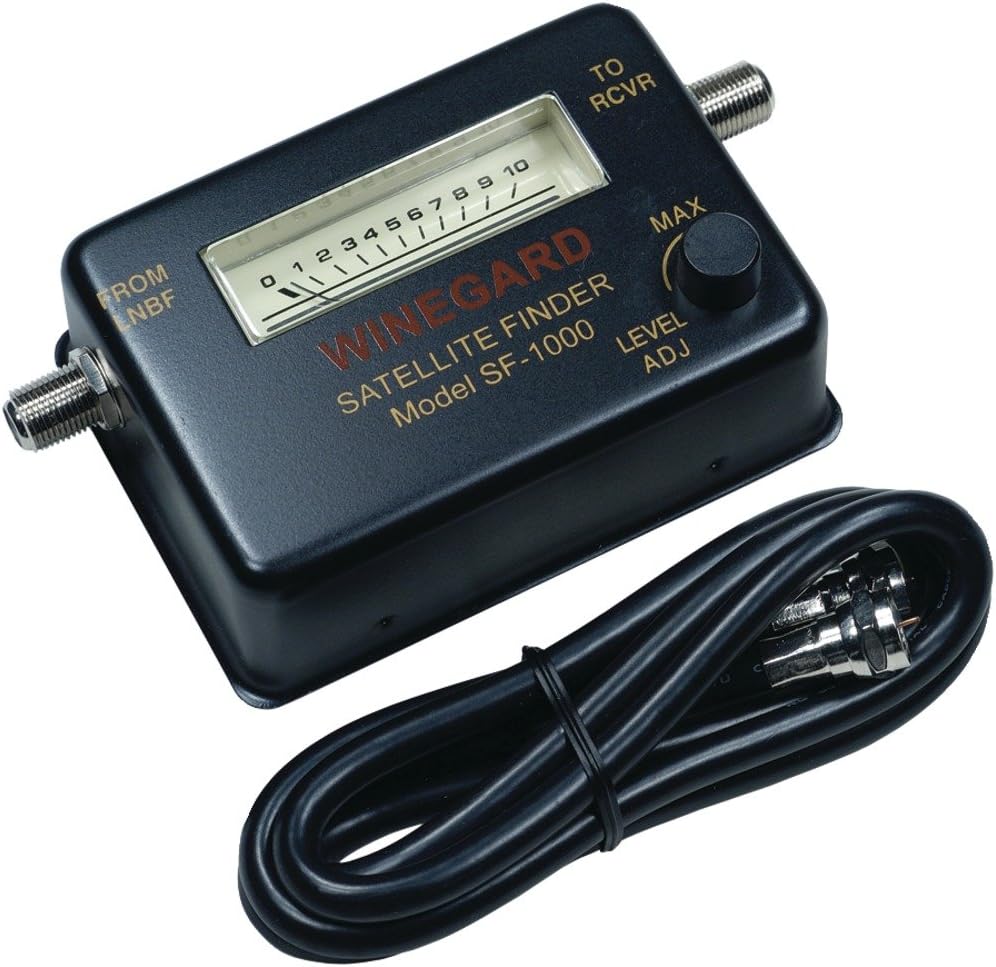
Figure 1: Winegard SF-1000 Satellite Finder Meter. This image shows the compact black meter with its analog signal strength display, input/output ports, and level adjustment knob, alongside a coiled coaxial cable.
Característiques principals:
- Interval de freqüència: 950-2050 MHz
- Impedància: 75 ohms
- Nivell d'entrada: -25 a -75 dBm
- Power Required: +13 to +18 VDC (Provided by the receiver)
- Meter with audio tone for precise signal alignment
- Universal Fit for various satellite antenna setups
Què hi ha a la caixa:
- Buscador de satèl·lits Winegard SF-1000
Configuració
Before beginning the setup process, ensure you have your satellite dish, LNB (Low Noise Block downconverter), and satellite receiver ready. The SF-1000 requires power from your satellite receiver to operate.
- Connect the LNB: Disconnect the coaxial cable from your LNB that normally goes to your receiver. Connect this cable to the port labeled "FROM LNB" on the SF-1000 Satellite Finder Meter.
- Connectar al receptor: Use a short coaxial cable (not included, but often supplied with satellite equipment) to connect the port labeled "TO RCVR" on the SF-1000 to the satellite input on your receiver.
- Encès: Turn on your satellite receiver. The SF-1000 will receive power from the receiver, and its meter will illuminate (if applicable) or show an initial reading.
- Ajustar la sensibilitat: Gireu el "LEVEL ADJ" knob counter-clockwise until the meter reading is at its lowest point (e.g., 0 or 1). This sets the sensitivity for finding the signal.
Nota important: Ensure all connections are secure to prevent signal loss or damage to the equipment. Avoid bending coaxial cables sharply.
Instruccions de funcionament
The SF-1000 uses both a visual meter and an audible tone to help you pinpoint the satellite signal.
- Alineació inicial del plat: Roughly point your satellite dish in the general direction of the desired satellite. Consult a satellite dish pointing guide or app for your specific location and satellite.
- Sweep for Signal: Slowly move the satellite dish horizontally (azimuth) and vertically (elevation) in small increments. Observe the meter on the SF-1000 and listen for the audio tone.
- Identify Peak Signal: As you approach the satellite signal, the meter reading will increase, and the audio tone will become higher in pitch and louder. Continue adjusting the dish until you find the highest possible meter reading and the loudest, highest-pitched tone.
- Refine Sensitivity: If the meter goes to its maximum reading (e.g., 10) and the tone is constant, turn the "LEVEL ADJ" knob clockwise slightly to reduce sensitivity. This will bring the meter reading down, allowing you to fine-tune the dish for an even stronger peak. Repeat steps 2 and 3 until you achieve the maximum signal strength without the meter pegging.
- Secure Dish: Once the optimal signal is achieved, carefully tighten all bolts and screws on your satellite dish mount to secure its position. Re-check the meter and tone after tightening to ensure the signal has not shifted.
- Disconnect SF-1000: After successful alignment, disconnect the SF-1000 Satellite Finder Meter. Reconnect the coaxial cable directly from the LNB to your satellite receiver.
- Verify Signal on Receiver: Check your satellite receiver's signal strength and quality indicators to confirm successful alignment.
Consell: Small, slow movements of the dish are key to finding the precise signal peak. Patience will yield the best results.
Manteniment
The Winegard SF-1000 Satellite Finder Meter is designed for durability and requires minimal maintenance.
- Neteja: Wipe the unit with a soft, dry cloth. Do not use liquid cleaners or abrasive materials, as they may damage the casing o components interns.
- Emmagatzematge: Store the SF-1000 in a cool, dry place away from direct sunlight and extreme temperatures when not in use.
- Connexions: Periodically inspect the coaxial connectors for any signs of corrosion or damage. Ensure they are clean and free of debris before making connections.
- Evitar l'impacte: Protect the device from drops or strong impacts, which can damage the internal circuitry or the sensitive meter.
Resolució de problemes
| Problema | Causa possible | Solució |
|---|---|---|
| No meter reading or audio tone. |
|
|
| Meter pegs at maximum, constant tone. |
|
|
| Cannot find signal. |
|
|
Especificacions
| Característica | Detall |
|---|---|
| Número de model | SF-1000 |
| Interval de freqüència | 950-2050 MHz |
| Impedància | 75 ohms |
| Nivell d'entrada | -25 a -75 dBm |
| Requisit d'energia | +13 to +18 VDC (from receiver) |
| Dimensions (aprox.) | 7.25 "L x 4.25" W x 1.75" H |
| Pes (aprox.) | 3.87 unces |
| Color | Negre |
| Fabricant | Companyia Winegard |
Garantia i Suport
For warranty information and technical support, please refer to the official Winegard weblloc web o contacteu directament amb el seu servei d'atenció al client. Conserveu el rebut de compra com a comprovant de compra per a qualsevol reclamació de garantia.
Oficial de Winegard Weblloc: www.winegard.com
Atenció al client: Si us plau, visiteu el website for contact details or refer to the packaging for specific support numbers.


