Introducció
This manual provides essential information for the safe and effective installation, operation, and maintenance of your APC RBC7 Replacement Battery Cartridge. This battery pack is designed to meet the power demands of various APC SMART-UPS models, ensuring reliable backup power and protection for your electronic equipment. Please read this manual thoroughly before proceeding with installation or use.
Informació important de seguretat
Sempre observeu les següents precaucions de seguretat quan manipuleu piles:
- Risc de descàrrega elèctrica: Batteries can present a risk of electric shock and high short circuit current. Exercise caution when working with batteries.
- Do Not Dispose of Batteries in Fire: Les bateries poden explotar.
- Do Not Open or Mutilate Batteries: L'electròlit alliberat és nociu per a la pell i els ulls. Pot ser tòxic.
- Utilitzeu equip de protecció: Always wear safety glasses and rubber gloves when handling batteries.
- Eviteu curtcircuits: Do not lay tools or metal objects on the battery.
- Advertència de la Proposició 65 de Califòrnia: Aquest producte conté productes químics coneguts per l'estat de Califòrnia per causar càncer i defectes de naixement o altres danys reproductius.
Contingut del paquet
Comproveu que el vostre paquet contingui els elements següents:
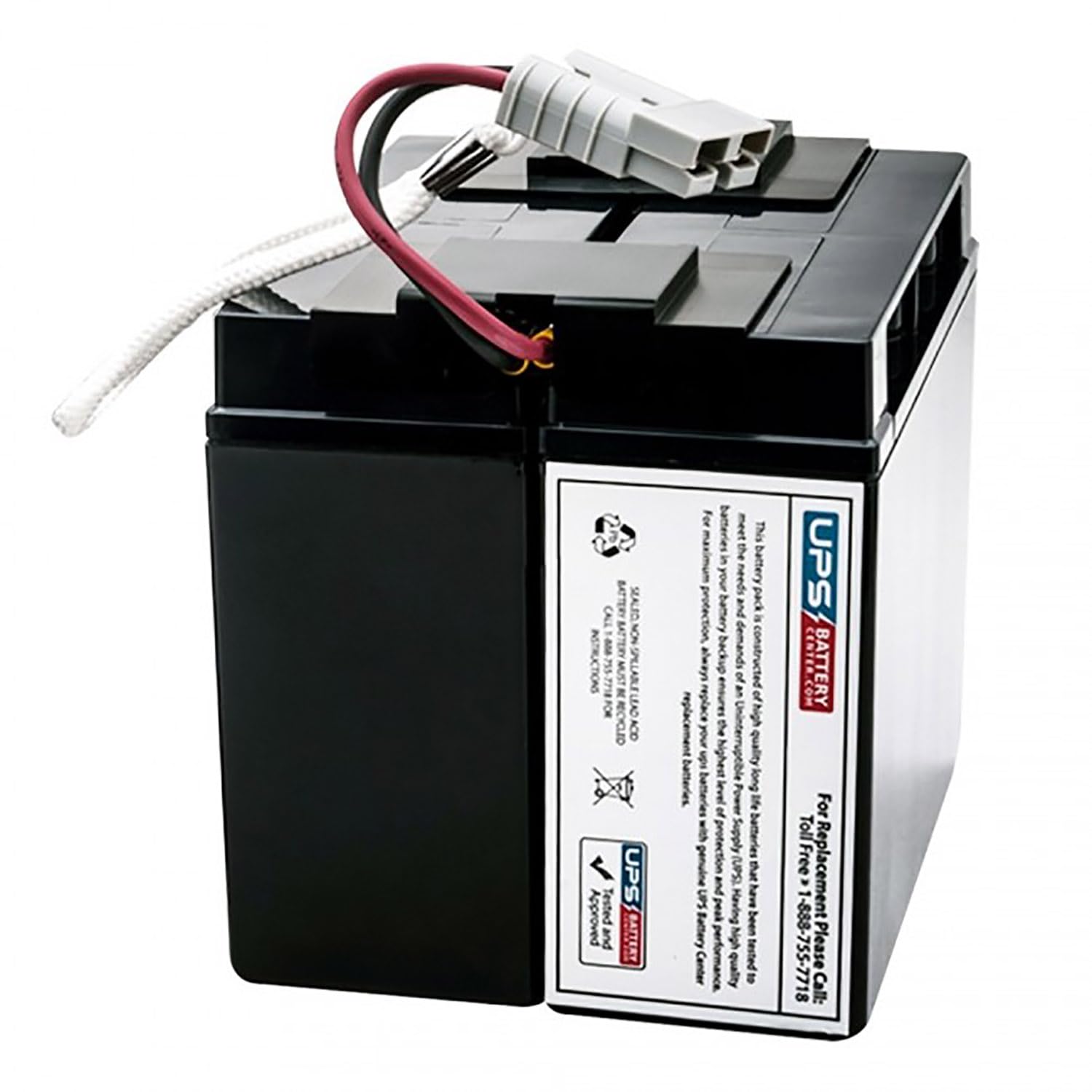
- Un (1) cartutx de bateria de recanvi APC RBC7
Instruccions d'instal·lació
Follow these steps to safely replace the battery cartridge in your APC SMART-UPS unit. Refer to your specific UPS model's user manual for detailed instructions on accessing the battery compartment.
- Apagueu el SAI: Turn off the UPS and any connected equipment.
- Disconnect from AC Power: Unplug the UPS power cord from the wall outlet.
- Localitzeu el compartiment de la bateria: Identify and open the battery compartment on your UPS. This may involve removing a front panel or cover.
- Disconnect and Remove Old Battery: Carefully disconnect the battery connector from the UPS. Gently slide the old battery cartridge out of the compartment. Note that the battery can be heavy.
- Inseriu una bateria nova: Slide the new APC RBC7 Replacement Battery Cartridge into the battery compartment. Ensure it is fully seated.
- Connecteu els cables de la bateria: Connect the battery connector from the new cartridge to the corresponding port within the UPS. Ensure a secure connection.
- Tanca el compartiment de la bateria: Securely close the battery compartment cover or panel.
- Reconnect AC Power and Power On: Plug the UPS power cord back into the wall outlet. Turn on the UPS. The UPS will typically perform a self-test and begin charging the new battery.
Funcionament
After installation, allow the new battery cartridge to charge for at least 24 hours to reach its full capacity. During this time, the UPS will provide power protection, but optimal runtime may not be available until the battery is fully charged. The UPS will automatically manage the charging process.
Manteniment i Reciclatge
The APC RBC7 is a sealed, non-spillable lead-acid battery that requires minimal maintenance. For optimal battery life, ensure the UPS operates within recommended environmental conditions (temperature and humidity). Avoid exposing the UPS to extreme temperatures.
Reciclatge de bateries: This battery is a sealed, non-spillable lead-acid battery and MUST BE RECYCLED. Do not dispose of the battery with household waste. For recycling instructions and assistance, please call 1-888-755-7718. Proper recycling helps protect the environment and conserves resources.
Resolució de problemes
If you encounter issues after installing the new battery, consider the following:
| Problema | Causa possible | Solució |
|---|---|---|
| UPS does not power on after battery replacement. | Battery connector not fully seated. | Ensure the battery connector is firmly plugged into the UPS. |
| Short runtime or battery not holding charge. | Battery not fully charged; UPS self-test needed. | Allow 24 hours for initial charge. Perform a UPS self-test (refer to UPS manual). |
| UPS indicates a battery fault. | Battery not recognized or faulty connection. | Verify battery connection. If issue persists, contact technical support. |
Especificacions del producte
- Marca: APC
- Model: Cartutx de bateria de recanvi RBC7
- Voltage: 12 Volts
- Ampera: 18 Amps
- Material: Lead-acid battery with Absorbent Glass Mat (AGM) technology
- Color: Negre
Informació de la garantia
This APC RBC7 Replacement Battery Cartridge is covered by a manufacturer's warranty. Please refer to the warranty documentation provided with your purchase or contact the manufacturer directly for specific terms and conditions.
Suport tècnic
For further assistance, technical support, or recycling inquiries, please contact:
UPSBatteryCenter Support: 1-888-755-7718


