Introducció
Gràcies per la compraasing the Technics SL-PD807 MASH 5 Disc CD Player. This manual provides detailed instructions for the proper setup, operation, and maintenance of your new audio component. Please read this manual thoroughly before using the unit to ensure optimal performance and longevity.
The SL-PD807 features a 5-disc carousel changer, allowing for extended playback without interruption, and incorporates MASH (Multi-stage Noise Shaping) D/A conversion for high-quality audio reproduction.
Informació important de seguretat
- Font d'alimentació: Ensure the unit is connected to an AC 120V, 60Hz power supply.
- Ventilació: No bloquegeu les obertures de ventilació. Deixeu prou espai al voltant de la unitat per a un flux d'aire adequat per evitar el sobreescalfament.
- Humitat: No exposeu la unitat a la pluja ni a la humitat. No col·loqueu objectes plens de líquids, com ara gerros, a sobre de la unitat.
- Neteja: Desendolleu la unitat de la presa de corrent abans de netejar-la. Feu servir un drap sec per netejar-la.
- Manteniment: No intenteu fer el manteniment d'aquesta unitat vosaltres mateixos. Envieu totes les tasques de manteniment a personal de servei qualificat.
Contingut del paquet
Si us plau, comproveu que tots els elements siguin presents al paquet:
- Technics SL-PD807 MASH 5 Disc CD Player
- Cable d'alimentació
- Cables d'àudio RCA
Note: A remote control is not included with this unit.
Configuració
1. Desembalatge
Carefully remove the CD player and all accessories from the packaging. Retain the packaging materials for future transport or storage.
2. Col·locació
Place the CD player on a stable, level surface away from direct sunlight, heat sources, and excessive dust or vibrations. Ensure there is sufficient space around the unit for proper ventilation.

Figura 1: Davant view of the Technics SL-PD807 CD Player with included RCA cables.
3. Connexions
Connect the CD player to your amplifier or receiver using the supplied RCA audio cables.
- Connect one end of the RCA audio cables (red and white plugs) to the 'LINE OUT' jacks on the rear of the SL-PD807.
- Connect the other end of the RCA audio cables to an available 'CD IN' or 'AUX IN' input on your amplifier/receiver. Match the red plug to the 'R' (right) input and the white plug to the 'L' (left) input.
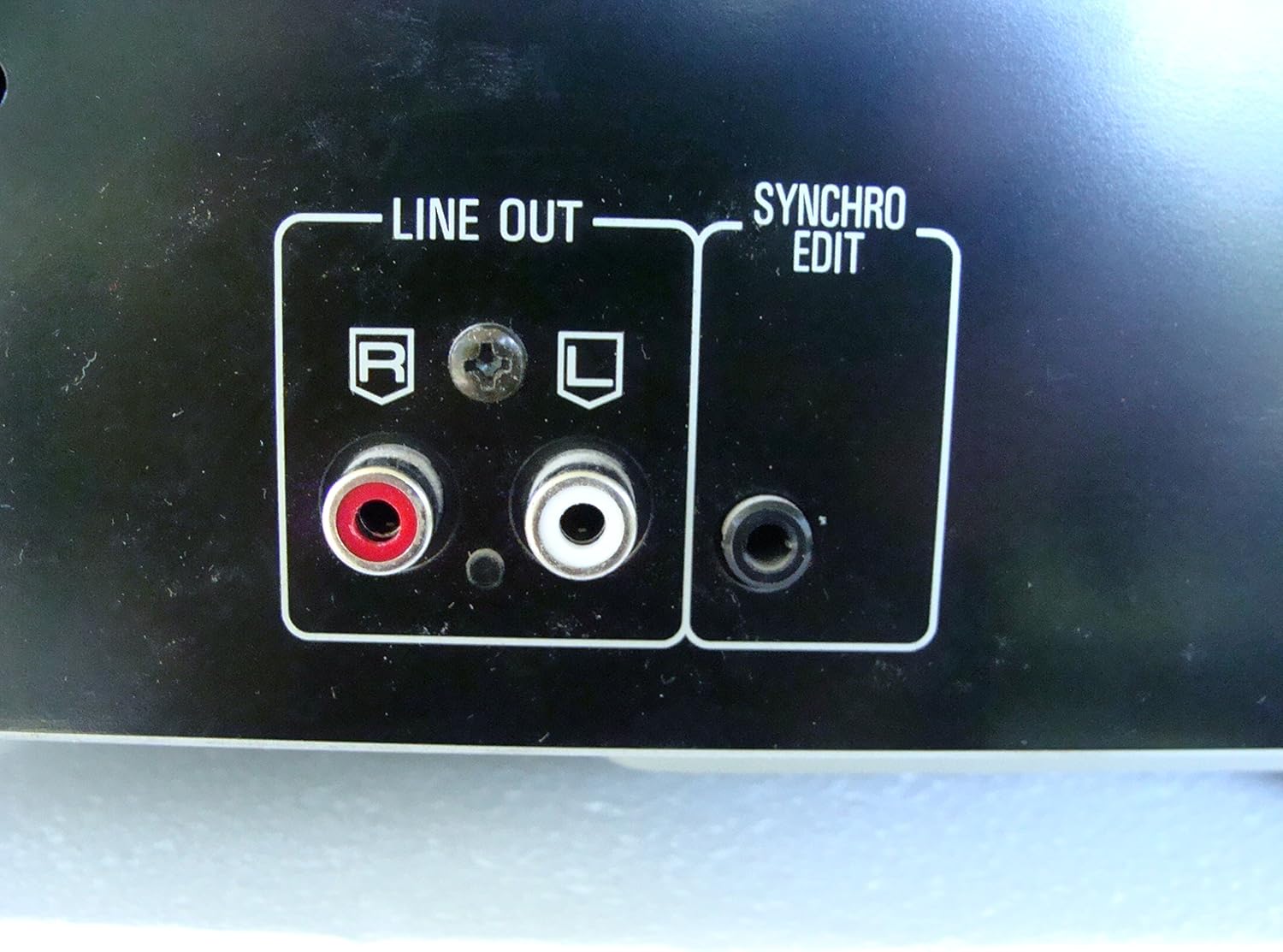
Figura 2: Rear panel connections, highlighting the 'LINE OUT' (RCA) and 'SYNCHRO EDIT' ports.
- Plug the power cord into the AC inlet on the rear of the CD player, then plug the other end into a standard AC wall outlet.
Instruccions de funcionament
1. Encendre/apagar
Premeu el botó PODER button located on the front left of the unit to turn the CD player on or off.
2. Càrrega de discs
The SL-PD807 features a 5-disc carousel. Press the OBRIR/TANCAR button to open the disc tray. Place up to five CDs onto the numbered disc slots with the label side facing up. Press OBRIR/TANCAR de nou per tancar la safata.

Figura 3: Front panel controls including disc tray, display, and playback buttons.
3. Reproducció bàsica
- Jugar: Premeu el botó JUGAR button (►) to start playback.
- Pausa: Premeu el botó PAUSA button (⏸) to temporarily stop playback. Press again to resume.
- Atura: Premeu el botó STOP botó (■) per aturar la reproducció.
- Omet les pistes: Premeu el botó SALTAR buttons (⏭︎ / ⏮︎) to skip to the next or previous track.
- Cerca: Manteniu premuda la CERCAR buttons (⏪︎ / ⏩︎) to fast forward or rewind within a track.
4. Disc Exchange
You can exchange discs while another disc is playing. Press the SALTA DEL DISC button to rotate the carousel to an empty slot or a disc you wish to remove/replace. The currently playing disc will continue to play until you select a new disc to play.
5. Modes de reproducció
- Reproducció aleatòria: Premeu el botó ALEATÒRIA button to play tracks on the current disc or all loaded discs in a random order.
- Reproducció del programa: Utilitza el PROGRAMA button to create a custom playback sequence of tracks from the loaded discs. Refer to the on-screen display for programming steps.
- Repetició de la reproducció: Premeu el botó REPETIR per repetir la pista actual, el disc actual o tots els discs.
Manteniment
1. Neteja de la unitat
Wipe the exterior of the unit with a soft, dry cloth. For stubborn stains, slightly dampen the cloth with water and a mild detergent, then wipe dry. Do not use abrasive cleaners, benzene, thinner, or alcohol, as these can damage the finish.

Figura 4: Top surface of the unit, illustrating areas that may require cleaning or show wear.
2. Cura del disc
- Manipuleu els discs per les vores per evitar que deixeu empremtes dactilars a la superfície de reproducció.
- Keep discs clean. Wipe from the center outwards with a soft, lint-free cloth if necessary.
- Guardeu els discs en les seves fundes per protegir-los de la pols i les ratllades.
Resolució de problemes
If you experience problems with your CD player, please consult the following table before seeking service.
| Problema | Causa possible | Solució |
|---|---|---|
| Sense poder | Cable d'alimentació no connectat correctament. | Comproveu la connexió del cable d'alimentació a la unitat i a la presa de corrent. |
| Sense so | RCA audio cables not connected correctly. Amplifier/receiver input not selected. | Ensure RCA cables are securely connected to both the CD player and amplifier. Select the correct input on your amplificador/receptor. |
| Disc does not play / Skipping | El disc està brut o ratllat. El disc està inserit incorrectament. | Clean the disc with a soft, lint-free cloth. Ensure the disc is placed label-side up in the tray. Try another disc. |
| Carousel does not rotate | Obstruction in the disc tray. | Ensure no foreign objects are obstructing the carousel mechanism. |
Especificacions
The following are the technical specifications for the Technics SL-PD807 MASH 5 Disc CD Player:
| Característica | Especificació |
|---|---|
| Nom del model | SL-PD807 |
| Fabricant | Tècniques |
| Capacitat del disc | 5 discos |
| Requisits d'alimentació | CA 120 V, 60 Hz, 13 W |
| Dimensions del paquet | 17 x 17 x 5 polzades |
| Pes de l'article | 15.02 lliures |
| Tecnologia de connectivitat | Auxiliary, Infrared |
| Característica especial | Protecció Anti-Skip |

Figura 5: Product label displaying model number and power specifications.
Garantia i Suport
For information regarding warranty coverage and customer support for your Technics SL-PD807 CD Player, please refer to the warranty card included with your purchase or visit the official Technics website. If you require further assistance, please contact Technics customer service.


